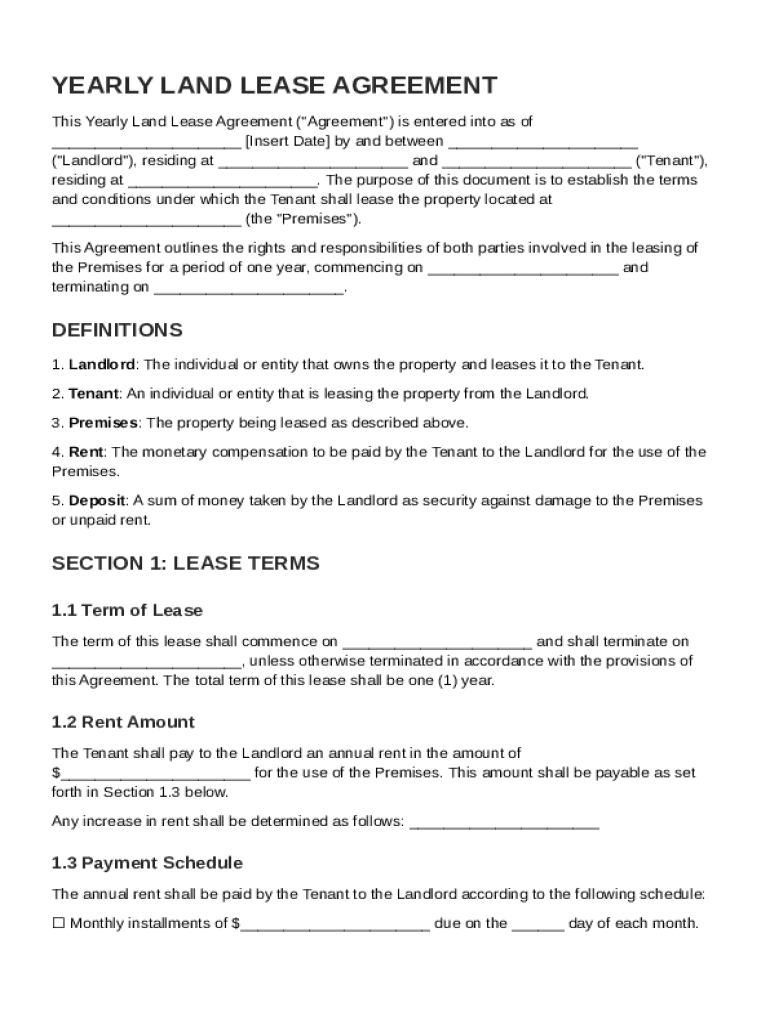
Yearly Land Lease Agreement Form
Use a Yearly Land Lease Agreement Template template to make your document workflow more streamlined.
What a yearly land lease agreement does
A Yearly Land Lease Agreement Form records the terms for using identified land during a one-year lease period. It normally identifies the landowner and tenant, describes the property, states rent and payment timing, defines permitted use, assigns maintenance and insurance duties, and addresses renewal or termination. The parties review the completed document, show intent to sign, and retain a reproducible copy. In the United States, an electronic signature may support the agreement under ESIGN and applicable state law, but state-specific real-estate requirements can still govern notarization, recording, and enforceability.
Who uses yearly land lease agreements
Landowners
Landowners and property managers use the form to document a one-year land term, rent, permitted activities, maintenance duties, renewal language, and signer approvals.
Leaseholders
Farm operators, commercial tenants, and organizations leasing vacant property use it to confirm obligations before occupying or using the land.
How the lease workflow works
The agreement moves from an editable property document to a signed, traceable lease record.
Upload document: Upload the prepared yearly land lease agreement to signNow. Check fields: Review detected fields and add missing signer, date, and initials fields. Assign signers: Assign the landowner and tenant, then send signing invitations. Store evidence: Collect signatures and retain the completed PDF with its audit trail.
Quick steps to complete the lease
Prepare the property terms first, then use signNow to route, complete, and preserve the signed yearly agreement.
Upload form:
Upload the current yearly lease template. Check details:
Confirm property and payment fields. Add signers:
Add landowner and tenant signers. Send lease:
Send the agreement for signatures. Save copy:
Download the completed lease record.
 Best ROI. Our customers achieve an average 7x ROI within the first six months.
 Scales with your use cases. From SMBs to mid-market, airSlate SignNow delivers results for businesses of all sizes.
 Intuitive UI and API. Sign and send documents from your apps in minutes.
What the lease audit trail records
The audit trail links signer activity and completion evidence to the specific yearly land lease agreement.
Authenticate signer:
Capture timestamp:
Track document:
Seal history:
Confirm completion:
Export evidence:
Processing stages for yearly land leases
Move the yearly land lease agreement from document preparation through signer completion and controlled archival.
Prepare lease document
Deliver to signers
Complete signer review
Archive signed records
Recommended lease workflow settings
Configure the agreement around signer identity, evidence capture, controlled access, and the retention policy that applies to the property record.
| Setting | Recommendation |
|---|---|
| Authentication method | Email verification with SMS OTP |
| Signature type | Typed or drawn electronic signature |
| Audit trail | Capture timestamps, IP, and signer actions |
| Document retention | Follow lease and state-records policy |
| Encryption and provisioning | AES-256 with role-based user access |
Legal standing of the signed agreement
A signed yearly land lease may be admissible when the parties show intent, consent to electronic records, signer attribution, and reliable retention and reproduction. ESIGN, 15 U.S.C. ch. 96, and applicable state electronic-transactions law support electronic signatures, while wills, codicils, certain court orders, and family-law decrees remain excluded from ESIGN coverage.

Features that support yearly land leases
signNow organizes the Yearly Land Lease Agreement Form around accurate fields, signer accountability, mobile access, and retrievable execution records.
Clear terms
Capture the property description, yearly term, rent, permitted use, and responsibilities in one organized agreement.
Remote signing
Send signature requests to the landowner and tenant without coordinating an in-person meeting.
Field control
Use signer assignments and required fields to reduce missing dates, initials, or signatures.
Audit trail
Preserve timestamps, signer actions, and completion evidence alongside the executed lease.
Record storage
Connect completed agreements to Google Drive, Box, Egnyte, or other supported storage workflows.
Mobile access
Use mobile apps when property managers or tenants review agreements away from the office.
Best practices for yearly land leases
Accurate property terms, correct signer assignment, and complete records reduce disputes when a one-year land lease is executed electronically.
Verify property and payment terms
Assign fields to the right signer
Preserve the lease record
Check state-specific requirements
Security controls for lease agreements
Data in transit:
Data at rest:
Security certification:
Information security:
U.S. eSignatures:
Signing evidence:
Key performance indicators that demonstrate SignNow's proven track record.
Troubleshooting yearly land lease signing
Resolve field, signer, legal, plan, authentication, and records questions before relying on an executed yearly land lease agreement.
Upload the source lease as a PDF or supported document, then review signNow’s detected fields. Add missing signature, date, initials, and property-term fields manually before assigning them to the landowner or tenant.
Use signNow’s required fields and signer assignments to prevent incomplete execution. Preview the agreement before sending, because a missing tenant signature or date can leave the yearly lease record incomplete.
Business includes templates, audit trails, mobile apps, and legally binding eSignatures at $8/user/month with annual billing. Business Premium adds bulk send at $15/user/month.
ESIGN and UETA support electronic signatures when intent, consent, attribution, and record reproduction are established. Review applicable state law because notarization, recording, or property-specific requirements may still apply.
Use SMS OTP or another configured authentication method when stronger signer attribution is needed. signNow records timestamps and signer actions in the audit trail for the executed agreement.
Download the signed PDF and audit trail after completion, then store them together under the applicable property-record policy. signNow provides secure storage controls, but your organization determines the retention period.
BE READY TO GET MORE
Get this form now!

If you believe that this page should be taken down, please follow our DMCA take-down process.