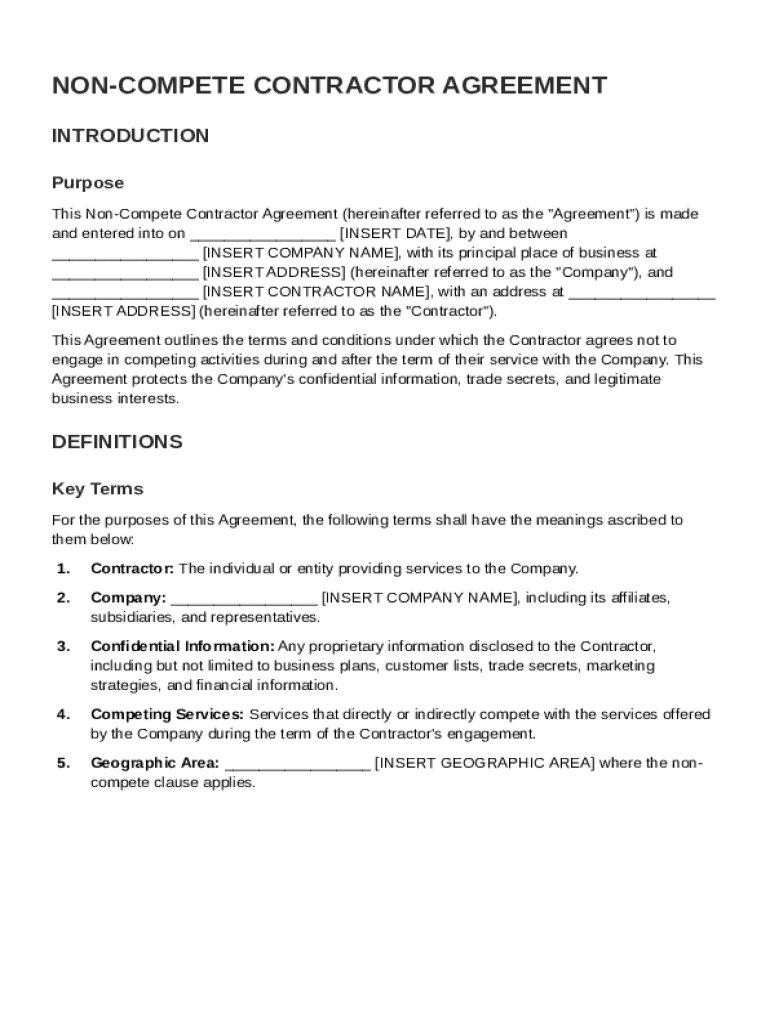
Non Compete Contractor Agreement Form
Use a Non Compete Contractor Agreement Template template to make your document workflow more streamlined.
What this contractor agreement does
A Non Compete Contractor Agreement Form records the terms under which an independent contractor may be restricted from competing with a business after or during an engagement. It commonly identifies the parties, services, consideration, restricted activities, duration, territory, confidentiality obligations, and signatures. There is no single federal noncompete form or universal deadline; enforceability depends on the governing state’s law, the contractor’s classification, the restriction’s scope, and the business interest protected. signNow lets a sender upload the agreement, detect fields, route it for signature, and preserve the completed document with an audit trail.
Teams that use the form
A property-management founder can use the form for contractor confidentiality and customer-protection terms, then send it from a mobile device. Martin Properties founder Tim Martin describes processing documents online, including mobile and offline work, but does not identify this specific form. A legal-operations team can maintain state-specific contractor templates, route agreements in role-based order, and preserve audit evidence. signNow customer stories from legal and enterprise settings illustrate this workflow, but no published customer story confirms a specific noncompete agreement.
How to complete the agreement
Prepare the state-specific agreement, then use signNow to place fields, route signatures, and preserve evidence of completion.
Upload:
Upload agreement Review fields:
Check detected fields Add signer:
Assign contractor Send:
Send for signature Archive:
Store completion record
Recommended agreement setup
Configure the agreement for identifiable signers, evidence of intent, controlled access, and retention aligned with the governing state law.
| Setting | Recommendation |
|---|---|
| Authentication method | Email link with SMS OTP |
| Signature type | Intent-based electronic signature |
| Audit trail | Capture timestamps, IP, and actions |
| Document retention | Retain signed agreement and completion record |
| Encryption and provisioning | TLS and AES-256 with admin-controlled access |
 Best ROI. Our customers achieve an average 7x ROI within the first six months.
 Scales with your use cases. From SMBs to mid-market, airSlate SignNow delivers results for businesses of all sizes.
 Intuitive UI and API. Sign and send documents from your apps in minutes.
Signer authentication and certificates
PKI signatures:
X.509 certificates:
Two-factor authentication:
SMS OTP:
ID verification:
Event evidence:
What the audit trail records
The audit trail supplements the Non Compete Contractor Agreement Form by documenting who signed, when actions occurred, and how the completed record was retrieved.
Authenticate signer:
Capture timestamp:
Link document:
Seal evidence:
Check completion:
Retrieve record:
Best practices for contractor agreements
Use the agreement to document a narrow, reviewable business restriction rather than treating an electronic signature as proof of enforceability.
Confirm governing law before sending
Define the restriction precisely
Review fields and signer roles
Preserve the complete record



Privacy and disclosure pitfalls
Personal addresses, compensation terms, and customer information may remain visible to unauthorized recipients when the completed contractor agreement is forwarded without access controls. A signer may complete the document without a clear electronic-record consent process when the contractor relationship involves a consumer-facing transaction covered by ESIGN 15 U.S.C. §7001(c). Unassigned initials, dates, or acknowledgment fields can leave the Non Compete Contractor Agreement Form incomplete even when the signature field shows a completed status. Uncontrolled template edits can change the restricted activity, duration, or territory and create inconsistent contractor obligations across states.
Risks of improper completion
State-law challenge
Contract dispute
Evidence weakness
Partial nonenforcement
Version conflict
Legal standing and evidence
A signed contractor agreement can support a business dispute when the record shows signer intent, consent, attribution, and reliable retention. ESIGN, 15 U.S.C. ch. 96, and applicable state electronic-transactions law recognize qualifying electronic records, but state law still determines noncompete enforceability. Wills, codicils, testamentary trusts, and certain court orders remain excluded.

Examples of contractor agreement workflows
Real signNow customer stories show how distributed teams handle agreements, while state law still controls noncompete enforceability.
Real estate founder
Martin Properties needed contractors and property partners to sign agreements without repeated office visits.
- Mobile signing and offline access
- Built-in audit trail for completed agreements
Tim Martin, founder of Martin Properties, says his team processes and executes documents online while maintaining compliance and security. The customer story does not identify a noncompete agreement specifically, so this example illustrates the signing workflow rather than claiming a form-specific outcome.
Technology enterprise
Tech Data manages internal and external documents across a large technology business with multiple participants and approval paths.
- Faster routing for contract signatures
- Integration-based document coordination
Tech Data CEO Bob Dutkowsky describes using airSlate SignNow to improve internal and external customer service while increasing speed to revenue. The published story does not name a noncompete form, so it supports the workflow context without attributing a specific legal result.
Troubleshooting noncompete agreement signing
Resolve the signing issue first, then confirm that the agreement’s restrictions comply with the governing state law and contractor relationship.
A noncompete is not automatically enforceable because it was e-signed. ESIGN and UETA support electronic records and signatures, but applicable state law controls scope, consideration, duration, geography, and worker classification. Review the agreement under the governing state’s law before sending it.
Upload the agreement to signNow, review auto-detected fields, and add signature, date, initials, and acknowledgment fields manually where needed. Business includes templates and audit trails; Business Premium adds bulk send when multiple contractors need substantially identical agreements.
Business is listed at $8 per user per month with annual billing and includes legally binding eSignatures, audit trails, and templates. Subscription plans include 100 signature invites per user per year, with overage fees; the Site License uses $1.50 per signature invite.
For a consumer-facing agreement, obtain electronic-record consent and show that the signer can access the record, as required by ESIGN 15 U.S.C. §7001(c). signNow can capture the signing event and audit trail, but your disclosure and consent process remains your responsibility.
SMS one-time-password authentication can add signer attribution, while advanced signer authentication is available on Enterprise. Authentication evidence does not replace a state-law review of whether the contractor received valid consideration or whether restrictions are reasonable.
A completed document can be retained with its audit trail and later exported for business records. Choose retention based on the agreement, litigation hold, and governing state requirements; do not apply HIPAA, IRS, or employment-record periods unless the record actually falls within those rules.
Key performance indicators that demonstrate SignNow's proven track record.
BE READY TO GET MORE
Get this form now!

If you believe that this page should be taken down, please follow our DMCA take-down process.