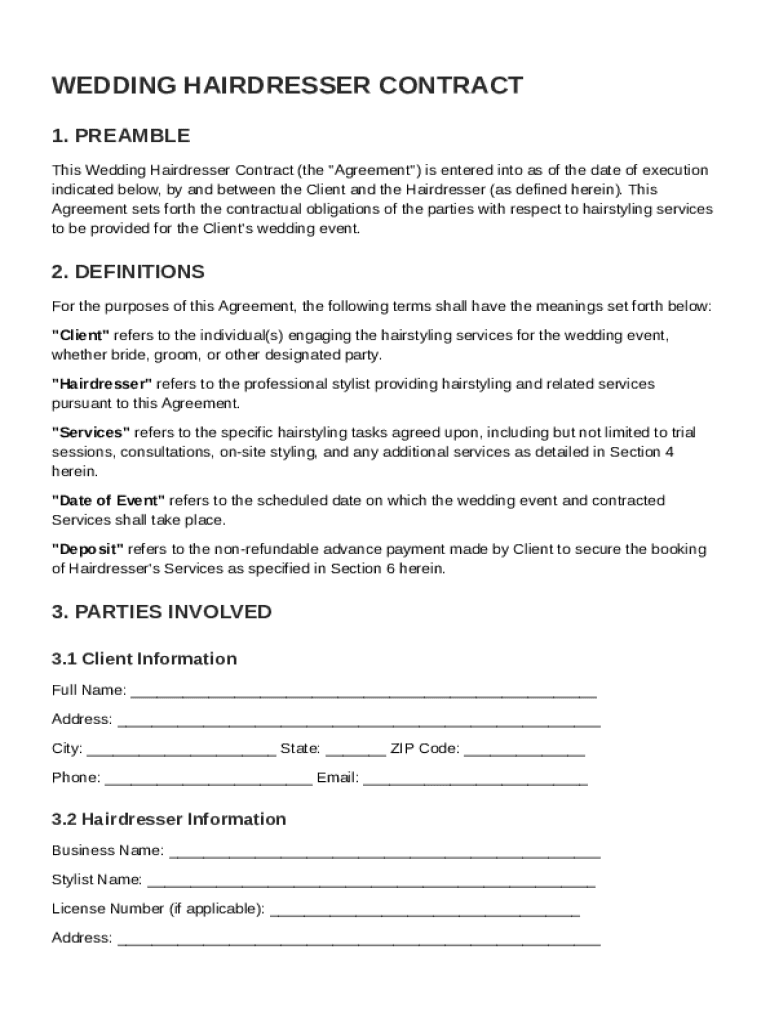
Wedding For Hairdresser Contract Form
Use a Wedding For Hairdresser Contract Template template to make your document workflow more streamlined.
What the wedding hairdresser contract covers
A Wedding For Hairdresser Contract Form is a written agreement between a hairdresser and wedding clients for styling services connected with a specific event. It records the wedding date, venue, trial and event-day services, arrival schedule, fees, deposits, cancellation terms, and responsibilities. The parties can upload the form to signNow, place or review fillable fields, send it to each signer, and receive a completed PDF with an audit trail. The contract should be reviewed for state-specific requirements and tailored to the actual services agreed.
Key features for wedding hair agreements
A wedding hairdresser contract turns service expectations into a signed record covering event details, styling responsibilities, payment obligations, and changes.
Event details
Record the couple’s names, wedding date, venue, styling schedule, requested services, and agreed deliverables in one signed document.
Service scope
List trial appointments, wedding-day styling, assistant fees, travel charges, and any other services the hairdresser will provide.
Payment terms
Document deposits, remaining balances, payment dates, accepted methods, and charges for additional work requested after signing.
Cancellation terms
Capture cancellation, postponement, rescheduling, illness, weather, and force majeure terms before the wedding date arrives.
Remote signatures
Send one agreement to the couple and hairdresser, collect signatures remotely, and preserve a record of each signing event.
Audit trail
Keep the executed contract and signNow audit trail available for resolving questions about timing, services, payment, or changes.
Complete the wedding hairdresser contract
Use this workflow to document wedding-day hair services, client approvals, payment terms, and signed changes before the event.
Upload contract:
Upload the completed wedding hairdresser contract to signNow. Check fields:
Review detected fields and add missing dates, prices, initials, or signature fields. Add signers:
Enter the couple’s and hairdresser’s signer details, then set signing order. Send contract:
Send the agreement and monitor completion from the signNow workspace. Archive records:
Store the signed contract and audit trail with the wedding booking records.
 Best ROI. Our customers achieve an average 7x ROI within the first six months.
 Scales with your use cases. From SMBs to mid-market, airSlate SignNow delivers results for businesses of all sizes.
 Intuitive UI and API. Sign and send documents from your apps in minutes.
Recommended contract workflow setup
Configure the wedding hairdresser contract around verified signer identity, a complete audit record, secure storage, and controlled access to client booking information.
| Setting | Recommendation |
|---|---|
| Authentication method | Email verification with SMS OTP |
| Signature type | Electronic signature with signer intent |
| Audit trail | Enabled for every completed agreement |
| Document retention | Retain through applicable state contract limits |
| Encryption | TLS in transit and AES-256 at rest |
Security for wedding contract records
Transport encryption:
Stored encryption:
Security certification:
Information security:
Electronic signature law:
Signer authentication:
How signNow records the contract audit trail
The audit trail preserves evidence of who signed the wedding hairdresser contract, what actions occurred, and when the agreement was completed.
Authenticate signers:
Timestamp actions:
Hash document:
Seal record:
Track activity:
Retrieve audit trail:
Challenges with wedding hairdresser contracts
Client names, event dates, service details, and cancellation terms may be omitted, creating disagreements about wedding-day responsibilities. Hairdressers may send unsigned contracts without confirming the bride, venue, payment schedule, and requested services before the event. Last-minute changes to styling schedules or additional services can remain undocumented unless both parties sign an updated agreement. Paper contracts can be misplaced, making it difficult to confirm deposits, arrival times, deliverables, and cancellation obligations.
Best practices for contract records
Accurate service terms and disciplined record handling make the signed wedding hairdresser agreement easier to administer and defend if questions arise.
Describe every wedding service precisely
Record payment obligations clearly
Define cancellation and rescheduling terms
Archive the executed agreement securely
Documents outside this contract workflow
State law may require acknowledgment
Excluded from ESIGN coverage
Decrees may require formal filing
Recording rules may require acknowledgment
Troubleshoot wedding contract signing
These answers address field assignment, signer access, plan capabilities, consent, notarization, and retention for this wedding hairdresser agreement.
Upload the original wedding hairdresser contract again and confirm the file opens correctly before sending. signNow’s field detection can identify fillable areas, but the sender should review dates, prices, service descriptions, and signature assignments manually.
Open the agreement’s recipient settings and verify the couple’s and hairdresser’s email addresses, signing order, and assigned fields. Sending a corrected invitation through signNow prevents one signer from completing fields intended for another.
Business includes legally binding eSignatures, audit trails, templates, and mobile apps at $8 per user per month when billed annually. Confirm the account plan before relying on bulk send or advanced authentication features.
For consumer-facing electronic records, ESIGN requires disclosure of the right to receive paper records, access to the electronic format, and procedures for withdrawing consent under 15 U.S.C. §7001(c). Obtain appropriate consent before electronic signing.
A completed wedding hairdresser contract is not a will, family law decree, court filing, or other ESIGN exception. If a separate document requires notarization or in-person execution under state law, follow that requirement separately.
Export the signed PDF and audit trail from signNow after completion, then store them with the booking record. Keep the record according to the applicable state contract rule and any industry-specific obligation that actually applies.
Key performance indicators that demonstrate SignNow's proven track record.
BE READY TO GET MORE
Get this form now!

If you believe that this page should be taken down, please follow our DMCA take-down process.