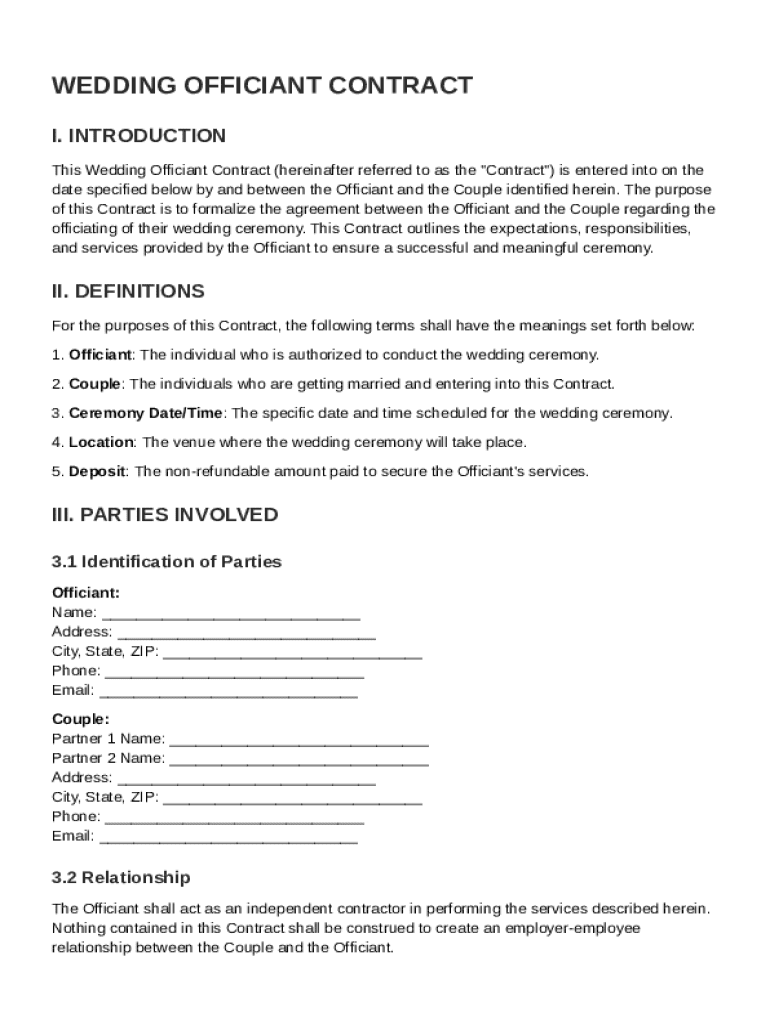
Wedding Officiant Contract Form
Use a Wedding Officiant Contract Template template to make your document workflow more streamlined.
What a wedding officiant contract covers
A Wedding Officiant Contract Form records the agreement between a couple and the person conducting their ceremony. It identifies the parties, ceremony date and location, services, fee, payment terms, cancellation rules, and signature obligations. The officiant completes the document with the couple, confirms that the promised services and deadlines are clear, and retains the signed copy. In the United States, an electronic contract may be enforceable under the ESIGN Act and applicable state law when the parties demonstrate intent, consent to electronic records, and access to an accurate retained record.
Who uses this officiant contract
Independent officiants
Independent wedding officiants use the form to define ceremony services, travel or rehearsal obligations, fees, payment dates, cancellation terms, and the couple’s contact details before accepting the engagement.
Wedding businesses
Wedding planners and ceremony businesses use signed copies to coordinate officiants, couples, venues, deposits, ceremony dates, and changes while preserving one accessible record for each event.
How to complete the officiant contract
Follow these steps to prepare, sign, and retain the Wedding Officiant Contract Form in signNow.
Upload form:
Upload the wedding officiant agreement to signNow. Review fields:
Let signNow detect fields, then check each assignment. Add signers:
Add the couple’s and officiant’s signer details. Send agreement:
Send the contract for electronic signatures. Store records:
Download the signed PDF and audit trail.
Features for wedding officiant agreements
signNow organizes the specific fields, signer assignments, delivery options, and records needed to complete a wedding officiant agreement.
Field placement
Upload the officiant agreement and place signature, initials, date, and text fields without rebuilding the document from scratch.
Signer roles
Assign each field to the officiant or couple so every required response and signature reaches the correct person.
Reusable template
Use a reusable template for recurring wedding services while updating the ceremony date, location, fee, and parties.
Signing links
Send the contract by email or signing link when the couple is not meeting the officiant in person.
Audit trail
Capture timestamps, signer actions, and document history in an audit trail connected to the completed agreement.
Mobile access
Review or sign from supported desktop browsers and signNow mobile apps when ceremony work occurs away from the office.
 Best ROI. Our customers achieve an average 7x ROI within the first six months.
 Scales with your use cases. From SMBs to mid-market, airSlate SignNow delivers results for businesses of all sizes.
 Intuitive UI and API. Sign and send documents from your apps in minutes.
Best practices for this contract
Accurate event details, clear signer assignments, and disciplined record handling make the completed officiant agreement easier to administer and review.
Describe every ceremony obligation clearly
Verify parties and field assignments
Record payment and cancellation terms
Archive the contract with its audit trail
State rules and document limits
State notarization
Will exclusion
Family-law exclusion
Deed requirements
Signer authentication and certificates
Signer identity:
Two-factor authentication:
ID verification:
Digital certificate:
Certificate standard:
Evidence record:
What the audit trail records
The audit trail supplies evidence about who interacted with the Wedding Officiant Contract Form, when actions occurred, and how the record was completed.
Authenticate signer:
Capture timestamp:
Hash document:
Seal record:
Track actions:
Export evidence:
Technical requirements for signing
Use signNow through Chrome, Firefox, Safari, or Edge on Windows or macOS. The signNow mobile apps support iOS and Android for reviewing and signing the Wedding Officiant Contract Form.
Browser support Chrome, Firefox, Safari, and Edge Desktop systems Windows and macOS desktop access Mobile access iOS and Android mobile apps
Organizations should confirm that managed devices permit browser access, email delivery, and document downloads. Teams using integrations, SSO, API access, or regulated workflows should verify the selected signNow plan and configure identity, access, and retention controls before sending agreements.
Wedding contract processing timeline
Use this sequence to move the officiant agreement from preparation through signed-record retention.
Prepare the contract
Deliver to signers
Collect signatures
Archive the record
Wedding contract troubleshooting questions
Resolve field, signing, consent, plan, and document-scope questions before sending the officiant agreement.
Upload the original contract again, then use signNow’s field-placement tools to add signature, date, and initials fields. Confirm that every required field is assigned to the correct signer before sending the Wedding Officiant Contract Form.
The Business plan includes templates, audit trails, mobile apps, and legally binding eSignatures at $8 per user per month when billed annually. Business Premium adds bulk send at $15 per user per month annually.
Use email delivery or a signing link, confirm the couple’s email addresses, and resend from the document workflow if needed. The audit trail records the signing event, including timestamps and action history.
A typed, drawn, or click-to-sign signature can satisfy the electronic-signature definition when intent, consent, attribution, and record retention are present. ESIGN and applicable UETA rules govern the agreement, subject to state law and exclusions.
For consumer-facing electronic records, provide the ESIGN disclosure, explain the right to receive paper records, confirm electronic access, and explain withdrawal procedures under 15 U.S.C. §7001(c).
A completed wedding agreement is not a will, codicil, testamentary trust, family-law decree, or court filing. Do not use this contract workflow for those excluded records; follow the applicable state or court procedure instead.
Key performance indicators that demonstrate SignNow's proven track record.
BE READY TO GET MORE
Get this form now!

If you believe that this page should be taken down, please follow our DMCA take-down process.