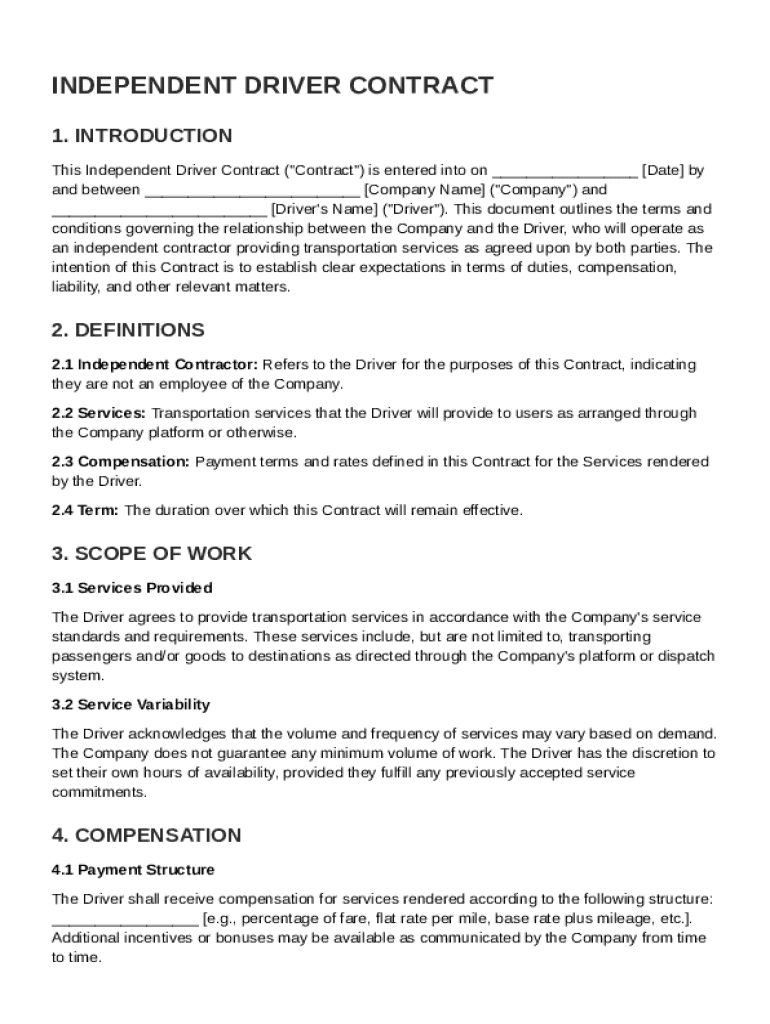
Independent Driver Contract Form
Use a Independent Driver Contract Template template to make your document workflow more streamlined.
What the Independent Driver Contract Form does
The Independent Driver Contract Form records the agreement between a business and a driver who performs services as an independent contractor. It identifies the parties, describes driving services, sets payment and expense terms, and documents responsibilities such as licensing, insurance, vehicle use, confidentiality, and termination. With signNow, the business uploads the contract, auto-detects fillable fields, adds driver and company signature fields, sends the document for signing, and stores the executed agreement with its audit trail. Classification still depends on applicable federal and state law, not the contract label alone.
Business types that use driver contracts
Independent Driver Contract Forms help businesses document driver engagements while separating contract administration from the legal classification analysis required by applicable law.
A solo courier can use a reusable contract template to capture driver-specific services, rates, expenses, and signature details without rebuilding the document for every engagement. A regional delivery company can route contracts through operations and legal reviewers, then send approved agreements to drivers while preserving each completed contract’s audit trail. A national logistics enterprise can connect driver contracting to Salesforce, NetSuite, or Microsoft Dynamics 365, supporting controlled templates and consistent records across operating locations.
These tasks are executed by both individual contributors and centralized administrators depending on organizational policy and required controls.
How this driver contract works
The signNow workflow moves the Independent Driver Contract Form from field preparation through signature collection and audit-ready storage.
Prepare contract: Upload the driver contract and review its detected fields. Complete fields: Add company and driver details, rates, dates, and signatures. Request signatures: Send the agreement through email or a signing link. Preserve evidence: Store the signed contract with its completion record.
Quick steps to complete the driver contract
Prepare the contract carefully, route it to the correct parties, and retain the signed document with its audit evidence.
Upload form:
Upload the Independent Driver Contract Form. Check fields:
Review detected fields and add missing ones. Add details:
Enter driver and company information. Send contract:
Send the contract to each signer. Store evidence:
Download the completed record and audit trail.
Choose a signing method for drivers
- Use the web app when operations staff need to upload the Independent Driver Contract Form, place fields, review recipients, and monitor completion from a desktop browser.
- Use the signNow mobile app when a dispatcher or driver must review and sign the contract from an iOS or Android device during field operations.
- Use kiosk mode when multiple drivers sign contracts at a managed location, with staff controlling the signing session on a shared device.
- Use a shareable signing link when drivers must access the same approved contract from messages, portals, or an operations website without individual email invitations.
 Best ROI. Our customers achieve an average 7x ROI within the first six months.
 Scales with your use cases. From SMBs to mid-market, airSlate SignNow delivers results for businesses of all sizes.
 Intuitive UI and API. Sign and send documents from your apps in minutes.
Platform requirements for driver contracts
Complete the Independent Driver Contract Form in Chrome, Firefox, Safari, or Edge on Windows or macOS. signNow also provides iOS and Android mobile apps for reviewing and signing contracts.
Desktop systems Windows and macOS Supported browsers Chrome, Firefox, Safari, Edge Mobile apps iOS and Android signNow apps
Teams deploying driver contracts across locations should manage supported browsers, mobile access, and account permissions centrally. Enterprise deployments can evaluate API access, SSO provisioning, and authentication controls according to their operational and compliance requirements. Test the contract’s fields and signing sequence on the devices drivers actually use before sending it broadly.
Features that support driver agreements
signNow combines field preparation, recipient routing, mobile signing, audit evidence, and integrations around the specific data captured in an Independent Driver Contract Form.
Field detection
Upload the Independent Driver Contract Form and let signNow identify fillable areas before you place driver, company, date, and signature fields.
Reusable template
Reuse an approved driver agreement while changing each driver’s legal details, rate, service description, and signature recipients.
Flexible delivery
Send the contract by email or signing link, allowing drivers to review and sign without rebuilding the document.
Audit trail
Capture signer actions, timestamps, IP details, and document history so operations teams can investigate how the agreement was completed.
Mobile signing
Review and sign the contract from signNow mobile apps when driver onboarding occurs away from an office.
Named integrations
Connect contract records with Salesforce, NetSuite, Microsoft 365, Google Drive, or Procore when the surrounding workflow requires it.
Signer authentication for driver contracts
PKI support:
X.509 certificates:
Two-factor authentication:
SMS OTP:
ID verification:
Enterprise controls:
How the audit trail records this contract
signNow records identity, timing, document integrity, and retrieval events so the Independent Driver Contract Form has a traceable signing history.
Authenticate signer:
Capture timestamp:
Hash document:
Seal record:
Log activity:
Export evidence:



Legal standing of the agreement
An Independent Driver Contract Form can provide evidence of the parties’ written terms and signing intent, but it does not alone determine contractor status or guarantee enforceability. Electronic signatures generally receive legal recognition under ESIGN, 15 U.S.C. ch. 96, and applicable UETA or New York ESRA rules. Wills, family law decrees, certain court filings, and other statutory exceptions remain outside ESIGN’s coverage.

Record-keeping practices for driver contracts
Retain the signed contract, completion certificate, and audit trail according to the record’s business and legal purpose.
Match retention to the record’s legal purpose
Export the audit trail after completion
Archive signed contracts securely
Verify driver and payment details
Retention periods for signed driver contracts
Retention depends on how the Independent Driver Contract Form is used, especially when it supports tax or business records.
Three years from filing
Six years when understatement exceeds 25%
Indefinitely for fraud or no return
Policy period for business records
Longer period under state law
Challenges when completing driver contracts
Leaving the driver’s legal name, payment method, vehicle duties, or insurance responsibilities incomplete creates ambiguity in the executed agreement. Calling a driver an independent contractor in the document does not override state classification tests based on the actual working relationship. Sending an outdated rate or service schedule can require a replacement agreement and complicate the audit history. Sharing a completed contract without access controls can expose addresses, payment terms, and other private business information.
Troubleshooting driver contract signing
Use these answers to resolve field, recipient, authentication, and legal-scope questions before relying on an executed Independent Driver Contract Form.
Why does the driver see an incomplete contract?
Upload the original Independent Driver Contract Form again and review signNow’s detected fields. Confirm that driver details, payment terms, dates, and signature fields are assigned to the correct recipient before sending a replacement request.
Can a driver sign without creating a signNow account?
A recipient can often open the invitation or signing link without a separate account, depending on the configured workflow. Require stronger authentication when the contract’s personal or financial information warrants it.
Does a signed contract satisfy contractor classification rules?
No. The contract records the parties’ stated terms, but federal and state agencies evaluate the actual relationship. Review applicable IRS guidance and state classification law rather than relying on the document label.
Key performance indicators that demonstrate SignNow's proven track record.
BE READY TO GET MORE
Get this form now!

If you believe that this page should be taken down, please follow our DMCA take-down process.