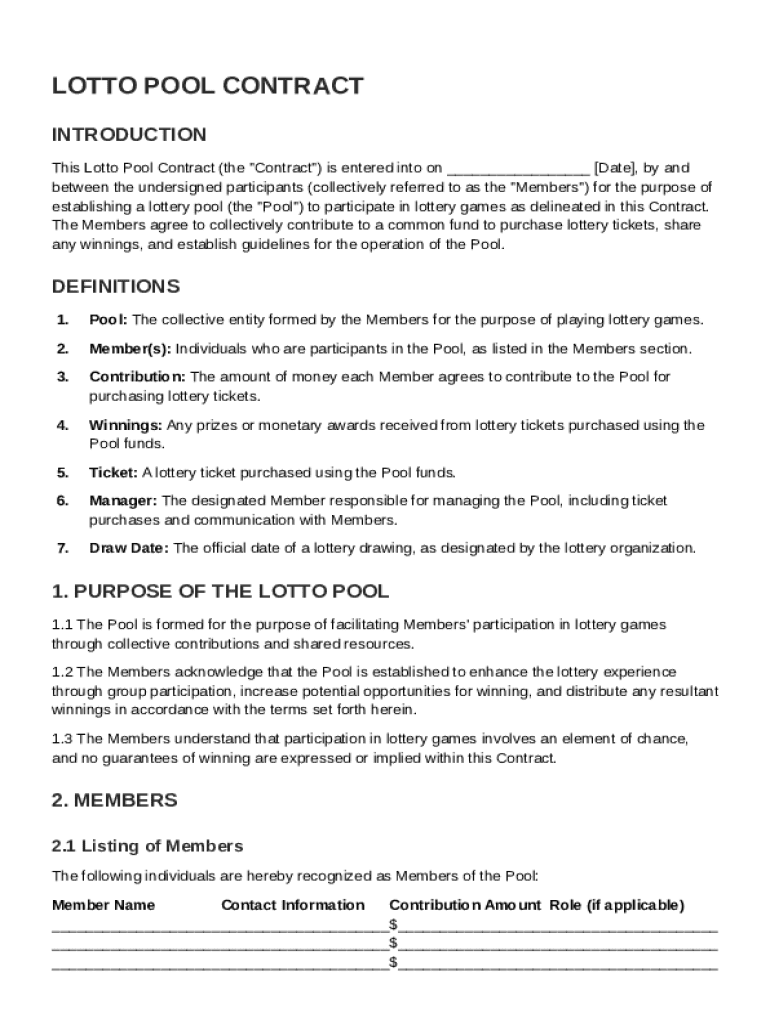
Lotto Pool Contract Form
Use a Lotto Pool Contract Template template to make your document workflow more streamlined.
What the Lotto Pool Contract Form covers
The Lotto Pool Contract Form is a private written agreement that records how a group buys lottery tickets and shares any resulting prize. It identifies the drawing or lottery, participants, contributions, ownership percentages, ticket custody, signing date, and distribution method. The form does not replace a state lottery claim process, determine tax liability, or guarantee a prize. A group can upload the agreement to signNow, review detected or manually placed fields, assign each participant, collect electronic signatures, and retain the completed document with its audit trail.
Who uses this pool contract?
Workplace pools
Work groups use the Lotto Pool Contract Form to record who contributed, who owns each share, who holds the tickets, and how a prize will be distributed. Each participant reviews the same agreement and signs the version circulated for approval.
Personal groups
Friends, family members, and community groups can use the form to replace informal messages with one signed record. The agreement can identify the drawing, ticket custody, contribution amounts, ownership percentages, and communication process for a potential prize.
Legal standing of a pool agreement
A signed Lotto Pool Contract Form can document participant intent, contributions, ownership shares, and prize-distribution terms. Under ESIGN, 15 U.S.C. ch. 96, and UETA where adopted, an electronic record and signature may carry legal effect when intent, consent, attribution, and reliable retention are shown. Wills, court orders, and certain family-law documents remain excluded.

How to complete the pool agreement
Use signNow to prepare the Lotto Pool Contract Form, identify every participant, collect signatures, and preserve the completed agreement.
Upload the agreement:
Upload the completed pool agreement and check every participant field. Check participant details:
Review detected fields and add missing names, shares, dates, or signatures. Assign signers:
Assign each participant a signing role and required signature fields. Send and store:
Send the agreement, monitor completion, and download the signed record.
 Best ROI. Our customers achieve an average 7x ROI within the first six months.
 Scales with your use cases. From SMBs to mid-market, airSlate SignNow delivers results for businesses of all sizes.
 Intuitive UI and API. Sign and send documents from your apps in minutes.
How the digital workflow works
The signNow workflow turns the group’s agreed lottery terms into one reviewable, signed record.
Upload: Upload the pool agreement to signNow. Prepare: Review detected fields and add missing participant details. Send: Send assigned fields to every participant. Archive: Store the signed PDF and audit trail.
Recommended pool agreement setup
Configure the Lotto Pool Contract Form around participant identity, documented consent, auditability, controlled access, and a retention policy appropriate to the pool’s records.
| Setting | Recommendation |
|---|---|
| Authentication method | Email invitation with SMS verification |
| Signature type | Electronic signature with signer intent |
| Audit trail | Export with completed agreement |
| Document retention | Apply a written state-law policy |
| Encryption | TLS 1.2/1.3 and AES-256 |
Best practices for pool agreements
A detailed Lotto Pool Contract Form reduces uncertainty by documenting participants, contributions, ticket custody, prize allocation, and approval history.
Identify the drawing and ownership terms
List every participant accurately
Document ticket custody responsibilities
Preserve the final signed record
Processing the pool agreement
The practical timeline depends on document readiness and participant response; signNow records the workflow milestones for later review.
Document preparation
Delivery to signers
Signer turnaround
Completion and archival
Platform requirements for signing
Participants can review and sign the Lotto Pool Contract Form in supported browsers, including Chrome, Firefox, Safari, and Edge, on Windows or macOS. signNow also provides mobile apps for iOS and Android, allowing participants to complete assigned fields from a supported phone or tablet.
Browsers Chrome, Firefox, Safari, and Edge Desktop systems Windows and macOS desktop access Mobile systems iOS and Android mobile apps
For a group workflow, use managed accounts when the sender must control templates, signer roles, or access to completed agreements. Confirm that each participant can open the invitation, receive any selected authentication code, review the PDF, and download the signed agreement and audit trail after completion.
Challenges this form helps address
Participants sign different agreement versions, creating uncertainty about the final ownership percentages and prize-distribution terms. A missing participant signature leaves the group without complete evidence of consent to the pool’s written allocation. The agreement omits ticket custody instructions, making responsibility for storage and prize claims unclear. Personal contact and payment information is shared broadly instead of being restricted to authorized participants.
State rules and document boundaries
State rule
Document scope
Court documents
Real-estate deeds
Lotto Pool Contract Form troubleshooting
These answers address field setup, signer access, plan limits, electronic-record consent, and compliance questions that can arise when circulating a pool agreement.
On signNow’s Business plan, upload the Lotto Pool Contract Form as a PDF and place fields manually when automatic detection does not identify participant names, contribution amounts, or signature areas. Review field assignments before sending.
The Business plan includes legally binding eSignatures and audit trails. If the group needs bulk sending for repeated pool agreements, Business Premium adds bulk send; select the plan based on the actual workflow rather than assuming every plan includes it.
A participant can sign through the email invitation or a shared link, depending on how the sender distributes the document. If stronger identity evidence is required, Enterprise adds advanced signer authentication; document the chosen method in the pool’s process.
For a consumer-facing transaction, ESIGN may require disclosure of the right to receive paper records, access to the electronic format, and a withdrawal procedure under 15 U.S.C. §7001(c). Review whether that rule applies before sending the agreement electronically.
signNow’s Business plan includes 100 signature invites per user per year, with overage fees described in the plan terms. Business Premium adds bulk send, while Site License uses $1.50 per signature invite for qualifying high-volume use.
If the agreement contains health information, signNow identifies HIPAA compliance as requiring a BAA. A private lottery agreement ordinarily does not require HIPAA treatment, but the sender should avoid placing unrelated protected health information in the document.
Key performance indicators that demonstrate SignNow's proven track record.
BE READY TO GET MORE
Get this form now!

If you believe that this page should be taken down, please follow our DMCA take-down process.