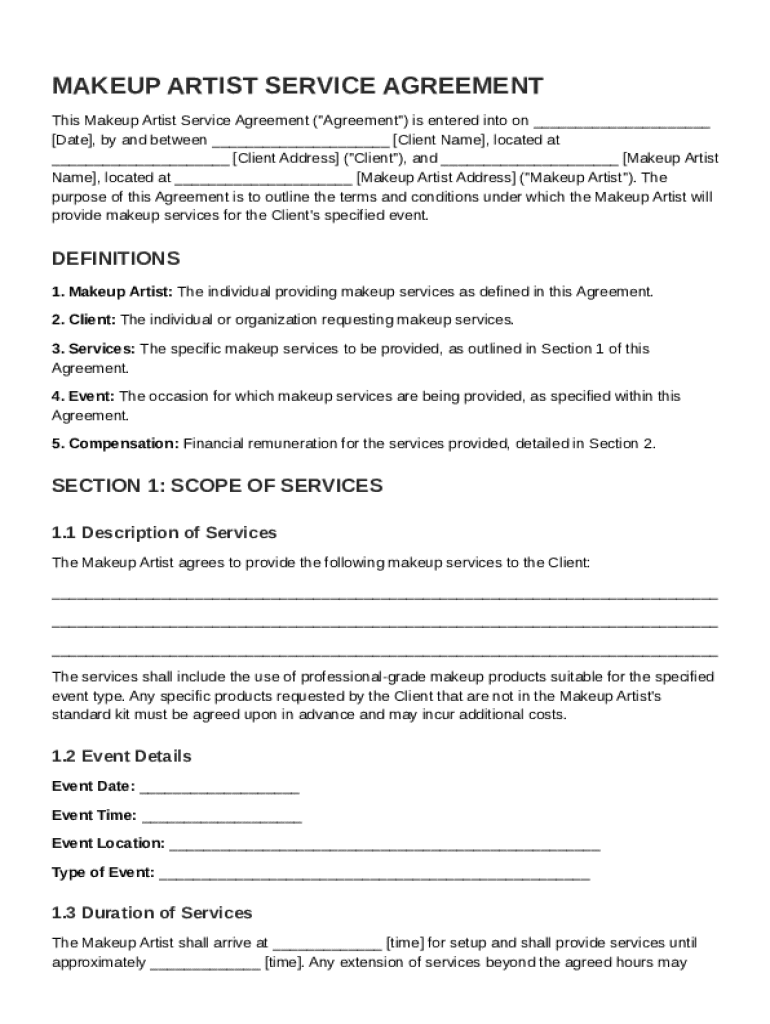
Makeup Artist Contract Form
Use a Makeup Artist Contract Template template to make your document workflow more streamlined.
What the contract form covers
A Makeup Artist Contract Form records the agreement between a makeup artist and a client, agency, producer, photographer, or other hiring party. It can identify the parties, event or production date, makeup services, location, compensation, deposits, travel expenses, cancellation terms, late-arrival rules, image or usage permissions, supplies, and signature details. The completed document clarifies what will be delivered and what each party must pay or provide. With signNow, the sender uploads the form, places fields, routes it for signature, and retains the completed agreement with an audit trail.
Legal standing of the agreement
A signed Makeup Artist Contract Form can provide evidence of the parties’ agreed services and payment terms when intent, consent, signer attribution, and record retention are established. ESIGN and applicable state electronic-transactions law, including UETA or New York ESRA, generally support electronic signatures, but exclude wills, certain court filings, and family-law decrees.

Who benefits from the contract form
The form fits independent artists, service businesses, and production organizations that need written terms before makeup work begins.
Independent makeup artists use the form to confirm bridal, editorial, film, television, event, and commercial services, including dates, locations, rates, deposits, and cancellation conditions before accepting work. Bridal studios and beauty agencies use recurring templates to coordinate multiple artists, clients, assistants, and venues while preserving engagement-specific services, payment terms, travel charges, and approvals. Production companies and advertising teams use the form to document on-set makeup responsibilities, call-time expectations, fees, usage permissions, confidentiality terms, and deliverables across distributed creative teams.
These tasks are executed by both individual contributors and centralized administrators depending on organizational policy and required controls.
Complete and sign the contract
Use this sequence to prepare the Makeup Artist Contract Form, collect signatures, and preserve the completed agreement.
Upload the form:
Upload the Makeup Artist Contract Form and check every client, service, date, fee, and cancellation field. Check the fields:
Review detected fields and add signature, initials, date, and payment fields where the agreement requires them. Assign signers:
Enter each signer’s email address, assign field ownership, and set the signing order for the makeup engagement. Send and archive:
Send the contract, monitor completion, and store the signed copy with its audit trail.
 Best ROI. Our customers achieve an average 7x ROI within the first six months.
 Scales with your use cases. From SMBs to mid-market, airSlate SignNow delivers results for businesses of all sizes.
 Intuitive UI and API. Sign and send documents from your apps in minutes.
Features for makeup service agreements
signNow provides a structured way to prepare, sign, track, and retain Makeup Artist Contract Forms covering services, compensation, scheduling, and client obligations.
Fillable fields
Place signer, initials, date, fee, service, and approval fields directly on the Makeup Artist Contract Form so each party completes the terms before signing.
Remote signing
Send the prepared contract by email or a signing link, allowing a makeup artist, client, agency, or production contact to review the same agreement remotely.
Audit trail
Capture signer actions, timestamps, and document history in an audit trail that helps connect the completed signature to the specific contract record.
Reusable templates
Save recurring service agreements as templates, then update the engagement date, rates, deliverables, travel terms, and cancellation language before each new transaction.
Mobile access
Use mobile apps when a makeup artist or client must review and sign from a location, studio, production set, or event venue.
Record control
Store the signed contract and completion evidence together so the parties can retrieve the agreed services, compensation, usage rights, and cancellation terms later.
Recommended contract workflow setup
Use a controlled workflow that matches the Makeup Artist Contract Form’s service details, signer risk, storage needs, and organizational access policy.
| Setting | Recommendation |
|---|---|
| Authentication method | Email verification with SMS for sensitive bookings |
| Signature type | Typed or drawn electronic signature |
| Audit trail | Enable completion history and export |
| Document retention | Retain through applicable tax and contract periods |
| Encryption | TLS 1.2/1.3 and AES-256 protection |
Best practices for contract preparation
Accurate service terms, clear payment conditions, and controlled records make a Makeup Artist Contract Form easier to administer and interpret.
Define the makeup services precisely
Record compensation and payment triggers
Address booking changes and cancellation
Archive the signed contract and audit trail
Security controls for signed contracts
Transport encryption:
Storage encryption:
Security certification:
Information security:
Signature compliance:
Health data controls:



Platform requirements for signing
The Makeup Artist Contract Form can be prepared in a current Chrome, Firefox, Safari, or Edge browser on Windows or macOS. Signers can also use signNow mobile applications on iOS or Android to review and sign the agreement.
Supported browsers Chrome, Firefox, Safari, and Edge Operating systems Windows, macOS, iOS, and Android Mobile signing signNow mobile applications
Teams handling studio, agency, or production contracts should use managed accounts and controlled access when multiple people can prepare or send forms. Organizations integrating contracts with business systems may also evaluate API access, user provisioning, and storage policies before deployment.
What the audit trail records
The audit trail links the Makeup Artist Contract Form to signer actions and completion evidence without replacing the agreement’s specific service terms.
Authenticate signer:
Capture timestamps:
Protect document history:
Seal completion:
Inspect audit trail:
Export evidence:
Questions about contract completion
Resolve field, signing, plan, authentication, and privacy questions before sending a Makeup Artist Contract Form for execution.
Upload the contract as a PDF or reusable template, then place required fields manually. signNow’s Business plan includes templates and audit trails; auto-detection may require review when the source has no fillable fields.
Use email authentication or enable stronger methods where available for the engagement’s risk level. signNow supports audit trails on Business, while Enterprise adds advanced signer authentication; ESIGN and UETA focus on intent, consent, attribution, and record retention.
A typed, drawn, or click-to-sign signature can document intent when properly associated with the contract and audit trail. Under ESIGN and UETA, electronic signatures generally receive legal equivalence, subject to exclusions and applicable state law.
Business is listed at $8 per user monthly with annual billing and includes 100 signature invites per user each year. Business Premium is $15 and adds bulk send; overage fees may apply under subscription plans.
Use a reusable template for recurring makeup services, but update dates, services, rates, travel fees, usage rights, and cancellation terms before each send. The audit trail records actions and timestamps for the completed transaction.
If the agreement contains health information, confirm whether your organization needs a HIPAA-compliant workflow and a business associate agreement. signNow identifies HIPAA compliance as requiring a BAA; privacy obligations still depend on the parties and data involved.
Key performance indicators that demonstrate SignNow's proven track record.
BE READY TO GET MORE
Get this form now!

If you believe that this page should be taken down, please follow our DMCA take-down process.