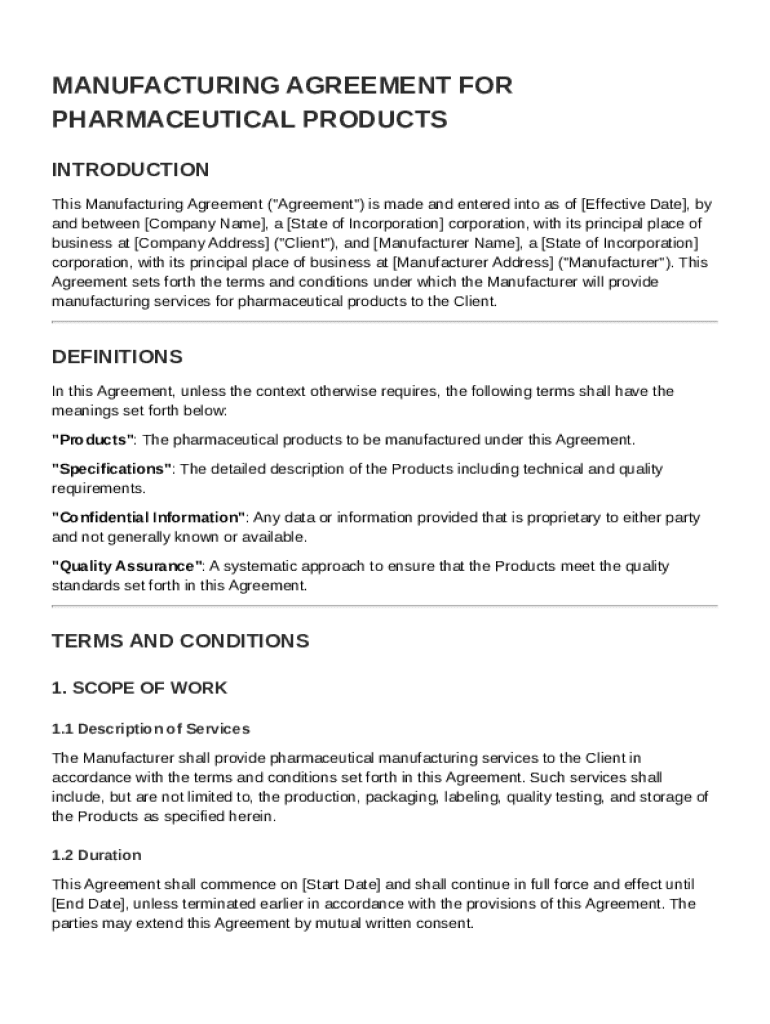
Manufactur In Pharmaceutical Sop Contract Form
Use a Manufactur In Pharmaceutical Sop Contract Template template to make your document workflow more streamlined.
What this pharmaceutical SOP contract form does
The Manufactur In Pharmaceutical Sop Contract Form is a business agreement used to document responsibilities for manufacturing pharmaceutical products under defined standard operating procedures. It records the parties, covered products or services, production and quality obligations, applicable SOP references, change controls, confidentiality terms, and approval requirements. In a U.S. workflow, the completed contract can be uploaded to signNow, reviewed by assigned parties, signed electronically, and preserved with its audit trail. The contract does not replace FDA requirements, a quality agreement, or state-specific legal review where those are required.
Why teams look for DocuSign alternatives
Organizations seek alternatives when they need different pricing models, stronger native automation, simpler bulk affidavit workflows, or more flexible identity-verification options than those available in a legacy envelope-based vendor.

Who uses this pharmaceutical contract form
Manufacturing teams
Pharmaceutical manufacturers and contract manufacturing organizations can use the form for production agreements, SOP-controlled services, quality responsibilities, change controls, deviation handling, and approval records. Quality and regulatory teams should verify that the contract reflects applicable procedures and does not replace required FDA documentation.
Business and quality teams
Procurement, legal, and supplier-quality groups can use the form to coordinate contract review, confidentiality terms, facility obligations, testing responsibilities, and signature evidence. The workflow is useful when several U.S. stakeholders must approve one controlled agreement before a manufacturing relationship proceeds.
Who benefits from this contract workflow
The form is most useful when several pharmaceutical manufacturing parties must document operational ownership and approve one controlled agreement.
A specialty pharmaceutical manufacturer can use the form to assign production, batch documentation, quality review, deviation handling, and change-control duties to the correct contract parties. A contract manufacturing organization can use the agreement to document sponsor instructions, facility responsibilities, SOP references, release controls, and communication requirements before production begins. An enterprise pharmaceutical company can standardize supplier agreements across sites, route approvals through quality and legal teams, and preserve signed contracts with searchable audit evidence.
These tasks are executed by both individual contributors and centralized administrators depending on organizational policy and required controls.
Features that support pharmaceutical contract control
A controlled digital workflow keeps pharmaceutical manufacturing obligations, approvals, signatures, and supporting records connected from drafting through archival.
Defined responsibilities
Capture the manufacturer, sponsor, facility, product, and SOP references in one controlled contract record. Clear role allocation helps teams identify who owns production, testing, release, deviations, and document updates.
SOP references
Attach or reference the SOP version governing the pharmaceutical manufacturing relationship. Version-aware drafting helps reviewers connect operational obligations to the procedure actually approved for use.
Role-based routing
Route the contract to manufacturing, quality, regulatory, and legal stakeholders in an intentional signing order. Assigned roles reduce uncertainty about review ownership before execution.
Auditable signing
Collect signatures online while preserving signer identity, timestamps, and action history. The resulting record supports later review of who approved the pharmaceutical manufacturing arrangement and when.
Secure records
Store the executed contract and completion evidence together. Centralized records make it easier to retrieve the agreement when quality teams investigate a deviation or verify supplier controls.
Business integrations
Connect the workflow with systems such as NetSuite, Oracle, Box, or Google Drive. Connected records reduce duplicate entry when contract status or executed documents must move between teams.
 Best ROI. Our customers achieve an average 7x ROI within the first six months.
 Scales with your use cases. From SMBs to mid-market, airSlate SignNow delivers results for businesses of all sizes.
 Intuitive UI and API. Sign and send documents from your apps in minutes.
Complete the pharmaceutical contract online
Use this sequence to prepare, route, sign, and retain the Manufactur In Pharmaceutical Sop Contract Form in signNow.
Prepare document:
Upload the contract template. Check fields:
Review detected fields and add missing roles. Add signers:
Assign pharmaceutical manufacturing stakeholders. Route contract:
Send for review and signature. Store evidence:
Download the executed agreement and audit trail.
Recommended workflow configuration
Configure the signing workflow around pharmaceutical quality review, signer identity, audit evidence, controlled storage, and the organization’s applicable retention policy.
| Setting | Recommendation |
|---|---|
| Authentication method | Email link with SMS OTP |
| Signature type | Typed or drawn electronic signature |
| Audit trail | Export with completed contract |
| Document retention | Follow applicable quality policy |
| Encryption | TLS 1.2/1.3 and AES-256 |
How the audit trail records signing
The audit trail separates the pharmaceutical contract’s business terms from technical evidence showing how each assigned party interacted with the document.
Authenticate signer:
Capture timestamp:
Hash document:
Seal record:
Log activity:
Export evidence:
Security controls for pharmaceutical agreements
TLS and AES-256:
HIPAA and 21 CFR Part 11:
SOC 2 Type II:
ISO 27001:
GDPR and CCPA:
ESIGN and UETA:



Record-keeping practices for pharmaceutical contracts
Retention and access controls should reflect the contract’s pharmaceutical quality, confidentiality, and regulatory context.
Export the contract and audit trail
Map retention to the governing rule
Limit access to authorized teams
Separate active and superseded versions
Challenges when completing the form
SOP references become ambiguous when the contract omits document numbers, revision levels, effective dates, or a process for approving later changes. Manufacturing, quality, and regulatory responsibilities overlap when the agreement does not clearly assign deviation investigations, batch release, testing, or record ownership. A signed contract may be difficult to defend when the executed document is stored without its completion certificate, audit trail, or approved version history. Confidential pharmaceutical information can be exposed when drafts, formulations, facility details, or quality records circulate through unmanaged email attachments and shared folders.
Document exclusions and state rules
Notarization
Wills
Family law
Real-estate deeds
Platform requirements for this form
Use signNow in Chrome, Firefox, Safari, or Edge on Windows or macOS. The signNow mobile apps support completing and signing the pharmaceutical contract on iOS and Android devices.
Browsers Chrome, Firefox, Safari, Edge Desktop Windows and macOS computers Mobile iOS and Android apps
Enterprise deployments should also review managed-device controls, API access, SSO provisioning, and any certificate or long-term validation requirements. Confirm the organization’s browser, identity, and records policies before routing a contract containing confidential manufacturing or quality information.
Pricing and features for contract workflows
This comparison uses verified signNow plan information; competitor pricing and features are marked Not verified when the supplied vendor data does not confirm them.
| Features | signNow | DocuSign | Adobe Sign | PandaDoc | Dropbox Sign |
|---|---|---|---|---|---|
| Starting price | $8/user/month annually | Not verified | Not verified | Not verified | Not verified |
| Free trial | 7 days, no card | Not verified | Not verified | Not verified | Not verified |
| Bulk send | Business Premium included | Not verified | Not verified | Not verified | Not verified |
| Audit trail | Included with Business | Not verified | Not verified | Not verified | Not verified |
| HIPAA compliance | Available with BAA | Not verified | Not verified | Not verified | Not verified |
Key performance indicators that demonstrate SignNow's proven track record.
Troubleshooting pharmaceutical contract signing
These answers address field detection, regulated workflows, signer controls, plan capabilities, and preservation of the executed contract.
Upload the contract as a PDF or supported document, then review signNow’s detected fields before sending. If fields are missing, add signature, date, initials, or text fields manually and assign each to the correct party.
The Business plan includes legally binding eSignatures, audit trails, templates, mobile apps, ISO 27001, SOC 2, and GDPR features. Business Premium adds bulk send, while Enterprise adds advanced signer authentication and conditional fields.
If the agreement includes protected health information, confirm that the organization has the required HIPAA arrangement, including a business associate agreement where applicable. signNow identifies HIPAA compliance as requiring a BAA.
For FDA-regulated electronic records, determine whether the process requires 21 CFR Part 11 controls beyond ordinary contract execution. signNow lists 21 CFR Part 11 compliance with 2FA, session timeouts, timestamps, and document history retention.
Use assigned signers, signing order, and authentication requirements before sending. Business Premium includes kiosk mode and quick invite links; Enterprise adds advanced signer authentication when stronger identity controls are required.
After completion, retrieve the executed contract and audit trail from signNow and archive them together under the organization’s approved retention policy. Do not treat the platform’s availability as the applicable legal retention period.
BE READY TO GET MORE
Get this form now!

If you believe that this page should be taken down, please follow our DMCA take-down process.