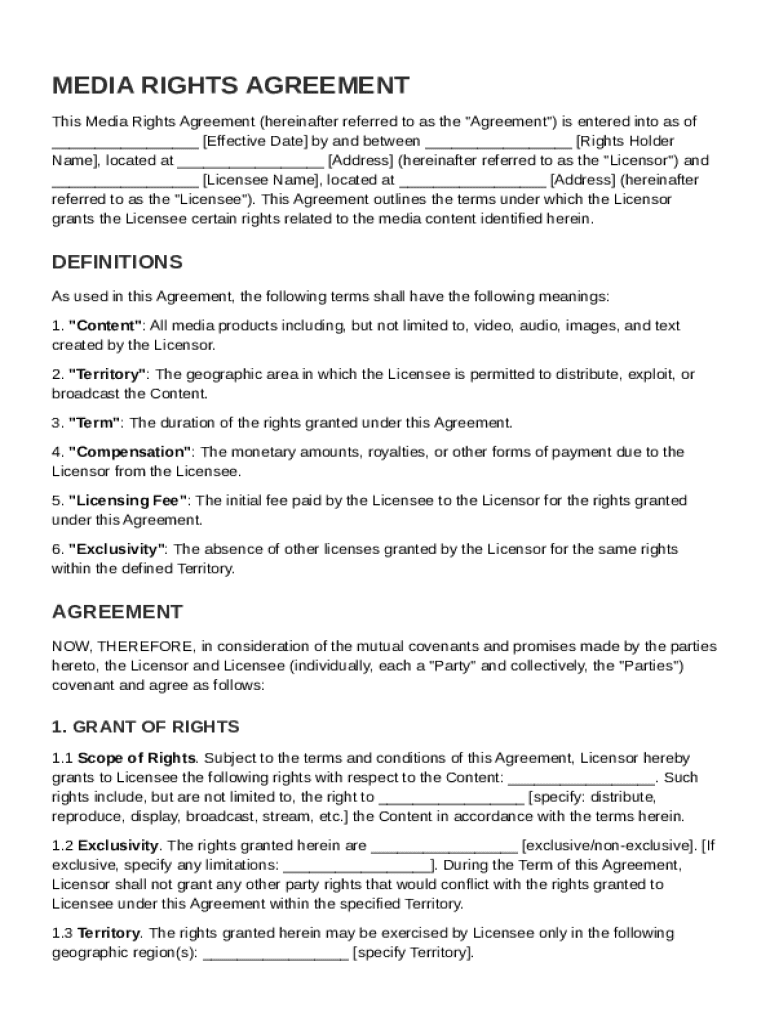
Media Rights Contract Form
Use a Media Rights Contract Template template to make your document workflow more streamlined.
What the media rights contract does
A Media Rights Contract Form records permission to use specifically identified creative work, likeness, performance, or other media under agreed conditions. It should identify the parties, work, permitted formats, territory, term, exclusivity, attribution, compensation, approval rights, and termination terms. With signNow, the sender uploads the agreement, reviews detected fields, assigns signature roles, sends it for signing, and retains the completed PDF with an audit trail. In the United States, ESIGN and applicable state law may support electronic execution when intent, consent, attribution, and record retention requirements are met.
Who benefits from media rights contracts
Media rights contracts clarify permission, scope, compensation, and evidence for creative work used in advertising, publishing, entertainment, and corporate communications.
Independent photographers and videographers use the form to document permission for named campaigns, media formats, territories, usage periods, and agreed compensation before delivering licensed files. Marketing agencies use repeatable media rights contracts to collect creator approvals, preserve usage restrictions, and coordinate signatures between clients, talent, production teams, and rights holders. Enterprise media teams use controlled templates for campaign releases, organized signer routing, audit trails, and searchable records when multiple contributors grant rights across projects and jurisdictions.
These tasks are executed by both individual contributors and centralized administrators depending on organizational policy and required controls.
How the media rights workflow works
The signNow workflow turns a prepared rights agreement into a traceable signed record without changing the commercial terms agreed by the parties.
Upload contract: Upload the Media Rights Contract Form to signNow. Prepare fields: Review detected fields and add rights-specific signature fields. Route for signing: Send the agreement to creators, licensees, or authorized representatives. Preserve evidence: Store the completed contract with its audit trail.
 Best ROI. Our customers achieve an average 7x ROI within the first six months.
 Scales with your use cases. From SMBs to mid-market, airSlate SignNow delivers results for businesses of all sizes.
 Intuitive UI and API. Sign and send documents from your apps in minutes.
How the audit trail records signing
For a Media Rights Contract Form, the audit trail connects each signature event to the agreement governing works, permitted uses, territory, term, and compensation.
Authenticate signer:
Capture timestamps:
Hash document:
Seal document:
Build audit trail:
Export evidence:
Media rights contract setup recommendations
Configure signing, access, evidence, and storage controls around the parties, licensed uses, territory, term, and compensation stated in the contract.
| Setting | Recommendation |
|---|---|
| Authentication method | Email link with SMS OTP for sensitive releases |
| Signature type | Typed or drawn electronic signature with signer intent |
| Audit trail | Capture timestamps, IP address, and signer actions |
| Document retention | Retain signed contracts and certificates under policy |
| Encryption and provisioning | Use AES-256 storage with role-based user access |
Security for signed rights agreements
Data in transit:
Data at rest:
Security reporting:
Information security:
Electronic signatures:
Access management:
Privacy and disclosure pitfalls
A contract may grant broad advertising, social, print, or broadcast rights without identifying the exact media, territory, duration, or campaign, creating uncertainty about permitted use. Unclear ownership language can leave a brand unsure whether the signer controls the underlying photograph, recording, performance, likeness, or third-party materials. Untracked amendments may change compensation, exclusivity, approval rights, or expiration dates while leaving reviewers unable to determine which version governs the campaign. Sharing a signed contract beyond authorized teams can expose personal information, payment terms, unpublished creative assets, or negotiated usage restrictions.



Platform requirements for signing
Open the Media Rights Contract Form in Chrome, Firefox, Safari, or Edge on Windows or macOS. signNow mobile apps support signing from iOS and Android devices, while TLS 1.2 or 1.3 protects data in transit.
Browser support Chrome, Firefox, Safari, and Edge Operating systems Windows, macOS, iOS, and Android Secure connection TLS 1.2 or 1.3 connection
Organizations can apply managed-device controls, provision users through administrative settings, and connect records through supported integrations. Confirm that each signer can access the contract, review its rights language, and retain the completed PDF and audit trail according to the organization’s records policy.
Key performance indicators that demonstrate SignNow's proven track record.
Media rights contract troubleshooting
Resolve field, signer, authentication, legal-validity, and record-preservation questions before distributing licensed media or relying on the completed agreement.
Business plans provide legally binding eSignatures, templates, and audit trails. For a Media Rights Contract Form, verify every licensed work and rights limitation before sending; the platform records execution evidence but does not determine whether the grant is legally sufficient.
If auto-detection misses a signature, date, initials, or approval field, open the document editor and place the field manually. Confirm each field is assigned to the correct creator, licensee, or representative before delivery.
Business Premium includes bulk send, which can help distribute substantially similar rights agreements. Review each recipient’s work, territory, term, and compensation before sending because bulk delivery does not replace contract-specific review.
Use SMS OTP or another available authentication control when the agreement contains personal information, payment terms, or valuable licensing rights. Stronger authentication supports attribution, but parties should still verify identity and authority independently.
ESIGN and UETA generally recognize electronic signatures when intent, consent, attribution, and record retention requirements are satisfied. Consumer-facing transactions may require an ESIGN disclosure under 15 U.S.C. §7001(c), so obtain legal advice for the audience and transaction.
Export the completed PDF and audit trail after all parties sign. Keep them together under the organization’s retention policy, preserving the exact rights language, signer events, timestamps, and any later amendment as a separate record.
BE READY TO GET MORE
Get this form now!

If you believe that this page should be taken down, please follow our DMCA take-down process.