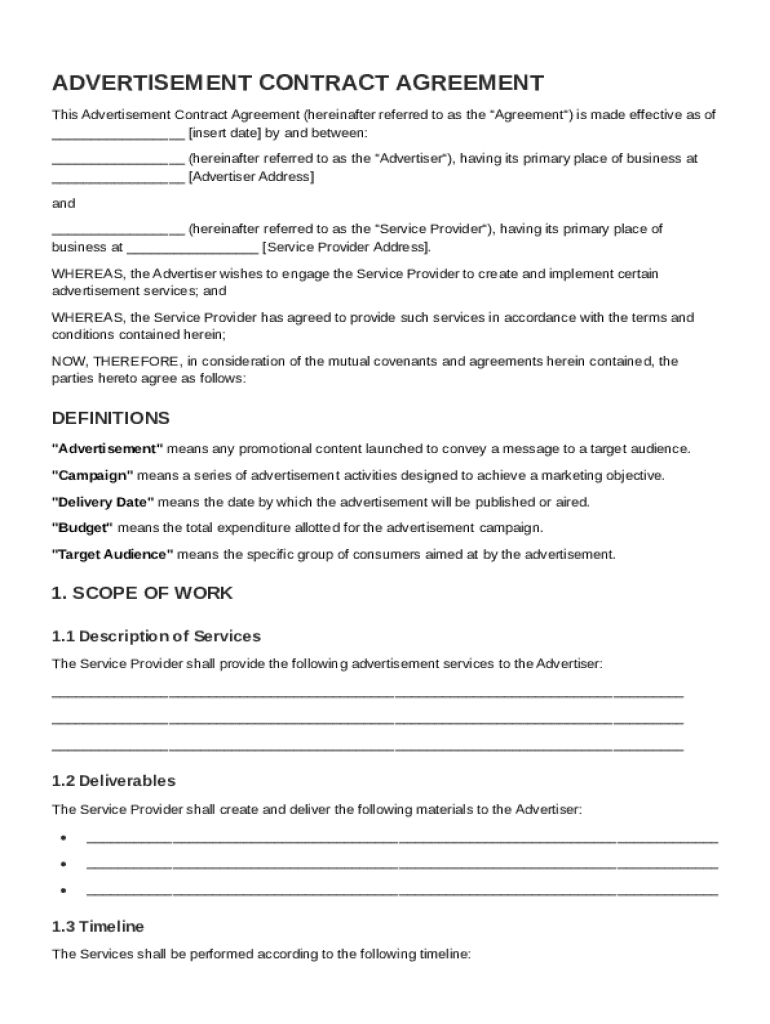
Advertisement Contract Form
Use a Advertisement Contract Template template to make your document workflow more streamlined.
What an Advertisement Contract Form does
An Advertisement Contract Form records the parties, advertising services, campaign details, placement terms, fees, approvals, and signatures for a specific promotional arrangement. It helps an advertiser and media provider confirm what will run, where it will appear, when delivery occurs, and how payment is handled. With signNow, upload the contract, auto-detect fillable fields, assign signer roles, send it electronically, and store the completed copy with its audit trail. ESIGN and UETA generally recognize qualifying electronic contracts, subject to applicable state law and statutory exceptions.
Who uses an advertisement contract
Advertising agencies
Advertising agencies use the form to define campaign scope, creative approvals, placement dates, media channels, fees, cancellation rights, and client sign-off before launch. A reusable signNow template can standardize recurring agency engagements while preserving contract-specific pricing and deliverables.
Advertisers and media providers
Businesses and media providers use the form to document purchased placements, publication schedules, audience commitments, payment terms, make-good obligations, and approval responsibilities. Electronic routing gives each party a reproducible record before an advertisement is released.
Features for advertisement contracts
signNow connects the Advertisement Contract Form workflow from field preparation through signature, audit evidence, and controlled storage.
Field detection
Auto-detected fields accelerate preparation of campaign dates, fees, approvals, and signature areas while leaving the sender responsible for checking every field against the original advertising terms.
Signer routing
Role-based routing sends the Advertisement Contract Form to advertisers, agencies, publishers, and finance approvers in the required order, reducing manual follow-up before placement begins.
Reusable templates
Reusable templates standardize recurring advertising agreements without removing campaign-specific pricing, media placement, deliverables, cancellation terms, or approval requirements.
Audit trail
The audit trail records signer actions, timestamps, authentication details, and delivery events, creating a structured evidence record for the completed advertising contract.
Mobile signing
Mobile apps allow authorized advertising and media teams to review or sign contracts away from a desk when campaign approvals require timely action.
Data protection
TLS 1.2/1.3 protects data in transit and AES-256 protects stored records, supporting controlled handling of contract terms and personal information.
How to complete the advertisement contract
Prepare the advertising terms once, route the form to every responsible party, and preserve the executed contract with its evidence record.
Upload contract:
Upload the Advertisement Contract Form PDF. Detect fields:
Let signNow detect fillable fields automatically. Assign roles:
Assign advertiser, agency, and media recipients. Send contract:
Send for signatures and required approvals. Store records:
Store the signed copy and audit trail.
 Best ROI. Our customers achieve an average 7x ROI within the first six months.
 Scales with your use cases. From SMBs to mid-market, airSlate SignNow delivers results for businesses of all sizes.
 Intuitive UI and API. Sign and send documents from your apps in minutes.
How the advertisement contract audit trail works
The audit trail records who handled the Advertisement Contract Form, what happened, and when each signing event occurred.
Signer authentication:
Timestamp capture:
Document hashing:
Tamper sealing:
Event history:
Audit export:
Privacy risks in advertisement contracts
Including unnecessary phone numbers, addresses, or audience data exposes personal information in the completed advertising contract. Failing to document electronic consent can weaken evidence that each party intended to sign the Advertisement Contract Form. Sending the contract through shared accounts can make signer attribution and access review difficult. Leaving completed contracts in unrestricted folders can expose pricing, campaign terms, and personal data.
Risks of incomplete advertising contracts
Unsigned agreement
Scope dispute
Weak evidence
Confidentiality exposure
Best practices for advertising contracts
Accurate campaign terms, controlled signing, and preserved evidence reduce disputes about what was purchased, approved, delivered, and paid.
Complete every commercial term
Review detected fields carefully
Assign authorized signers
Archive the evidence record
Security controls for advertisement contracts
Transit encryption:
Stored encryption:
Security certification:
Security management:
U.S. compliance:
Privacy compliance:
Recommended advertisement contract setup
Configure the Advertisement Contract Form around signer identity, evidence preservation, confidentiality, and the retention rule applicable to its business purpose.
| Setting | Recommendation |
|---|---|
| Authentication method | Email verification with SMS OTP |
| Signature type | Electronic signature with signer intent |
| Audit trail | Capture timestamps, actions, and delivery |
| Document retention | Apply the longest applicable legal period |
| Encryption | TLS 1.2/1.3 and AES-256 protection |
Advertisement contract retention schedule
Retention depends on the Advertisement Contract Form’s business and regulatory purpose; apply the longest applicable federal, state, contractual, or litigation-hold requirement.
Three years for tax records
Six years for understatements
Three years for payroll
Six years for broker-dealers
Seven years for audit records
Advertisement contract troubleshooting
Use these answers to resolve signing, evidence, privacy, and plan questions before circulating an Advertisement Contract Form.
Business includes audit trails, templates, mobile apps, and legally binding eSignatures. Upload the Advertisement Contract Form, place fields, assign recipients, and send it for completion. Business Premium adds bulk send when the same advertising contract must reach multiple parties.
Business Premium includes bulk send, while Business does not list that feature. For repeated Advertisement Contract Form campaigns, prepare one approved template, map recipient fields, and use bulk send only after confirming each recipient’s contract-specific terms.
signNow states that ESIGN and UETA compliance supports electronic signatures. Preserve signer intent, electronic consent where required, attribution, and a reproducible record. Consumer-facing transactions may require the disclosure and access procedures described in 15 U.S.C. §7001(c).
Use role-based recipients and a defined signing order when the advertiser, agency, and media provider approve different sections. The audit trail records authentication, timestamps, actions, and delivery events, helping connect each signature to the final Advertisement Contract Form.
Business includes audit trails and templates. If the contract contains protected health information, HIPAA compliance requires a business associate agreement and appropriate safeguards; do not assume an ordinary advertising contract needs HIPAA controls without a healthcare-related use case.
The Business plan is $8 per user per month when billed annually, with a 7-day free trial and no credit card required. Paid subscription plans include 100 signature invites per user annually; overage fees may apply, so review usage before sending campaigns.
Key performance indicators that demonstrate SignNow's proven track record.
BE READY TO GET MORE
Get this form now!

If you believe that this page should be taken down, please follow our DMCA take-down process.