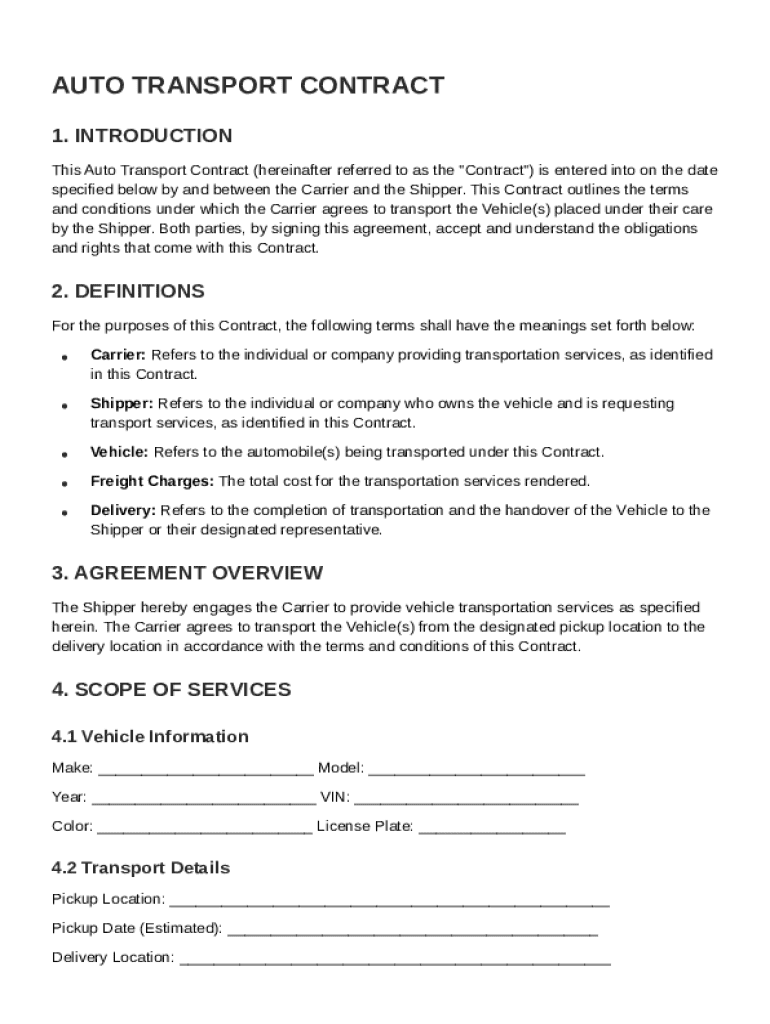
Auto Transport Contract Form
Use a Auto Transport Contract Template template to make your document workflow more streamlined.
What an auto transport contract covers
An Auto Transport Contract Form is a written agreement for moving a specified vehicle between identified parties. It records the vehicle identification number, year, make, model, condition, pickup and delivery locations, requested dates, transport method, price, deposits, cancellation terms, and responsibility for delays or damage. A broker, carrier, dealership, fleet operator, or vehicle owner completes the shipment-specific fields before the parties sign. With signNow, upload the agreement, auto-detect fillable fields, send it to the assigned signers, and store the completed PDF with its audit trail.
Who uses an auto transport contract
Transport brokers
Auto transport brokers use the form to document shipper instructions, carrier assignments, pickup and delivery terms, vehicle condition details, cancellation provisions, and payment responsibilities before arranging vehicle movement.
Carriers and owners
Carriers, dealerships, fleet operators, and individual vehicle owners use signed copies to confirm custody, delivery expectations, damage documentation, and authorization for a specific shipment.
Features for an auto transport contract
signNow organizes shipment details, signer routing, electronic execution, and completion evidence around the parties and vehicle identified in each Auto Transport Contract Form.
Vehicle details
Capture the vehicle identification number, year, make, model, condition, pickup location, and delivery location in one shipment-specific agreement before signatures are requested.
Signer routing
Assign separate fields to the shipper, carrier, broker, dealership, or owner so every required party signs the correct Auto Transport Contract Form.
Payment terms
Record price, deposit, payment timing, cancellation terms, and responsibility for delays in fields that parties can review before execution.
Remote signing
Send the contract by email or signing link, allowing parties to approve shipment terms without coordinating an in-person meeting.
Audit evidence
Keep the completed PDF with signNow’s audit trail, including signer actions and completion evidence relevant to later shipment or damage questions.
Mobile workflow
Use templates and mobile apps to prepare and sign transport agreements while staff work from offices, dealerships, terminals, or dispatch locations.
How the transport contract workflow works
Prepare the shipment-specific agreement in signNow, route it to the people responsible for the vehicle movement, and preserve the completed record.
Upload agreement: Upload the Auto Transport Contract Form. Detect fields: Let signNow detect fillable fields. Assign signers: Assign shipment parties to fields. Complete record: Send, sign, and store evidence.
 Best ROI. Our customers achieve an average 7x ROI within the first six months.
 Scales with your use cases. From SMBs to mid-market, airSlate SignNow delivers results for businesses of all sizes.
 Intuitive UI and API. Sign and send documents from your apps in minutes.



Recommended transport contract setup
Configure the Auto Transport Contract Form around signer identity, shipment evidence, controlled access, and retention requirements for the records actually created.
| Setting | Recommendation |
|---|---|
| Authentication method | Email invitation with SMS OTP |
| Signature type | Typed or drawn electronic signature |
| Audit trail | Retain completion history with final PDF |
| Document retention | Three years from filing for tax records |
| Encryption | TLS 1.2 or 1.3 and AES-256 |
What the audit trail records
The signNow audit trail connects the Auto Transport Contract Form to signer activity, timestamps, document integrity, and retrievable completion evidence.
Signer authentication:
Timestamp capture:
Document hashing:
Tamper-evident sealing:
Action history:
Audit-trail export:
Privacy and disclosure issues in transport contracts
Customer names, addresses, phone numbers, and vehicle details remain exposed when completed contracts are emailed without controlled access. A signer may not receive a clear electronic-record disclosure before signing, weakening evidence that consent covered the digital contract. Shared links or unrestricted folders can let unauthorized staff view pickup locations, vehicle details, payment terms, or signed carrier agreements. Changing carrier rates or delivery terms after signing without a documented revision can create disputes over which contract version controls.
Best practices for transport contracts
Accurate vehicle data, clearly assigned signers, and a preserved completion record make an Auto Transport Contract Form easier to administer and review.
Verify vehicle details before sending
Separate shipment and payment terms
Assign every signer correctly
Preserve the executed agreement
Legal standing of a transport contract
An electronically signed Auto Transport Contract Form can support a U.S. business transaction when the parties demonstrate intent, consent, attribution, and reliable record retention under ESIGN, 15 U.S.C. ch. 96, and applicable UETA law. Wills, codicils, testamentary trusts, court orders, and specified family-law documents remain outside ESIGN’s coverage.

Security for signed transport records
Transport encryption:
Stored document protection:
Control assurance:
Information security:
Electronic signing:
Protected health data:
Troubleshooting Auto Transport Contract Form workflows
Resolve access, plan, signing, and compliance questions by matching each Auto Transport Contract Form workflow to the relevant signNow feature and U.S. requirement.
Business plan pricing is $8 per user per month with annual billing, and the plan includes legally binding eSignatures, templates, mobile apps, and audit trails. For a transport contract, upload the document, map signature fields, and send it to the assigned parties before reviewing the completed record.
Business Premium is $15 per user per month with annual billing and includes bulk send. Use it when the same Auto Transport Contract Form must be distributed to multiple customers or carriers, while checking each recipient’s vehicle and shipment details before sending.
signNow lists 100 signature invites per user per year for Business, Business Premium, and Enterprise subscription plans, with overage fees. A high-volume transport operation should check invite usage or evaluate the Site License, priced at $1.50 per signature invite.
signNow states that ESIGN and UETA compliance supports electronic signing, but contract enforceability still depends on intent, consent, signer attribution, and record retention. Give consumer signers the required electronic-record disclosure under 15 U.S.C. §7001(c) when applicable.
If a signer cannot access the Auto Transport Contract Form, confirm the recipient email, resend the invitation, or create a signing link where appropriate. Business Premium includes quick invite links; do not use an open link when shipment or payment information requires restricted access.
For vehicle contracts containing protected health information, signNow identifies HIPAA compliance as requiring a BAA. Confirm that the workflow, recipients, storage, and agreement meet the covered entity’s requirements before including PHI in the transport record.
Use cases for auto transport contracts
Brokers, carriers, dealerships, and fleet teams can adapt the form to shipment-specific terms without losing the signed record.
Auto transport brokerage
A regional auto transport brokerage needs customers and assigned carriers to approve shipment terms without coordinating office visits. It converts its transport agreement into a signNow template with fields for vehicle identity, locations, price, dates, and signatures.
- Broker and carrier sign in sequence
- Vehicle-specific terms remain visible
The brokerage can send a document tailored to each vehicle movement, preserve the executed contract, and review the audit trail when a customer questions pickup, delivery, payment, or authorization terms. The workflow does not replace carrier or state-law requirements; it organizes the agreed transaction record.
Vehicle logistics team
A dealership arranging vehicle deliveries needs a consistent contract for customers, transport providers, and internal logistics staff. It uses signNow to route the agreement from shipment preparation through signature and completion.
- Customer details match shipment records
- Completed PDF stays with delivery file
A structured Auto Transport Contract Form helps the dealership keep delivery terms, vehicle information, and signer evidence together. Staff can use the final document and audit trail to identify what was approved, when it was signed, and which parties participated.
Key performance indicators that demonstrate SignNow's proven track record.
BE READY TO GET MORE
Get this form now!

If you believe that this page should be taken down, please follow our DMCA take-down process.