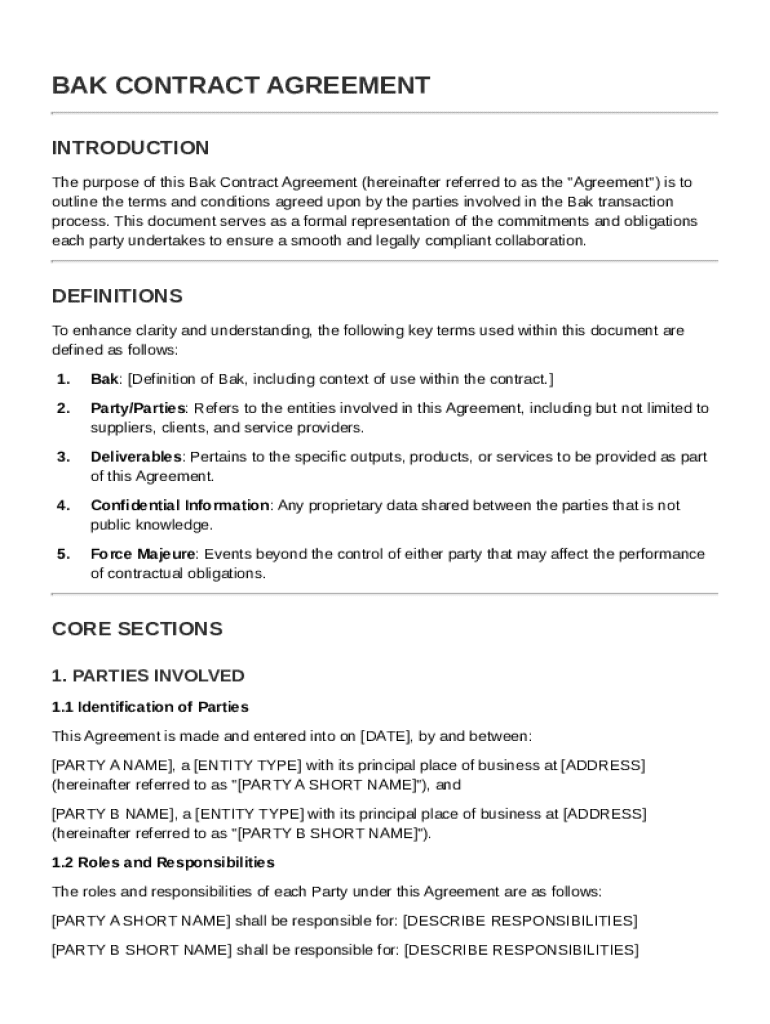
Bak Contract Form
Use a Bak Contract Template template to make your document workflow more streamlined.
What is Bak Contract Form?
Bak Contract Form is a business agreement document that records the terms accepted by its parties and their signatures. With signNow, a sender uploads the form, reviews automatically detected fillable fields, assigns each signature or acknowledgment field to the correct signer, and sends the document electronically. Signers review the presented terms, complete required fields, and receive a completed copy. The audit trail records transaction activity, helping the parties retain evidence of intent, timing, and document history. Contract enforceability still depends on the agreement and applicable state law.
Business types using Bak Contract Form
Bak Contract Form fits organizations that need repeatable agreements, identifiable signers, and a retrievable electronic record.
Solo consultants can send Bak Contract Form agreements to clients, collect signatures remotely, and retain the completed record without coordinating paper delivery or in-person meetings. Regional construction companies can route Bak Contract Form bids and subcontractor agreements between office staff, field supervisors, and vendors while preserving a single signed document. Multi-location enterprises can standardize Bak Contract Form templates, delegate sending, and apply permission controls so business units follow the same approval process.
These tasks are executed by both individual contributors and centralized administrators depending on organizational policy and required controls.
Who uses Bak Contract Form?
Small businesses
Small businesses use Bak Contract Form for customer agreements, vendor terms, and internal approvals that require a clear signed record without paper circulation.
Contract-based teams
Legal, real estate, construction, and financial-services teams use Bak Contract Form when several parties must review defined terms and return signed documents through a controlled workflow.
How to complete Bak Contract Form
Complete Bak Contract Form by uploading the document, checking its fields, assigning signers, and tracking the signed record.
Upload the form:
Upload the Bak Contract Form PDF to signNow. Check fields:
Review detected fields and add missing signer, date, or initials fields. Add signers:
Enter signer details and choose the required signing order. Send for signature:
Send the completed request and monitor each signing event.
Key features for Bak Contract Form
signNow combines field preparation, signer routing, mobile completion, and audit evidence for a controlled Bak Contract Form workflow.
Field detection
Upload Bak Contract Form once, then review automatically detected fields before sending. Manual field placement lets you correct missing signer, date, initials, or acknowledgment entries without rebuilding the document.
Signer routing
Assign Bak Contract Form fields to named recipients and define the signing sequence. Each person sees the fields relevant to their role, reducing incomplete submissions and clarifying responsibility for every signature.
Flexible delivery
Send Bak Contract Form through email invitations or shareable signing links. Recipients can review and sign from supported devices without requiring a separate document exchange by the sender.
Audit trail
Capture timestamps, signer actions, and document history alongside the completed Bak Contract Form. The resulting audit evidence helps document intent and transaction chronology under ESIGN and UETA.
Mobile signing
Use signNow mobile apps to review and complete Bak Contract Form away from a desktop. Mobile access helps field teams and clients return signed records without paper handling.
Record management
Store the completed Bak Contract Form with controlled access and its audit evidence. Keeping both records together supports retrieval, review, and consistent internal retention practices.
 Best ROI. Our customers achieve an average 7x ROI within the first six months.
 Scales with your use cases. From SMBs to mid-market, airSlate SignNow delivers results for businesses of all sizes.
 Intuitive UI and API. Sign and send documents from your apps in minutes.



Why teams look for DocuSign alternatives
Organizations seek alternatives when they need different pricing models, stronger native automation, simpler bulk affidavit workflows, or more flexible identity-verification options than those available in a legacy envelope-based vendor.

Recommended Bak Contract Form setup
Configure signer identity, signature evidence, protection, retention, and access controls before sending Bak Contract Form.
| Setting | Recommendation |
|---|---|
| Authentication method | Email link with SMS verification |
| Signature type | Electronic signature with signer intent |
| Audit trail | Enable completion history and timestamps |
| Document retention | Follow the transaction’s governing policy |
| Encryption | AES-256 at rest and TLS 1.2/1.3 in transit |
Bak Contract Form processing timeline
Processing depends on field accuracy, signer availability, and the signing order configured for this Bak Contract Form.
Prepare the document
Deliver to signers
Collect signatures
Archive the record
Security for Bak Contract Form
Data encryption:
Transport security:
Security certification:
Management standard:
Electronic signatures:
Health information:
Platform requirements for Bak Contract Form
Use Bak Contract Form in Chrome, Firefox, Safari, or Edge on Windows or macOS. signNow also provides mobile apps for iOS and Android, allowing signers to review assigned fields and complete the document from supported devices.
Browsers Chrome, Firefox, Safari, Edge Operating systems Windows, macOS, iOS, Android Access methods Desktop browsers and signNow apps
Organizations should manage access through approved devices, user permissions, and documented retention procedures. Enterprise deployments may also evaluate API access, SSO provisioning, and certificate configuration when Bak Contract Form records require centralized administration or regulated handling.
Challenges when completing Bak Contract Form
Automatically detected fields may not match the Bak Contract Form layout, requiring manual review before the document reaches a signer. Incorrect signer assignments can leave required Bak Contract Form fields incomplete or expose private contract terms to the wrong recipient. A missing signing order can create conflicting approvals when multiple parties must review and sign Bak Contract Form. Retaining only the signed PDF without its audit trail can weaken the record of identity, timing, and signing activity.
Risks of mishandling Bak Contract Form
Electronic consent
Attribution failure
Record integrity
Contract dispute
Bak Contract Form troubleshooting
Resolve Bak Contract Form issues by checking field assignments, signer access, authentication, plan limits, and the legal recordkeeping requirements that apply to your transaction.
Business includes legally binding eSignatures, templates, audit trails, and mobile apps at $8 per user per month with annual billing. signNow also provides a 7-day free trial without requiring a credit card, subject to current plan terms.
Business Premium adds bulk send at $15 per user per month with annual billing. Use it when the same Bak Contract Form must be distributed to many separate recipients; otherwise, Business provides the core signing and audit-trail functions.
If a signer cannot open the request, verify the email address, resend the invitation, or provide a signNow signing link. Ask the signer to use a supported browser and complete any configured SMS or identity verification step.
A signature request does not replace required consumer consent disclosures. For consumer-facing electronic records, ESIGN 15 U.S.C. §7001(c) requires paper-right disclosure, electronic-access capability, and withdrawal procedures where applicable.
signNow’s audit trail records signing activity, timestamps, and document history. Preserve the completed Bak Contract Form and audit trail together; the platform’s ESIGN and UETA compliance does not determine whether the underlying contract is substantively enforceable.
The Business plan includes 100 signature invites per user per year, with overage fees applying under current plan terms. Enterprise pricing and Site License usage differ, so confirm the selected plan before sending high-volume forms.
Key performance indicators that demonstrate SignNow's proven track record.
BE READY TO GET MORE
Get this form now!

If you believe that this page should be taken down, please follow our DMCA take-down process.