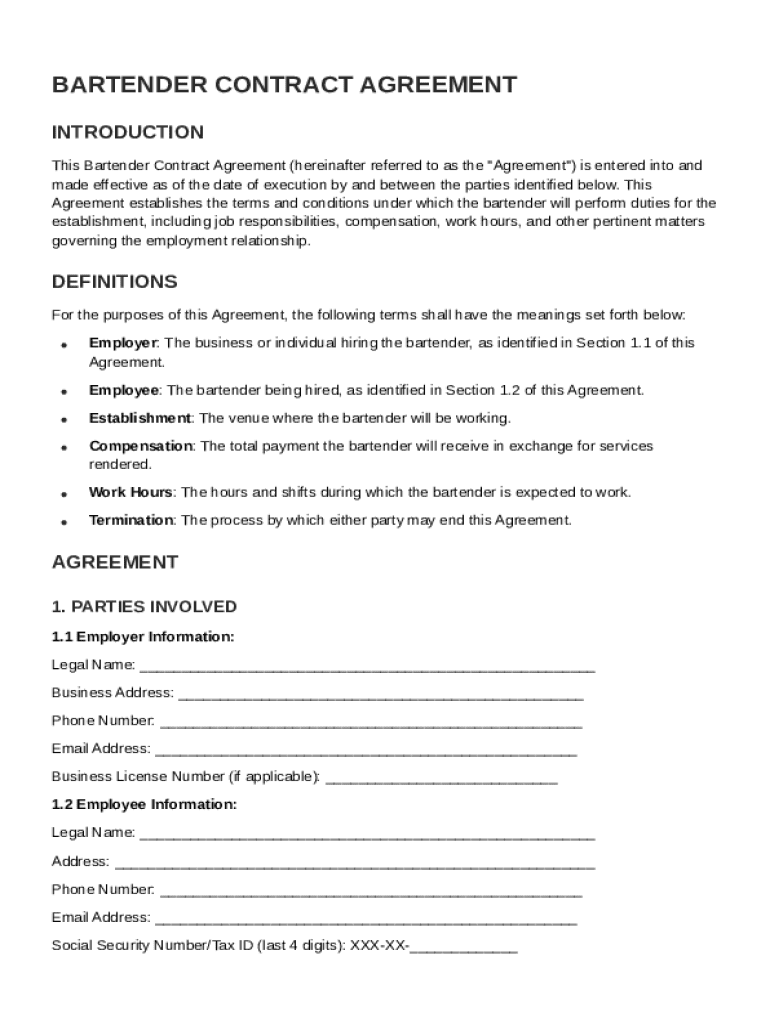
Bartender Contract Form
Use a Bartender Contract Template template to make your document workflow more streamlined.
What a bartender contract form covers
A Bartender Contract Form is a private agreement that records the relationship between a bartender and the hiring business or event host. It can identify the parties, service dates, venue, responsibilities, compensation, gratuities, scheduling expectations, cancellation terms, and signatures. Unlike an IRS or USCIS filing, it has no universal federal filing deadline or issuing agency. The parties should adapt it to the engagement and applicable state contract law. signNow lets the sender upload the agreement, add fields, route it for signatures, and retain the completed PDF with its audit trail.
Who uses a bartender contract form
Hospitality businesses
Bars, restaurants, caterers, event venues, and independent bartenders can use the form to document service dates, assigned duties, compensation, gratuities, scheduling expectations, cancellation terms, and signatures. The agreement can be sent before a shift, private event, seasonal engagement, or recurring service arrangement, giving both parties a consistent record.
Event service providers
Staffing agencies, event planners, and contractors can use the form when placing bartenders at weddings, festivals, corporate events, and private functions. Each agreement can identify the responsible parties, payment terms, venue obligations, and service scope, while signNow records the signing sequence and completed document.
Features for completing bartender contracts
signNow combines field preparation, signer routing, mobile access, reusable templates, and audit evidence for bartender agreements used across events and hospitality operations.
Field placement
Upload the bartender agreement and add fields for names, dates, duties, compensation, cancellation terms, and signatures without rebuilding the document.
Signer routing
Route one agreement to the bartender, hiring business, or event representative in a defined signing order, reducing uncertainty about who must act next.
Audit trail
Capture timestamps, signer actions, and completion history with the contract so parties can preserve evidence alongside the signed PDF.
Reusable templates
Reuse an approved bartender agreement template while updating event dates, venue details, duties, and compensation for each engagement.
Mobile signing
Let bartenders review and sign from a mobile device when event work takes place away from an office or venue administration desk.
Business integrations
Connect completed agreements to supported systems such as Google Drive, Box, Salesforce, or NetSuite when the contracting workflow needs centralized records.
How the bartender contract workflow works
The signNow workflow turns a bartender agreement into a controlled sequence: prepare the document, assign fields, collect signatures, and preserve completion evidence.
Upload: Upload the Bartender Contract Form to signNow. Add fields: Place fields for parties, dates, duties, pay, and signatures. Send: Send the agreement to each required signer. Store: Collect signatures and save the completed record.
 Best ROI. Our customers achieve an average 7x ROI within the first six months.
 Scales with your use cases. From SMBs to mid-market, airSlate SignNow delivers results for businesses of all sizes.
 Intuitive UI and API. Sign and send documents from your apps in minutes.
What the bartender contract audit trail records
The audit trail documents who handled the bartender agreement, when each action occurred, and how the completed record can be retrieved.
Authenticate signer:
Capture timestamps:
Hash document:
Seal record:
Track events:
Export trail:
Recommended bartender contract setup
Use field-level controls, authenticated signing, audit evidence, and restricted access when preparing a Bartender Contract Form in signNow.
| Setting | Recommendation |
|---|---|
| Authentication method | Email verification with SMS for sensitive agreements |
| Signature type | Typed or drawn electronic signature |
| Audit trail | Retain completion history with the signed PDF |
| Document retention | Apply IRC §6501(a) when tax records apply |
| Encryption and provisioning | AES-256 storage with role-based user access |
Processing stages for a bartender contract
The Bartender Contract Form has four operational stages, from preparing the agreement through collecting signatures and preserving the completed record.
Prepare the document
Send to signers
Complete signer review
Archive the record
Best practices for retaining bartender agreements
Retain the signed bartender agreement with evidence of execution, access controls, and the rule that governs the underlying business record.
Record the agreement’s business context
Apply the correct retention period
Export evidence after signing
Protect sensitive contract information
Security controls for bartender contracts
Data encryption:
Independent assurance:
Security certification:
Electronic signature law:
Privacy protections:
Protected health information:
Risks of an incomplete bartender contract
Incomplete execution
Compensation dispute
Performance dispute
Weak proof
Troubleshooting bartender contract signing
Resolve the named document, signer, plan, compliance, authentication, and retention issues before treating a bartender agreement as complete.
Upload the final bartender agreement again and use signNow’s field detection or add fields manually. Confirm that every required signature, date, compensation acknowledgment, and initials field is assigned to the correct party before sending.
Open the document’s recipient settings and verify each bartender, hiring business, or event representative has the correct email address and signing order. Resend only after confirming the agreement version and recipient roles.
Business includes templates, audit trails, and legally binding eSignatures at $8 per user per month when billed annually. Business Premium costs $15 and adds bulk send, which helps distribute repeated bartender agreements.
signNow states that its eSignatures comply with ESIGN and UETA. For a bartender agreement, preserve evidence of intent, signer attribution, consent, and record reproduction; state law and the transaction’s facts still determine enforceability.
Use stronger signer controls when the agreement contains sensitive identity or payment information. signNow’s Enterprise plan adds advanced signer authentication, while SMS codes or other controls should match the business’s risk assessment.
After completion, download the signed PDF and audit trail from signNow and place them in controlled storage. Retention depends on the underlying record; IRC §6501(a) generally provides three years for federal tax assessment.
Key performance indicators that demonstrate SignNow's proven track record.
BE READY TO GET MORE
Get this form now!

If you believe that this page should be taken down, please follow our DMCA take-down process.