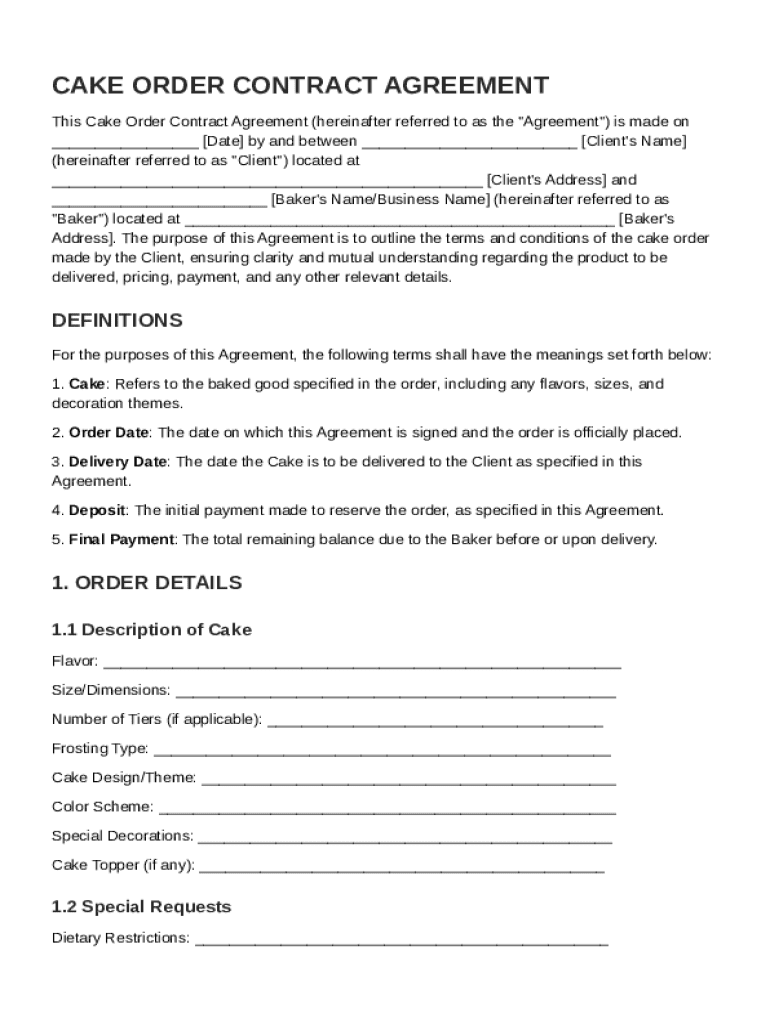
Cake Order Contract Form
Use a Cake Order Contract Template template to make your document workflow more streamlined.
What a cake order contract does
A Cake Order Contract Form records the customer’s requested cake and the bakery’s fulfillment agreement before production begins. It can identify the event date, servings, flavors, fillings, frosting, decorations, inscription, allergy information, pickup or delivery instructions, price, deposit, balance, cancellation terms, and signatures. With signNow, a bakery uploads the contract, reviews auto-detected fields, adds missing fields, sends it to the customer, and stores the completed agreement with its audit trail. ESIGN and applicable UETA laws generally recognize qualifying electronic signatures, subject to statutory exceptions and consent requirements.
Who uses this cake order contract
Bakeries
Bakeries and independent cake decorators use the form to document customer names, event dates, cake size, servings, flavors, fillings, frosting, decorations, inscriptions, allergy disclosures, pickup or delivery instructions, pricing, deposits, balances, cancellation terms, and approval signatures.
Customers and planners
Customers, event planners, and office coordinators use the contract to review customized cake specifications before production. A signed record clarifies the requested design, quantity, delivery address, payment schedule, change policy, and responsibility for confirming final details.
Who benefits from cake order contracts
The form fits custom cake businesses that need written approval for specifications, pricing, deposits, delivery arrangements, and changes before fulfillment begins.
Independent cake decorators can use a reusable contract for custom designs, deposit terms, pickup windows, and customer approval before purchasing ingredients or scheduling production. Local bakeries can route cake order contracts from sales staff to decorators and delivery teams, keeping flavor choices, allergen notes, payment terms, and signed customer instructions together. Multi-location bakery groups can standardize templates and permissions while allowing each location to manage its own cake orders, customer signatures, fulfillment notes, and completed records.
These tasks are executed by both individual contributors and centralized administrators depending on organizational policy and required controls.
How to complete a cake order contract
Complete the cake order contract online by checking order details, collecting signatures, and preserving the signed agreement with its audit trail.
Upload contract:
Upload your cake order contract PDF to signNow. Check fields:
Review detected fields and add missing customer, event, payment, and signature fields. Send contract:
Enter the customer’s email and send the completed contract for signature. Store records:
Monitor signing status and download the completed agreement with its audit trail.
Features that organize cake orders
Cake order contracts become easier to review when customer instructions, bakery approvals, signature events, and completed records stay connected throughout fulfillment.
Order details
Capture customer name, event date, cake specifications, servings, flavors, decorations, delivery details, pricing, deposits, balance due, cancellation terms, and signature fields in one structured agreement.
Field detection
Auto-detect existing fillable areas after upload, then add fields for customer approval, bakery acknowledgment, payment terms, and final delivery confirmation.
Direct sending
Send the cake order contract directly to the customer, reducing transcription errors between phone conversations, invoices, production notes, and the final signed agreement.
Reusable templates
Use templates for recurring cake packages while preserving variable details such as flavors, design instructions, pickup times, delivery addresses, and custom pricing.
Status tracking
Track whether the customer opened, signed, or completed the contract, helping bakery staff identify unsigned orders before production begins.
Audit trail
Keep the completed cake order contract and audit trail together, creating a clearer record of customer intent, approval, and the agreed fulfillment details.
 Best ROI. Our customers achieve an average 7x ROI within the first six months.
 Scales with your use cases. From SMBs to mid-market, airSlate SignNow delivers results for businesses of all sizes.
 Intuitive UI and API. Sign and send documents from your apps in minutes.



Recommended setup for cake order contracts
A bakery can configure the contract workflow around customer authentication, signature evidence, controlled staff access, and retention practices suited to custom order records.
| Setting | Recommendation |
|---|---|
| Authentication method | Email link with SMS OTP |
| Signature type | Typed or drawn customer signature |
| Audit trail | Preserve completion certificate and activity log |
| Document retention | Follow applicable business and state requirements |
| User provisioning | Admin-managed roles for bakery staff |
What the cake contract audit trail records
The audit trail documents how the cake order moved from customer review to signed approval, helping connect the final contract with its signing evidence.
Authenticate signer:
Capture timestamps:
Record actions:
Seal document:
Link completion:
Export audit trail:
Security for cake order contracts
TLS 1.2/1.3 protects transfers:
AES-256 protects stored files:
SOC 2 Type II certified:
ISO 27001 certified:
ESIGN and UETA compliant:
GDPR compliant data handling:
Platform requirements for signing
Cake Order Contract Form can be prepared and signed through supported desktop browsers, including Chrome, Firefox, Safari, and Edge, on Windows or macOS. signNow also provides mobile apps for iOS and Android, allowing bakery staff or customers to review and sign from supported mobile devices.
Browsers Chrome, Firefox, Safari, Edge Desktop systems Windows and macOS computers Mobile apps iOS and Android signNow apps
Use an up-to-date browser or the signNow mobile app, a reliable internet connection, and a device that can display the complete cake order contract. Bakery administrators should also apply organizational access controls before sharing customer names, addresses, delivery information, payment terms, or other order details.
Best practices for signed cake orders
Clear specifications, consistent approvals, and controlled records help bakeries fulfill custom cake orders without relying on scattered messages or memory.
Name every cake specification clearly
Capture fulfillment details before sending
Match pricing with payment terms
Secure completed records
Challenges in managing cake orders
Customer instructions may be split between texts, calls, social messages, and handwritten notes, creating conflicting cake flavors, decoration details, pickup times, or delivery addresses. A customer may approve a design without clearly acknowledging deposit requirements, remaining balance, cancellation terms, allergen disclosures, or changes requested after production starts. Uncontrolled copies can expose customer names, phone numbers, addresses, event dates, and payment details to staff who do not need access to the order. A bakery may begin production before receiving the signed contract, leaving the agreed design, price, and fulfillment instructions difficult to prove during a dispute.
Legal standing of a cake order contract
A signed Cake Order Contract Form can support proof of customer intent when the parties consent to electronic records, the signature is attributable to the signer, and the completed record remains reproducible under ESIGN, 15 U.S.C. ch. 96, and applicable UETA law. Wills, court orders, and specified family-law documents are excluded.

Cake order contract troubleshooting
Resolve signing, field, privacy, and evidence questions by matching the cake order workflow with signNow capabilities and the applicable U.S. electronic-record rules.
Upload the cake order contract as a clear PDF, then review signNow’s detected fields. Add missing fields manually for cake size, flavors, decorations, delivery details, deposit, balance, customer approval, and bakery signature before sending.
The Business plan costs $8 per user monthly when billed annually and includes templates, audit trails, mobile apps, ISO 27001, SOC 2, and GDPR support. Business Premium costs $15 annually billed and adds bulk send and kiosk mode.
For a customer-facing contract, provide the required electronic-record disclosure and confirm the customer can access the electronic format. Under 15 U.S.C. §7001(c), consumers must also have a method to withdraw consent and request paper records.
signNow’s audit trail records signing activity, timestamps, and document history. Preserve the completed contract and audit trail together so the bakery can show which specifications the customer reviewed and approved, rather than relying on later messages.
If customer information includes protected health information, signNow identifies HIPAA compliance as requiring a BAA. A cake bakery should avoid collecting unnecessary health details and should assess whether HIPAA applies before using the contract for medical events.
ESIGN and UETA generally recognize electronic signatures for U.S. business transactions when intent, consent, attribution, and record retention are established. Wills, court orders, and other statutory exceptions are outside that general rule and require separate legal review.
Key performance indicators that demonstrate SignNow's proven track record.
BE READY TO GET MORE
Get this form now!

If you believe that this page should be taken down, please follow our DMCA take-down process.