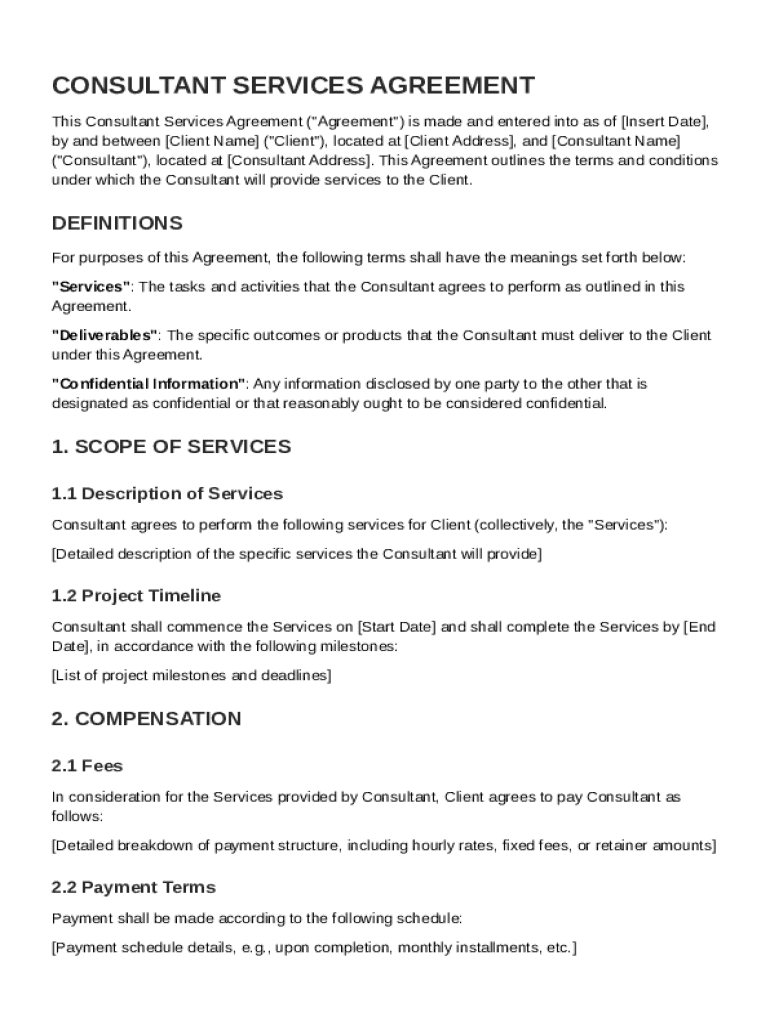
Consultant Contract Form
Use a Consultant Contract Template template to make your document workflow more streamlined.
What a consultant contract form does
A Consultant Contract Form records the relationship between a business and an independent consultant, including services, deliverables, payment terms, confidentiality, intellectual property, and termination conditions. It is not an IRS filing or a single federally issued form; its fields depend on the engagement and governing contract law. With signNow, a sender uploads the contract, reviews detected fillable fields, assigns signature and date fields, and sends it to the consultant and authorized business signer. The completed PDF and audit trail preserve the signing event for business records.
Key features for consultant contracts
signNow connects contract preparation, signer routing, audit evidence, templates, mobile access, and business integrations for consultant engagements.
Field placement
Upload an existing Consultant Contract Form and place fields for consultant details, services, fees, milestones, signatures, and dates without rebuilding the agreement.
Signer routing
Route the contract to the consultant, client representative, and other required signers in a defined order, helping each party complete only assigned fields.
Audit evidence
Capture completion details, timestamps, IP information, and workflow actions in an audit trail that travels with the signed consultant agreement.
Reusable templates
Reuse an approved consultant contract template while updating the engagement scope, payment terms, deliverables, and governing-law language for each project.
Mobile signing
Let consultants review and sign from signNow mobile apps or supported browsers when project teams work across offices, sites, and client locations.
Business integrations
Connect contract workflows with systems such as Salesforce, NetSuite, Google Drive, Box, or Procore when engagement records require coordinated storage.
Business types using consultant contracts
Consultant contracts help independent professionals, regulated practices, and enterprise procurement teams document responsibilities before services begin.
Solo consultants can define scope, milestones, payment terms, confidentiality, and intellectual-property ownership before accepting client work, then retain a signed copy and audit trail for the engagement record. Healthcare consulting practices can collect signatures on service agreements and related consent documents, while applying HIPAA safeguards and executing a BAA when protected health information is involved. Larger enterprises can standardize consultant agreements across procurement, legal, and finance teams using shared templates, delegated sending, role-based access, and controlled archival for recurring engagements.
These tasks are executed by both individual contributors and centralized administrators depending on organizational policy and required controls.
How consultant contract signing works
A consultant contract moves from upload to field review, signature collection, and audit-trail-backed storage in four practical steps.
Upload contract: Upload the contract PDF to signNow. Review fields: Auto-detect fillable fields and review placement. Send requests: Send signature requests to each consultant. Archive record: Store completed contracts with audit trails.
 Best ROI. Our customers achieve an average 7x ROI within the first six months.
 Scales with your use cases. From SMBs to mid-market, airSlate SignNow delivers results for businesses of all sizes.
 Intuitive UI and API. Sign and send documents from your apps in minutes.
Complete a consultant contract in signNow
Use this sequence to prepare the contract, assign responsibilities, collect signatures, and preserve evidence of the completed consultant engagement.
Upload document:
Upload the Consultant Contract Form PDF. Check fields:
Review detected fields for contract parties and dates. Assign signers:
Assign signature fields to each required signer. Send contract:
Send the agreement and monitor completion status. Store evidence:
Download the signed contract and audit trail.
Legal standing of consultant contracts
A consultant contract can be evidence of agreed services when parties show intent, consent, signer attribution, and reliable record retention. ESIGN, 15 U.S.C. ch. 96, and UETA generally support electronic business signatures, but wills, certain court orders, and family-law decrees remain excluded under 15 U.S.C. §7003.

Recommended consultant contract setup
Configure the workflow around signer identity, contract evidence, secure storage, and controlled access for every consultant engagement.
| Setting | Recommendation |
|---|---|
| Authentication method | Email verification with SMS OTP |
| Signature type | Electronic signature with clear intent |
| Audit trail | Capture timestamps, IP addresses, and actions |
| Document retention | Retain signed contracts under company policy |
| Encryption | Use TLS 1.2/1.3 and AES-256 |
Security for consultant contract records
Transit encryption:
Stored encryption:
Security certification:
Information security:
Privacy compliance:
Healthcare safeguards:
Inside a consultant contract audit trail
The audit trail separates the consultant contract’s visible terms from technical evidence showing who acted, when they acted, and which record was completed.
Authenticate signer:
Capture timestamp:
Hash document:
Seal record:
Record activity:
Retrieve evidence:



Privacy pitfalls in consultant contracts
Including unnecessary taxpayer, health, or banking information in a consultant contract increases exposure if recipients, storage locations, or access permissions are not reviewed. Failing to capture electronic consent and signer intent can weaken evidence that the consultant and business agreed to the displayed contract terms. Sending a contract through an unreviewed shared link can expose confidential rates, deliverables, or intellectual-property clauses to unintended recipients. Leaving consultant access active after project completion can expose signed contracts and audit records beyond the business need.
Consultant contract pricing comparison
signNow pricing and plan details are shown alongside competitor information only where the available vendor data is verified.
| Features | signNow | DocuSign | Adobe Sign | PandaDoc | Dropbox Sign |
|---|---|---|---|---|---|
| Starting annual price | $8/user/month, Business plan | Not verified | Not verified | Not verified | Not verified |
| Free trial period | 7 days, no credit card required | Not verified | Not verified | Not verified | Not verified |
| Bulk send availability | Business Premium, $15/user/month annually | Not verified | Not verified | Not verified | Not verified |
| Audit trail availability | Included in Business plan | Not verified | Not verified | Not verified | Not verified |
| HIPAA compliance | Available with required BAA | Not verified | Not verified | Not verified | Not verified |
Consultant contract troubleshooting
Resolve field, plan, signer, privacy, and legal-scope questions before distributing a completed consultant contract.
On the Business plan, upload the contract PDF and use signNow fields for names, dates, fees, deliverables, and signatures. If automatic detection misses a field, place it manually before sending. The completed record can include an audit trail documenting signing activity.
signNow Business includes legally binding eSignatures, templates, audit trails, and mobile apps at $8/user/month with annual billing. Business Premium is $15/user/month annually and adds bulk send, which is useful for repeated consultant agreements.
For a consultant contract containing protected health information, signNow identifies HIPAA compliance as requiring a BAA. Execute the BAA and configure access controls before using the workflow for covered healthcare activity.
ESIGN and UETA generally recognize electronic signatures for business transactions when intent, consent, attribution, and record retention are established. Review state contract law and the contract’s governing-law clause for specific enforceability questions.
If a signer cannot open the request, verify the email address, resend the invitation, or provide a signNow signing link. Business Premium includes quick invite links, while stronger authentication may require an Enterprise feature or configured add-on.
A consultant contract does not replace a will, codicil, testamentary trust, court order, or family-law decree. Those documents fall within ESIGN exceptions under 15 U.S.C. §7003 and may require separate state procedures.
Key performance indicators that demonstrate SignNow's proven track record.
BE READY TO GET MORE
Get this form now!

If you believe that this page should be taken down, please follow our DMCA take-down process.