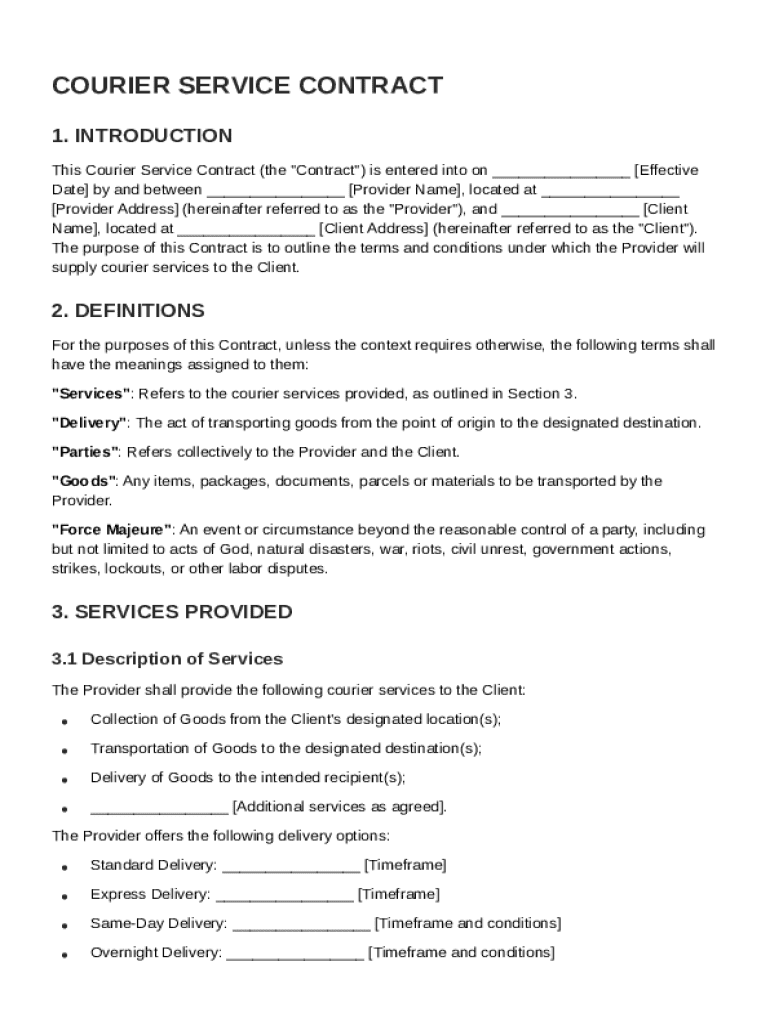
Courier Service Contract Form
Use a Courier Service Contract Template template to make your document workflow more streamlined.
What this courier contract form does
A Courier Service Contract Form is a business agreement that sets the terms for transporting packages or documents between a courier and a customer. It identifies the parties, describes pickup and delivery services, states rates and payment duties, and allocates responsibility for loss, damage, delay, claims, and prohibited items. The parties can upload the completed form to signNow, review automatically detected fields, assign signers, and collect electronic signatures. ESIGN and applicable state law may recognize the resulting record when intent, consent, attribution, and reproducible retention requirements are met.
Who uses this courier contract form
Courier businesses
Courier businesses use the form for service agreements that define pickup, delivery, payment, liability, and communication obligations. Operations managers, dispatch teams, and business customers can complete the agreement before recurring or one-time deliveries begin.
Business customers
Retailers, offices, law firms, and healthcare organizations can use the form to document delivery arrangements. The parties should tailor confidentiality, insurance, service-level, and handling terms to the actual shipment and applicable state law.
Business types using courier contracts
The form supports courier operations at different scales, from a single delivery provider to procurement-controlled enterprise transportation programs.
Solo courier operators can document pickup routes, delivery windows, rates, payment terms, and customer responsibilities without maintaining a paper contract process. Regional delivery companies can standardize agreements for dispatch teams while preserving customer-specific pricing, liability terms, and authorized signatures. Enterprise shippers can route courier contracts through procurement, legal, operations, and finance while retaining signed records and audit trails.
These tasks are executed by both individual contributors and centralized administrators depending on organizational policy and required controls.
Key features of a courier contract form
A well-structured Courier Service Contract Form connects delivery operations, commercial terms, liability allocation, and documented approval in one usable record.
Service scope
Capture pickup points, delivery destinations, service windows, package instructions, and proof-of-delivery expectations in one signed agreement.
Clear pricing
Record rates, recurring charges, fuel adjustments, accessorial fees, invoice timing, and payment responsibilities before deliveries begin.
Risk allocation
Assign courier and customer responsibilities for loss, damage, delay, prohibited items, and claims notices using negotiated terms.
Reusable workflow
Send the same approved agreement to designated parties and preserve completed versions for recurring courier relationships.
Audit trail
Use signNow audit trails to retain signing events, timestamps, signer actions, and the completed contract together.
Mobile signing
Complete agreements from desktop or mobile workflows when dispatchers, drivers, or customers are away from the office.
How this courier contract workflow works
The signNow workflow converts a completed courier agreement into an assigned, trackable signing process without changing its negotiated service terms.
Upload form: Upload the completed Courier Service Contract Form Check fields: Review detected fields and add missing ones Send contract: Assign parties, send, and collect signatures Archive record: Store the signed PDF with its audit trail
 Best ROI. Our customers achieve an average 7x ROI within the first six months.
 Scales with your use cases. From SMBs to mid-market, airSlate SignNow delivers results for businesses of all sizes.
 Intuitive UI and API. Sign and send documents from your apps in minutes.
Steps to complete the courier contract
Use this sequence to prepare the Courier Service Contract Form, route it to the correct parties, and retain the completed agreement.
Upload form:
Upload the Courier Service Contract Form to signNow. Check fields:
Review detected fields and correct assignments. Add signers:
Add courier and customer signer details. Complete contract:
Send, sign, and download the completed record.
What the courier contract audit trail records
After signing, the audit trail connects signer activity and document history to the executed Courier Service Contract Form for later review.
Authenticate signer:
Capture timestamp:
Log actions:
Seal document:
Store evidence:
Export trail:
Recommended courier contract setup
Set up the courier agreement around identifiable signers, reproducible records, controlled access, and protection for shipment information.
| Setting | Recommendation |
|---|---|
| Authentication method | Email verification with SMS authentication |
| Signature type | Electronic signature with signer intent |
| Audit trail | Enable completion certificate and action history |
| Document retention | Retain signed PDF and audit trail together |
| Encryption | Use TLS 1.2/1.3 and AES-256 protection |
Best practices for courier contracts
Clear service terms reduce delivery disputes and help each party understand its operational, payment, and record-keeping responsibilities.
Name every contracting party clearly
Define delivery duties and pricing
Set liability and claims terms
Preserve the executed record securely
Privacy pitfalls in courier agreements
Package addresses, recipient names, phone numbers, and delivery instructions can expose personal data when copied into unnecessary contract fields or shared with unauthorized recipients. A consumer signer may not receive the ESIGN paper-record disclosure or access explanation required before consenting to electronic delivery of the agreement. Unassigned required fields can leave rates, liability terms, or signatures incomplete while the document appears ready for operational use. Shared administrator credentials or unrestricted templates can expose shipment details and allow unauthorized changes to recurring courier agreements.



Mobile options for courier agreements
signNow provides iOS and Android apps for reviewing and signing Courier Service Contract Forms. Mobile workflows can support offline signing, and camera-based capture can digitize paper delivery agreements before fields are checked and assigned.
Mobile apps iOS and Android apps Offline mode Offline signing available Camera capture Camera-based document capture
Teams should confirm device management, connectivity, and local retention procedures before using mobile workflows for shipment information. Regulated healthcare deliveries may require a HIPAA-compliant configuration and a business associate agreement when protected health information is involved.
Legal standing of courier agreements
A Courier Service Contract Form can provide evidence of the parties’ agreed delivery terms when the record identifies the parties, shows intent and consent, and remains reproducible. ESIGN, 15 U.S.C. ch. 96, and applicable state law support electronic records for covered business transactions, but exclude wills, family law decrees, court orders, and other listed documents.

Processing stages for courier contracts
The form has no universal federal signing deadline; completion depends on the parties’ service-start date and agreed contract terms.
Prepare contract
Send to signers
Collect signatures
Archive completion
Courier contract troubleshooting questions
These answers address field detection, signer access, plan capabilities, electronic-consent requirements, and document types excluded from electronic-signature laws.
Upload the original Courier Service Contract Form again, then review signNow’s automatically detected fields. If a field is missing, add it manually and assign it to the correct signer before sending. Business plans include templates and audit trails for repeat agreements.
Confirm that every signer has the correct email address and that required fields are assigned. A signNow signing link can provide an alternate route, while SMS authentication may be added when the selected plan and workflow support it.
A typed, drawn, or click-to-sign signature can qualify as an electronic signature when intent, consent, attribution, and record retention requirements are satisfied. ESIGN and applicable state law govern; signNow’s audit trail documents the signing event.
Business is listed at $8 per user per month with annual billing and includes legally binding eSignatures, templates, and audit trails. Business Premium is listed at $15 and adds bulk send; Enterprise is listed at $30 and adds advanced signer authentication.
For a consumer-facing courier arrangement, provide the ESIGN consumer disclosure, demonstrate electronic access, and explain how consent can be withdrawn under 15 U.S.C. §7001(c). Store a reproducible copy of the disclosure and executed agreement with the audit trail.
Do not use this workflow for wills, codicils, testamentary trusts, family law decrees, or court orders excluded by ESIGN. Those documents may require separate state procedures, witnesses, notarization, or in-person filing.
Key performance indicators that demonstrate SignNow's proven track record.
BE READY TO GET MORE
Get this form now!

If you believe that this page should be taken down, please follow our DMCA take-down process.