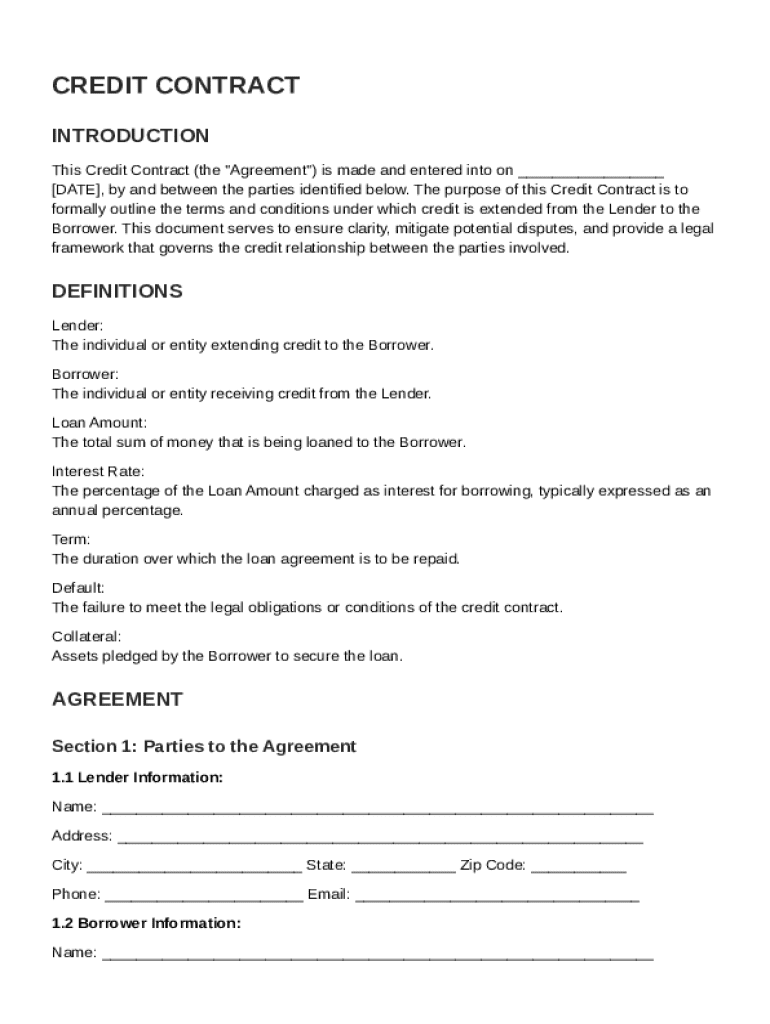
Credit Contract Form
Use a Credit Contract Template template to make your document workflow more streamlined.
Credit Contract Form overview
A Credit Contract Form records the parties, financial terms, repayment obligations, and signatures for a credit arrangement. In practice, the document is uploaded to signNow, its fillable fields are reviewed or added, and the prepared version is sent to the designated parties. Each signer reviews the contract and applies an electronic signature, while signNow preserves the completed document and audit trail. The ESIGN Act, 15 U.S.C. ch. 96, and applicable UETA or New York ESRA rules may support electronic execution when intent, consent, attribution, and reliable record retention are established.
Who uses the Credit Contract Form
Lenders and borrowers
Lenders and borrowers use the Credit Contract Form to record negotiated credit terms, obligations, and signatures in one document workflow.
Finance and legal teams
Finance and legal teams review, send, and archive completed credit contracts with signer evidence and controlled access.
How the Credit Contract Form works
signNow turns the supplied Credit Contract Form into a guided signing workflow that preserves the document and its completion evidence.
Upload document: Upload the Credit Contract Form to signNow. Prepare fields: Review detected fields and add missing signature or date fields. Send for signing: Send the assigned version to each contract party. Archive evidence: Store the signed contract with its audit trail.
What the audit trail records
The Credit Contract Form audit trail documents the technical sequence from signer authentication through completion and evidence export.
Authenticate signer:
Capture timestamp:
Track document:
Seal completion:
Link actions:
Export evidence:
 Best ROI. Our customers achieve an average 7x ROI within the first six months.
 Scales with your use cases. From SMBs to mid-market, airSlate SignNow delivers results for businesses of all sizes.
 Intuitive UI and API. Sign and send documents from your apps in minutes.
Recommended contract workflow setup
Use a controlled signing workflow that identifies each party, preserves the completed Credit Contract Form, and supports later review.
| Setting | Recommendation |
|---|---|
| Authentication method | Email invitation with SMS OTP |
| Signature type | Standard electronic signature |
| Audit trail | Export certificate of completion |
| Document retention | Follow contract and state policy |
| Encryption | TLS 1.2/1.3 and AES-256 |
Platform requirements for signing
Complete the Credit Contract Form in Chrome, Firefox, Edge, or Safari over a secure TLS connection. signNow also provides mobile apps for iOS and Android, allowing parties to review and sign from supported mobile operating systems.
Browsers Chrome, Firefox, Edge, Safari Desktop systems Windows 10+, macOS 12+ Mobile systems iOS 15+, Android 10+
Organizations should manage supported Windows, macOS, iOS, and Android devices through their own security policies. Confirm browser updates, camera permissions for document capture, network access, and mobile-app controls before sending a Credit Contract Form containing financial or personally identifiable information.
Businesses that use credit contracts
Credit Contract Form workflows fit organizations that need documented financial terms, identifiable signers, and a retrievable electronic record.
Independent lenders and small-business owners use Credit Contract Form to document borrower terms, repayment obligations, and approvals without coordinating repeated in-person meetings. Financial-services teams use reusable signNow templates, role-based access, and audit trails to route credit contracts through review, signature, and controlled record storage. Enterprise legal and procurement departments use delegated sending and shared templates to standardize credit-contract execution across business units while preserving signer-specific evidence.
These tasks are executed by both individual contributors and centralized administrators depending on organizational policy and required controls.
Credit Contract Form processing stages
A controlled sequence helps prevent missing fields, misdirected invitations, and incomplete records when executing the Credit Contract Form.
Document preparation
Signer delivery
Signer turnaround
Completion and archival
Legal standing for business use
A Credit Contract Form may be admissible when the parties show intent to sign, consent to electronic records, signer attribution, and reliable retention under the ESIGN Act, 15 U.S.C. ch. 96, and applicable UETA or New York ESRA rules. Wills, codicils, testamentary trusts, court orders, and specified family-law documents remain excluded.

Risks requiring legal review
Evidence gap
Attribution dispute
Scope exclusion
Consent defect
Best practices for credit contracts
Accurate fields, approved templates, controlled access, and complete signing evidence make Credit Contract Form workflows easier to review and administer.
Verify contract parties and terms
Approve the template before reuse
Retain the signed evidence
Control access to financial records
Credit Contract Form troubleshooting
Resolve contract-field, signer-access, authentication, disclosure, and retention questions before sending the Credit Contract Form for signature.
Upload the original Credit Contract Form as a PDF, then use signNow’s field tools to place signature, date, initials, and required text fields. If auto-detection misses a field, add it manually before sending. The Business plan includes templates and audit trails for repeat contract workflows.
signNow’s Business plan is listed at $8 per user per month with annual billing and includes legally binding eSignatures, templates, audit trails, and mobile apps. Business Premium is $15 per user per month annually and adds bulk send and kiosk mode.
A Credit Contract Form can use signNow’s audit trail to record signer actions, timestamps, and document history. For stronger identity evidence, configure available authentication controls and document the parties’ consent to electronic records under ESIGN and applicable state law.
Consumer-facing credit records may require the ESIGN consumer disclosure under 15 U.S.C. §7001(c), including paper-record rights, electronic-access capability, and withdrawal procedures. Obtain legal review before sending a consumer transaction through an electronic workflow.
If a signer cannot open the invitation, verify the recipient email address, resend the invite, or provide a controlled signing link. signNow supports shareable signing links, while SMS or stronger authentication may be configured when the workflow requires it.
signNow encrypts data in transit with TLS 1.2/1.3 and at rest with AES-256. Its product compliance materials identify SOC 2 Type II certification, ISO 27001 certification, and ESIGN/UETA compliance; assess contract-specific and state requirements separately.
Key performance indicators that demonstrate SignNow's proven track record.
BE READY TO GET MORE
Get this form now!

If you believe that this page should be taken down, please follow our DMCA take-down process.