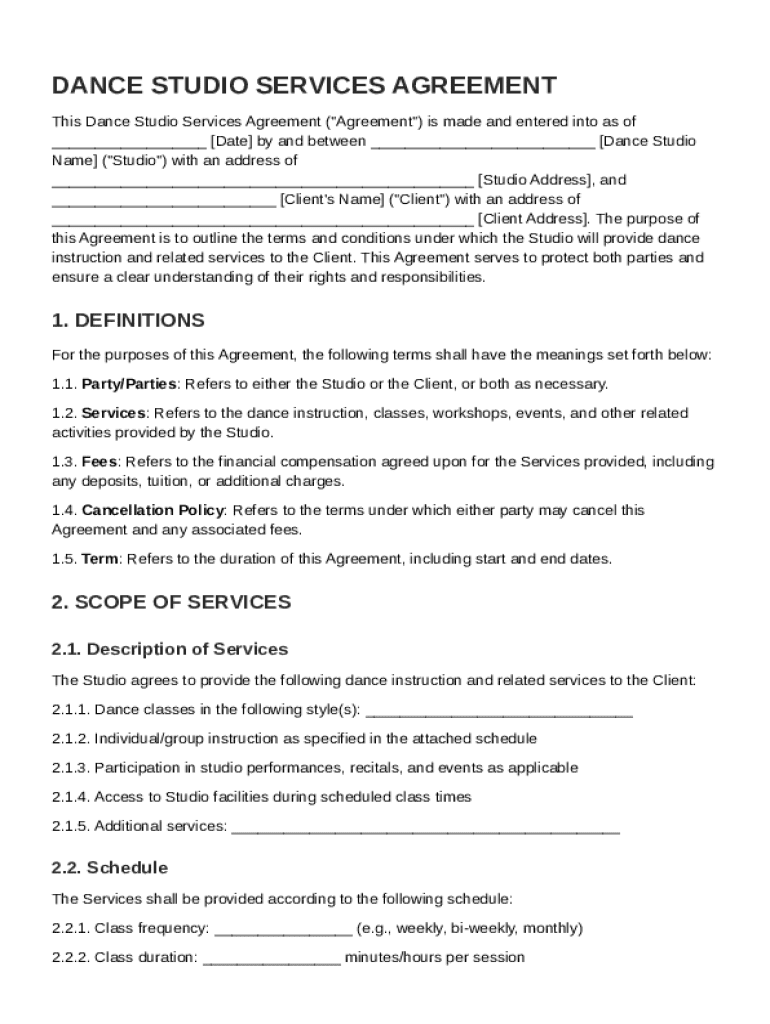
Dance Studio Contract Form
Use a Dance Studio Contract Template template to make your document workflow more streamlined.
What the Dance Studio Contract Form does
The Dance Studio Contract Form records the agreement between a studio and a student, parent, instructor, or contractor before dance services begin. It can identify the parties, class or service details, tuition, payment terms, schedule, cancellation rules, studio policies, safety acknowledgments, waivers, emergency contacts, and required permissions. With signNow, a studio uploads the document, auto-detects fillable fields, assigns signature and date fields, sends it to the appropriate participants, and stores the completed PDF with an audit trail. The contract remains subject to applicable state contract, consumer, privacy, and family-law requirements.
Features for dance studio contracts
Dance studios can prepare, route, sign, and retain enrollment agreements with fields and evidence matched to each student, family, instructor, or contractor.
Field placement
Upload an existing Dance Studio Contract Form and place fields for student or parent names, class details, fees, waivers, and signatures without rebuilding the document manually.
Signer routing
Send each contract to parents, adult students, instructors, or contractors in a defined signing order, keeping every required approval tied to the correct agreement.
Mobile signing
Collect signatures from a phone, tablet, or computer when families cannot visit the studio, reducing paper handling for enrollment and recurring class agreements.
Audit trail
Capture timestamps, signer actions, and completion history in an audit trail that helps the studio demonstrate how a contract was executed and finalized.
Reusable templates
Reuse an approved contract template for new classes while updating dates, tuition, schedules, and emergency information for each enrollment cycle.
Centralized records
Keep completed contracts and their signing evidence together so administrators can retrieve an individual student agreement without searching through paper folders or email threads.
Business types using dance contracts
Dance Studio Contract Form workflows vary with enrollment volume, staffing structure, and the number of locations maintaining student agreements.
Solo dance instructors can collect signed lesson agreements, cancellation terms, and payment acknowledgments without arranging separate studio visits or maintaining paper folders for each student. Independent dance studios can reuse enrollment templates, route contracts to parents and adult students, and preserve audit trails while managing class schedules, waivers, and tuition terms. Multi-location dance organizations can standardize contract templates, delegate sending, and control access across administrators while keeping completed agreements available for enrollment and compliance reviews.
These tasks are executed by both individual contributors and centralized administrators depending on organizational policy and required controls.
How this contract workflow works
A studio can move from an existing contract file to signed, retrievable enrollment records in four controlled stages.
Upload: Upload the Dance Studio Contract Form to signNow. Prepare: Auto-detect fields and add missing signature details. Route: Send the agreement to each required signer. Retain: Store the completed PDF with its audit trail.
 Best ROI. Our customers achieve an average 7x ROI within the first six months.
 Scales with your use cases. From SMBs to mid-market, airSlate SignNow delivers results for businesses of all sizes.
 Intuitive UI and API. Sign and send documents from your apps in minutes.
How the signNow audit trail works
The audit trail records execution evidence around each Dance Studio Contract Form, from signer access through completion and export.
Signer authentication:
Timestamp capture:
Document identity:
Tamper evidence:
Action attribution:
Audit retrieval:
Recommended contract workflow setup
Configure the Dance Studio Contract Form around signer identity, execution evidence, controlled access, and retention appropriate to studio operations.
| Setting | Recommendation |
|---|---|
| Authentication method | Email verification with SMS OTP |
| Signature type | Typed or drawn electronic signature |
| Audit trail | Export completion history with signed PDF |
| Document retention | At least three years unless law requires longer |
| Encryption | TLS 1.2/1.3 and AES-256 protection |
Security for contract records
Transport encryption:
Stored data:
Security reporting:
Security management:
Electronic signatures:
Protected health data:
Retention practices for dance contracts
Keep executed dance studio contracts organized, reproducible, and protected throughout their business and legal life.
Set a documented retention period
Export the audit trail
Archive records securely
Preserve contract context
Privacy and disclosure pitfalls
Including student health information or emergency details in every copy can expose personal data to staff who do not need access. A parent may sign without reviewing the electronic-record disclosure or without demonstrating access to the contract format. Shared studio accounts can make it difficult to attribute a signature request, template change, or contract download to one administrator. Sending an outdated tuition schedule or waiver version can create conflicts between enrollment records and the agreement actually signed.
Legal standing of signed contracts
A Dance Studio Contract Form can be admissible when the parties show intent, consent to electronic records, signer attribution, and reliable retention under the federal ESIGN Act, 15 U.S.C. chapter 96, and applicable state UETA law. Wills, codicils, testamentary trusts, court orders, and family-law decrees remain excluded.

Pricing and plan comparison
For a dance studio, plan selection depends on enrollment volume, bulk sending, signer authentication, retention controls, and whether contracts contain regulated information.
| Features | signNow | DocuSign | Adobe Sign | PandaDoc | Dropbox Sign |
|---|---|---|---|---|---|
| Starting price | $8/user/month annually | Not verified | Not verified | Not verified | Not verified |
| Free trial | 7 days, no card required | Not verified | Not verified | Not verified | Not verified |
| Bulk send | Business Premium includes bulk send | Not verified | Not verified | Not verified | Not verified |
| Audit trail | Included with Business plan | Not verified | Not verified | Not verified | Not verified |
| HIPAA compliance | Available with BAA requirement | Not verified | Not verified | Not verified | Not verified |
| Annual signature invites | 100 per user annually | Not verified | Not verified | Not verified | Not verified |
Dance studio contract troubleshooting
Resolve field, signer, disclosure, plan, and record-protection questions before treating a Dance Studio Contract Form as fully executed.
Upload the original Dance Studio Contract Form again, then review signNow’s detected fields. Add or reposition name, date, initials, and signature fields when auto-detection misses a waiver or payment section.
Use signNow’s routing controls to assign the parent, adult student, instructor, or contractor as the correct signer. A signing order prevents the studio from treating an incomplete agreement as final.
Business includes legally binding eSignatures, templates, audit trails, and mobile apps. Business Premium adds bulk send and kiosk mode, which may help when enrolling many students at a studio event.
For consumer-facing electronic records, provide the ESIGN disclosure required by 15 U.S.C. §7001(c), confirm the signer can access the format, and explain how electronic consent may be withdrawn.
Use role-based access and export the signed PDF with its audit trail. signNow reports SOC 2 Type II certification, ISO 27001 certification, and ESIGN and UETA compliance.
A contract involving protected health information requires a HIPAA-compliant workflow and a business associate agreement. Do not assume a dance enrollment form is subject to HIPAA without an applicable covered-entity relationship.
Key performance indicators that demonstrate SignNow's proven track record.
BE READY TO GET MORE
Get this form now!

If you believe that this page should be taken down, please follow our DMCA take-down process.