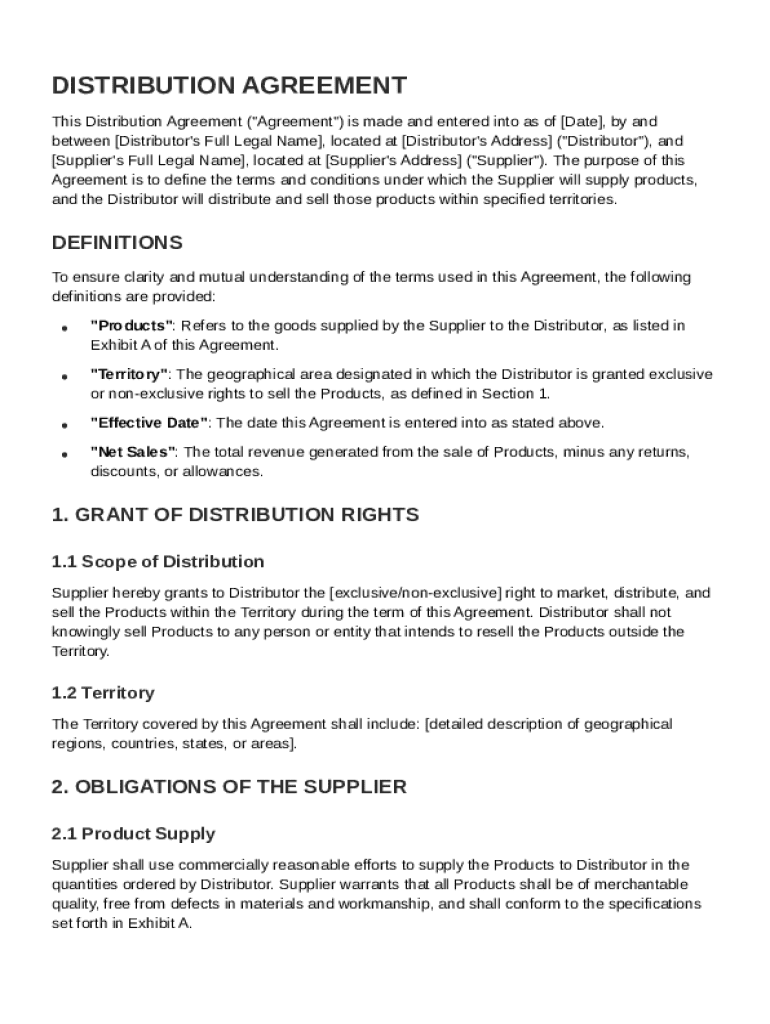
Distribution Contract Form
Use a Distribution Contract Template template to make your document workflow more streamlined.
What is a Distribution Contract Form?
A Distribution Contract Form records the terms under which a manufacturer or supplier authorizes a distributor to market, sell, or deliver products. It identifies the parties, territory, products, pricing or payment terms, responsibilities, restrictions, effective dates, and required signatures. With signNow, upload the agreement, review detected fields, assign fields to the manufacturer and distributor, send invitations, and preserve the signed PDF with its audit trail. ESIGN and applicable state law can support the electronic record when intent, consent, attribution, and retention requirements are met.
Who uses this contract form
Manufacturers
Manufacturers and wholesalers use the Distribution Contract Form to define territories, product responsibilities, pricing terms, delivery obligations, and authorized signatures before appointing a distributor.
Distributors
Distributors and sales organizations use the agreement to document acceptance of commercial terms, approval responsibilities, payment conditions, and restrictions on representing supplied products.
Features for distribution agreements
A Distribution Contract Form workflow should make commercial terms clear, collect every required signature, and preserve evidence of completion for the parties.
Field placement
Upload the Distribution Contract Form and place text, date, initials, and signature fields where each distributor must complete the agreement.
Signing order
Send the contract to distributors in a defined signing order, reducing missed approvals and clarifying each party’s responsibility.
Reusable templates
Use reusable templates for recurring distributor agreements while keeping each transaction’s parties and commercial terms separate.
Audit trail
Capture timestamps, signer activity, and document history alongside the completed Distribution Contract Form for later review.
Mobile signing
Let distributors review and sign from supported mobile apps or desktop browsers without requiring an in-person exchange.
Integrations
Connect completed agreements to systems such as Salesforce, NetSuite, Google Drive, or Box for organized records.
How the contract workflow works
A Distribution Contract Form moves from document preparation to assigned signatures, completed agreement, and preserved transaction evidence.
Upload contract: Upload the Distribution Contract Form and let signNow detect fillable fields. Assign fields: Review distributor details, add missing fields, and assign each signer. Send agreement: Send the agreement through email invitations or a controlled signing link. Store record: Store the completed contract with its audit trail and signing evidence.
 Best ROI. Our customers achieve an average 7x ROI within the first six months.
 Scales with your use cases. From SMBs to mid-market, airSlate SignNow delivers results for businesses of all sizes.
 Intuitive UI and API. Sign and send documents from your apps in minutes.
How signNow records contract activity
The audit trail connects each Distribution Contract Form signature to an identity, time, action, and preserved document record.
Authenticate signer:
Capture timestamp:
Hash document:
Seal record:
Log activity:
Export history:
Teams managing distribution agreements
Manufacturers, distributors, and enterprise sales teams can assign responsibilities while administrators govern templates, access, and completed Distribution Contract Form records.
A regional manufacturer can reuse an approved Distribution Contract Form template, assign territory and payment fields, and route the agreement to a distributor while retaining centralized oversight of completed records. A wholesale distributor can use delegated sending to issue approved agreements to multiple suppliers, while administrators control templates, user access, and the signing evidence attached to each transaction. An enterprise sales operation can connect contract workflows with CRM or ERP records, use role-based administration, and preserve audit trails for agreements handled across departments and regions.
These tasks are executed by both individual contributors and centralized administrators depending on organizational policy and required controls.
Security for signed contracts
Data at rest:
Data in transit:
Security reporting:
Information security:
U.S. eSignatures:
Privacy controls:
Platform requirements for signing
Complete a Distribution Contract Form through signNow in Chrome, Firefox, Safari, or Edge on Windows or macOS. Signers can also use signNow mobile apps on iOS or Android, with an internet connection for document delivery and audit-trail updates.
Browsers Chrome, Firefox, Safari, and Edge Desktop systems Windows and macOS desktop access Mobile apps iOS and Android mobile apps
Organizations should manage supported browsers, mobile permissions, and document access through their device policies. Enterprise deployments may also evaluate SSO, API access, signer authentication, and storage controls before routing Distribution Contract Form records into Salesforce, NetSuite, Google Drive, Box, or another approved system.
Legal standing of distribution contracts
A Distribution Contract Form can provide evidence of agreed commercial terms when the parties show intent, consent to electronic records, signer attribution, and reliable retention. ESIGN, 15 U.S.C. ch. 96, and applicable state electronic-transactions law support electronic records, but wills, court orders, family-law decrees, and other statutory exceptions remain outside that framework.

State rules and exclusions
May require acknowledgment
Excluded from ESIGN
Statutory exception applies
State recording rules apply
Key performance indicators that demonstrate SignNow's proven track record.
Distribution contract troubleshooting
Resolve field, signer, plan, authentication, enforceability, and record-retention questions before distributing the completed agreement.
Upload the original Distribution Contract Form again and confirm that the PDF opens without a password. signNow can then detect available fields or let you place fields manually before sending the agreement.
Open the recipient settings and confirm each distributor’s email address, signing order, and required fields. A corrected invite can be sent without changing the underlying Distribution Contract Form.
Business includes legally binding eSignatures, templates, audit trails, and mobile apps at $8 per user per month with annual billing. Bulk send is listed for Business Premium at $15 per user per month.
Enable stronger signer authentication when the distribution relationship requires it. Enterprise adds advanced signer authentication, while the Site License offers authentication-related add-ons and enterprise controls.
For U.S. business agreements, ESIGN and applicable state law support electronic signatures when intent, consent, attribution, and record retention are established. Review any industry or state-specific signing requirement before use.
Export the completed PDF and audit trail from the authorized signNow workspace, then apply the retention policy for the agreement’s business and regulatory context. No single federal period applies to every distribution contract.
BE READY TO GET MORE
Get this form now!

If you believe that this page should be taken down, please follow our DMCA take-down process.