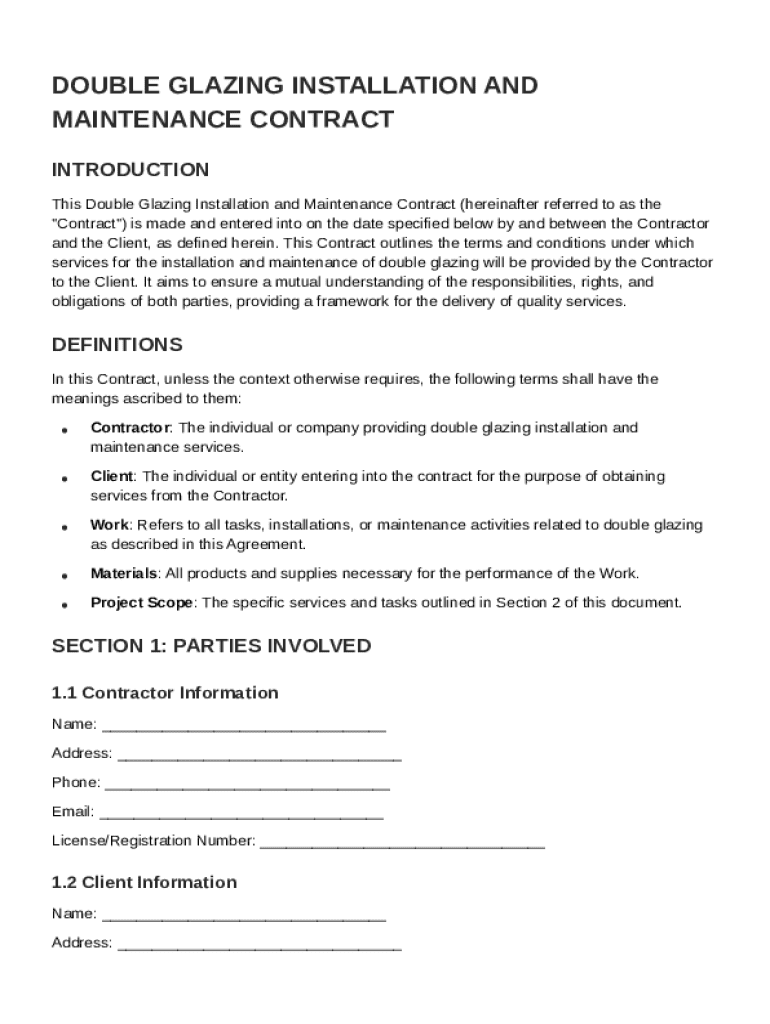
Double Glaz Contract Form
Use a Double Glaz Contract Template template to make your document workflow more streamlined.
What the Double Glaz Contract Form does
The Double Glaz Contract Form is a business agreement used to record negotiated terms, responsibilities, approvals, and signatures between identified parties. The available form name does not identify a government agency, tax filing, statutory deadline, or required field set, so users should review the underlying contract before signing. With signNow, a sender uploads the form, places or confirms fillable fields, assigns each signer, and sends it electronically. Signers review the stated obligations, provide required information, and sign; signNow then preserves the completed document and related audit trail for business records.
Who can use this contract form
Business agreements
Contract administrators, operations teams, and small businesses can use the Double Glaz Contract Form to collect agreed terms, signatures, dates, and approvals from identified parties. Because the form name does not identify a regulated filing, the responsible organization must define the contract’s audience, approval rules, and governing law.
Industry workflows
Legal, real estate, construction, and service organizations can route the form to customers, vendors, owners, or internal approvers. signNow can preserve the signed copy and audit trail, but users must separately confirm whether the underlying transaction requires witnesses, notarization, or special state-law execution.
How the form moves from draft to signature
The workflow keeps contract preparation, signing, and record preservation in separate steps.
Upload form: Upload the Double Glaz Contract Form Check fields: Confirm names, dates, terms, and signature fields Send document: Send the assigned version to each signer Preserve record: Store the completed agreement and audit trail
Complete the form in signNow
Prepare the approved Double Glaz Contract Form, route it to authorized parties, and preserve the executed record after completion.
Upload form:
Upload the approved contract file. Prepare fields:
Review detected fields and add missing signature fields. Assign signers:
Assign each field to the correct signer. Send contract:
Send the prepared form through signNow. Store records:
Review the signed copy and audit trail.
 Best ROI. Our customers achieve an average 7x ROI within the first six months.
 Scales with your use cases. From SMBs to mid-market, airSlate SignNow delivers results for businesses of all sizes.
 Intuitive UI and API. Sign and send documents from your apps in minutes.
Choose a signing method for the form
- Use the web app when the sender needs to upload the approved Double Glaz Contract Form, place fields, assign signers, and monitor completion from a desktop workflow.
- Use the mobile app when a signer must review and complete the assigned Double Glaz Contract Form from an iOS or Android device.
- Use kiosk mode for supervised, in-person completion when the organization controls the signing device and follows its identity and privacy procedures.
- Use a shareable signing link when the same approved form must reach signers through a controlled distribution process without manually entering each invitation.
Recommended workflow setup
Configure the Double Glaz Contract Form around signer identity, field integrity, audit evidence, and the retention rule governing the transaction.
| Setting | Recommendation |
|---|---|
| Authentication method | Email link with SMS OTP |
| Signature type | Typed or drawn electronic signature |
| Audit trail | Enable completion certificate and action log |
| Document retention | Follow the contract policy and state law |
| Encryption | TLS 1.2/1.3 and AES-256 at rest |
Features that support contract completion
signNow connects document preparation, signer routing, electronic execution, and record preservation for the Double Glaz Contract Form.
Document upload
Upload the approved Double Glaz Contract Form and prepare it for completion without recreating the agreement in a separate editor.
Fillable fields
Place signature, initials, date, and text fields so each participant completes the part assigned to them.
Signer routing
Route the contract to multiple signers in the required sequence when business approval depends on role order.
Audit trail
Capture timestamps, signer actions, and completion evidence alongside the executed Double Glaz Contract Form.
Mobile signing
Let signers review and complete assigned fields through signNow web and mobile experiences.
System integrations
Connect completed agreements to repositories or business systems such as Google Drive, Box, Salesforce, or NetSuite.
Signer authentication and signature evidence
Signer authentication:
Two-factor authentication:
Identity verification:
PKI signatures:
X.509 certificates:
Action evidence:
Platform requirements for completing the form
Open the Double Glaz Contract Form in signNow through Chrome, Firefox, Safari, or Edge on Windows or macOS. signNow also provides mobile apps for iOS and Android, allowing signers to review and complete assigned fields from supported phones or tablets.
Web browsers Chrome, Firefox, Safari, and Edge on Windows or macOS. Mobile apps signNow mobile apps for iOS and Android. Document capture Camera capture supports scanning source pages.
Use managed devices when the agreement contains confidential business information. Administrators should confirm account access, signer identity, and any organization-specific retention policy before deployment. Mobile signing can support field completion, but it does not determine whether the underlying contract requires notarization, witnesses, or another state-law formality.
Issues to check before signing
The form name does not identify its governing agency, so confirm the contract owner, applicable state law, and required clauses before sending. Missing effective dates, payment terms, renewal language, or signer authority can create ambiguity even when every signature field is completed. Sending the wrong version can undermine the parties’ understanding; lock the approved document before assigning signature fields. A completed signature does not replace required notarization or separate formalities when the underlying transaction or state law requires them.
State-law limits to check
Notarization required
Wills excluded
Family law excluded
Deed formalities
Troubleshooting the Double Glaz Contract Form
Resolve document, signer, evidence, and legal-formality questions before treating the completed Double Glaz Contract Form as final.
The form name does not identify a standard government template or filing agency. Confirm the source document, parties, governing law, and required clauses before using signNow.
Upload the approved document again, then inspect field placement and signer assignments. signNow supports templates and fillable fields, but the sender remains responsible for confirming every contractual term.
Use signNow’s routing controls to send the Double Glaz Contract Form to the intended parties. If order matters, assign sequential roles and verify each email address before sending.
Business plans include audit trails, while Business is listed at $8 per user monthly with annual billing. The audit trail records signing activity; it does not determine contract validity under state law.
Electronic signatures generally receive legal recognition under ESIGN, 15 U.S.C. ch. 96, and applicable state law such as UETA. Exceptions and transaction-specific formalities still apply, including notarization where required.
For consumer-facing records, obtain electronic consent and provide the disclosures required by 15 U.S.C. §7001(c). Store the completed contract and audit evidence so the record can be accurately reproduced.
Key performance indicators that demonstrate SignNow's proven track record.
BE READY TO GET MORE
Get this form now!

If you believe that this page should be taken down, please follow our DMCA take-down process.