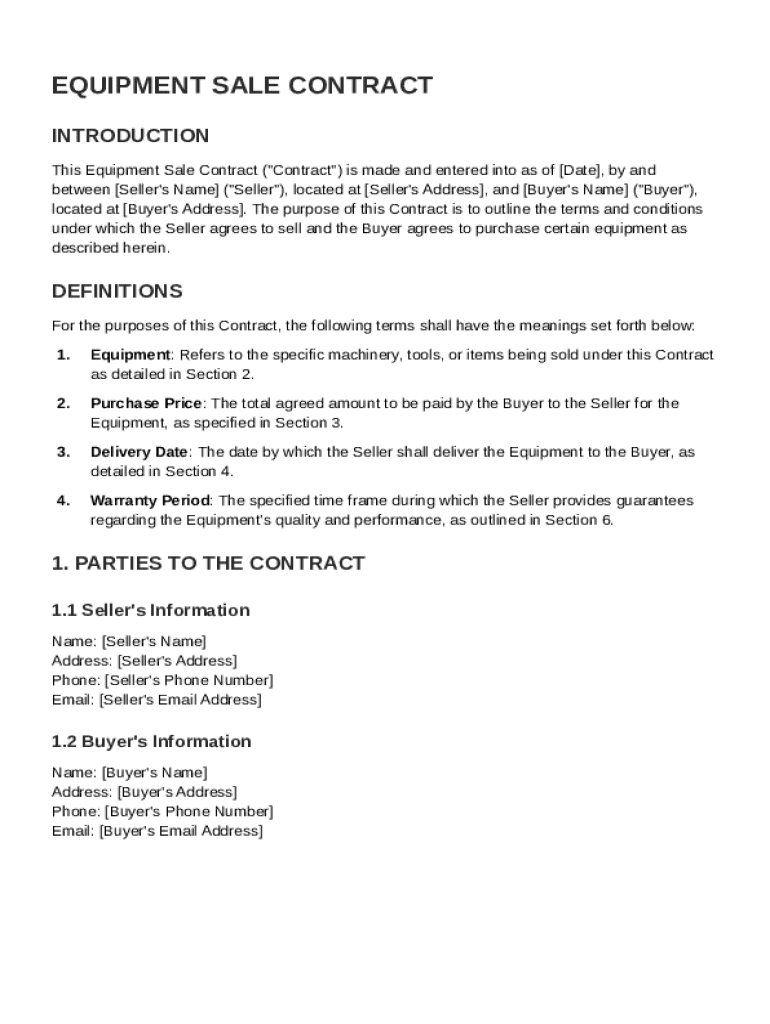
Equipment Sale Contract Form
Use a Equipment Sale Contract Template template to make your document workflow more streamlined.
What an Equipment Sale Contract Form covers
An Equipment Sale Contract Form is a written agreement that records the sale of identified machinery, vehicles, tools, or other business equipment from a seller to a buyer. It normally identifies the parties and asset, states price and payment terms, assigns delivery and risk responsibilities, and describes warranties, condition, inspection, and acceptance. The parties review the completed document, sign it, and retain the executed record. For U.S. transactions, electronic execution may be recognized under ESIGN and applicable state law, including UETA, when intent, consent, attribution, and record access requirements are met.
Why teams look for DocuSign alternatives
Organizations seek alternatives when they need different pricing models, stronger native automation, simpler bulk affidavit workflows, or more flexible identity-verification options than those available in a legacy envelope-based vendor.

Features that clarify equipment sale agreements
A structured Equipment Sale Contract Form brings asset details, payment obligations, delivery conditions, warranties, and execution evidence into one reviewable record.
Defined parties
Capture buyer and seller names, business addresses, equipment identifiers, purchase price, payment terms, delivery details, warranties, and signatures in one structured agreement for easier review before execution.
Asset details
Record the equipment description, serial number, condition, accessories, and included documentation so both parties can identify exactly what the sale covers and reduce disputes over the delivered asset.
Payment terms
State the purchase price, deposit, balance, taxes, payment method, and due dates clearly, giving accounting and operations teams a reliable reference for invoicing and collection.
Delivery terms
Specify delivery location, transfer date, inspection responsibilities, and risk of loss so the parties understand when possession and responsibility move from seller to buyer.
Warranty terms
Add warranty coverage, exclusions, maintenance obligations, and acceptance conditions directly to the contract, preserving the negotiated expectations that apply after the equipment changes hands.
Signed record
Upload the completed agreement, place signature and date fields, send it to each party, and retain the executed PDF with its audit trail for later reference.
Who uses this equipment sale form
Equipment sellers
Equipment sellers use the form to document asset identity, condition, price, delivery, warranties, and transfer obligations before releasing equipment.
Business buyers
Business buyers use it to confirm the exact asset, payment terms, inspection rights, acceptance conditions, and evidence of the seller’s commitments.
 Best ROI. Our customers achieve an average 7x ROI within the first six months.
 Scales with your use cases. From SMBs to mid-market, airSlate SignNow delivers results for businesses of all sizes.
 Intuitive UI and API. Sign and send documents from your apps in minutes.
Complete the equipment sale form
Use this sequence to prepare the asset details, route the agreement, collect signatures, and preserve evidence of execution in signNow.
Upload form:
Upload the Equipment Sale Contract Form to signNow. Check fields:
Review auto-detected fields and add missing details. Assign signers:
Assign buyer and seller signature fields. Send document:
Send the agreement for secure review and signing. Store record:
Store the signed PDF with its audit trail.
Recommended signing setup for equipment sales
Configure authentication, signature capture, audit evidence, retention, and encryption before sending an Equipment Sale Contract Form for execution.
| Configuration | Recommendation |
|---|---|
| Signer authentication | Email verification with SMS OTP |
| Signature type | Typed or drawn e-signature |
| Audit trail | Capture IP, timestamps, and actions |
| Document retention | Retain under written business policy |
| Encryption | TLS 1.2/1.3 and AES-256 encryption |
How the audit trail records execution
The audit trail preserves technical evidence around each Equipment Sale Contract Form signing event, from authentication through retrieval of the completed record.
Authenticate signer:
Timestamp actions:
Hash document:
Seal record:
Log activity:
Export evidence:



Security for equipment sale records
Data at rest:
Data in transit:
Security certification:
Information security:
Electronic signatures:
Health information:
Processing stages for an equipment sale
The contract moves from asset and payment preparation through signer delivery, execution, and controlled archival of the completed record.
Prepare the document
Deliver to signers
Complete signer review
Archive the record
Best practices for completing the contract
Accurate asset identification, separated payment terms, defined delivery duties, and controlled records make an Equipment Sale Contract Form easier to administer.
Describe the equipment precisely
State payment obligations separately
Define delivery and acceptance terms
Preserve execution and supporting records
Pricing and plan comparison
Compare verified signNow plan facts with unavailable competitor data before selecting a workflow for Equipment Sale Contract Form execution and record management.
| Features | signNow | DocuSign | Adobe Sign | PandaDoc | Dropbox Sign |
|---|---|---|---|---|---|
| Starting price | $8/user/mo annually | Not verified | Not verified | Not verified | Not verified |
| Free trial | 7 days, no card | Not verified | Not verified | Not verified | Not verified |
| Bulk send | Business Premium | Not verified | Not verified | Not verified | Not verified |
| Audit trail | Included in Business | Not verified | Not verified | Not verified | Not verified |
| HIPAA support | Available with BAA | Not verified | Not verified | Not verified | Not verified |
Equipment sale form troubleshooting
Resolve field, signing, compliance, and plan questions before sending an Equipment Sale Contract Form to the buyer or seller.
Upload the original Equipment Sale Contract Form again and confirm the file opens correctly before using signNow’s field detection. Add any missed fields manually, especially serial number, price, delivery, and signature fields.
Business includes legally binding eSignatures, templates, mobile apps, and audit trails at $8 per user monthly with annual billing. Business Premium adds bulk send at $15 per user monthly annually.
A signNow electronic signature can support ESIGN and UETA requirements when the signer demonstrates intent, consents to electronic records, can be identified, and the record remains accessible and reproducible. State contract law still applies.
Use a Business Associate Agreement when the transaction includes protected health information and the workflow is subject to HIPAA. HIPAA requires covered records to be retained for six years under 45 CFR 164.530(j).
If a buyer or seller cannot sign, verify the assigned email, resend the invitation, or use a shareable signing link. Confirm that the correct party receives the role-specific fields before sending again.
Business plans include 100 signature invites per user annually, with overage fees applying after the allowance. The Site License uses $1.50 per signature invite and is designed for 1,000 or more documents yearly.
Key performance indicators that demonstrate SignNow's proven track record.
BE READY TO GET MORE
Get this form now!

If you believe that this page should be taken down, please follow our DMCA take-down process.