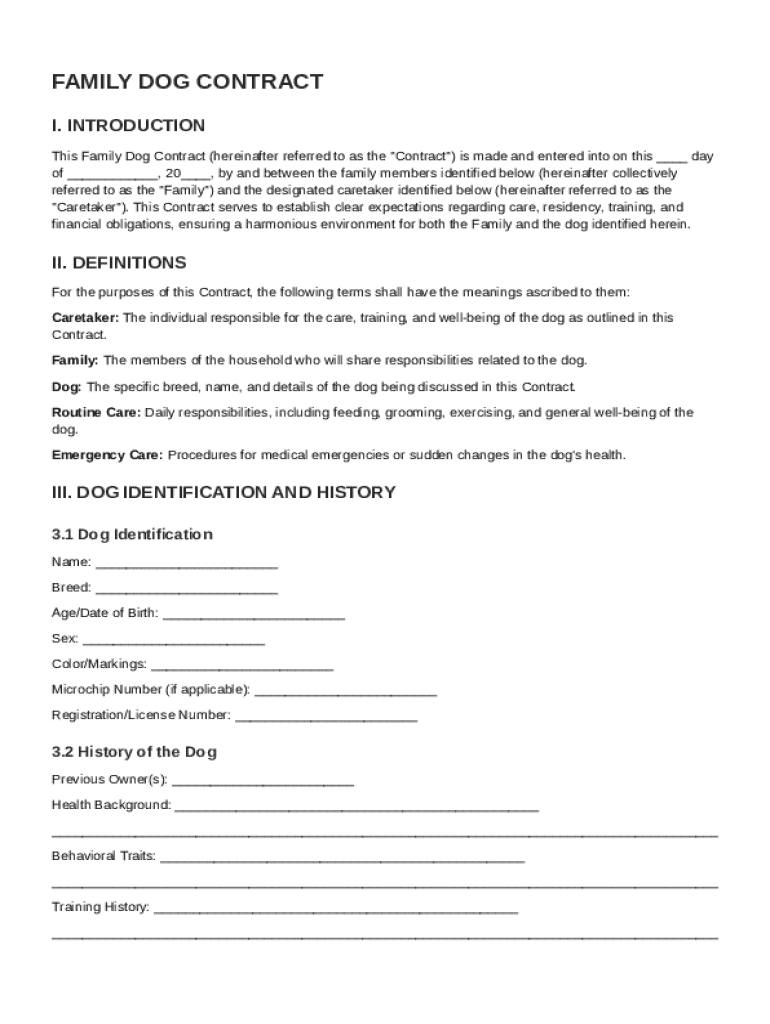
Family Dog Contract Form
Use a Family Dog Contract Template template to make your document workflow more streamlined.
What the family dog contract covers
Family Dog Contract Form is a written agreement that records the terms for placing or transferring a dog between parties. It can identify the dog and the parties, describe payment and ownership conditions, assign care and veterinary responsibilities, and document return or transfer requirements. A breeder, rescue organization, or adopter prepares the agreement, reviews its terms, and signs it with the other parties. With signNow, the document can be uploaded, fields reviewed, sent for signatures, and stored with an audit trail. State contract law may affect enforceability.
Who benefits from a family dog contract
Family Dog Contract Form helps people document ownership, care, payment, and return expectations before a dog changes households.
Independent dog breeders use the form to document ownership terms, care expectations, payment details, and transfer conditions with each adopting household. Rescue organizations use it to record adoption commitments, veterinary responsibilities, return conditions, and consent for follow-up communications. Pet-service enterprises use repeatable agreements to coordinate foster placements, boarding arrangements, training obligations, and customer approvals across multiple locations.
These tasks are executed by both individual contributors and centralized administrators depending on organizational policy and required controls.
How the family dog contract works
The signNow workflow turns a prepared Family Dog Contract Form into a trackable agreement through four document-specific steps.
Upload form: Upload the Family Dog Contract Form to signNow. Check fields: Review detected fields and add missing signature or date fields. Add signers: Enter the adopter, breeder, or organization signer details. Complete record: Send, collect signatures, and store the completed agreement.
Complete the Family Dog Contract Form
Follow these steps to prepare, send, sign, and retain the Family Dog Contract Form in signNow.
Upload document:
Upload the completed Family Dog Contract Form file. Review fields:
Review auto-detected fields and add missing fields. Assign signers:
Add each adopter, breeder, or organization signer. Send contract:
Send the agreement through email or a signing link. Store record:
Monitor signatures and download the completed record.
 Best ROI. Our customers achieve an average 7x ROI within the first six months.
 Scales with your use cases. From SMBs to mid-market, airSlate SignNow delivers results for businesses of all sizes.
 Intuitive UI and API. Sign and send documents from your apps in minutes.
Inside the Family Dog Contract audit trail
The audit trail separates signer identity, timestamps, document events, and retrieval evidence so the completed Family Dog Contract Form can be reviewed later.
Signer authentication:
Timestamp capture:
Document integrity:
Event history:
Completion record:
Audit export:
Key features for dog contract workflows
Family Dog Contract Form workflows combine structured information, controlled signing, and retrievable records for breeders, adopters, rescues, and pet-service organizations.
Structured fields
Reusable fields capture dog details, parties, payment terms, care duties, and transfer conditions consistently across agreements.
Signing order
Sequential signing routes the contract to the breeder, adopter, rescue organization, or other required parties in the intended order.
Audit trail
Audit trails record signing activity, timestamps, and document events to support later review of the completed agreement.
Reusable template
Templates reduce repeated preparation when an organization uses the same Family Dog Contract Form for multiple placements.
Mobile signing
Mobile apps let parties review and sign the agreement from supported mobile devices when an in-person meeting is impractical.
Document storage
Secure storage keeps the signed contract and completion record together for later access by authorized users.



Security for signed dog agreements
Data encryption:
Transport security:
Security reporting:
Information security:
Health data safeguards:
Electronic signatures:
Platform requirements for dog contracts
Use current Chrome, Firefox, Safari, or Edge on Windows or macOS to prepare the Family Dog Contract Form. signNow mobile apps support signing on iOS and Android devices through the signNow application.
Browsers Chrome, Firefox, Safari, and Edge Desktop systems Windows and macOS desktop access Mobile apps iOS and Android signNow apps
Organizations should confirm that managed devices permit document uploads, email or signing-link access, and secure storage. Teams using the Family Dog Contract Form should also restrict template editing, control signer permissions, and preserve the completed contract with its audit trail.
Privacy pitfalls in dog contract records
Including unnecessary personal or veterinary information exposes sensitive details to every recipient who receives the completed contract. Missing electronic-consent language can weaken evidence that a signer agreed to receive and sign the Family Dog Contract Form electronically. Leaving shared templates broadly accessible can let unauthorized users change adoption terms, payment details, or care obligations. Sending the contract to the wrong email address can disclose household information and collect a signature from an unintended person.
Legal value of a signed dog contract
A completed Family Dog Contract Form can document the parties’ intent, agreed care duties, payment terms, and transfer conditions. Under ESIGN, 15 U.S.C. ch. 96, and applicable state electronic-transactions law, an electronic signature may carry the same legal effect as a handwritten signature when consent, attribution, intent, and record retention are established. State law controls contract disputes and exceptions.

Pricing options for signing dog contracts
signNow pricing is verified for annual billing; competitor pricing and feature details are not verified in the supplied vendor data.
| Features | signNow | DocuSign | Adobe Sign | PandaDoc | Dropbox Sign |
|---|---|---|---|---|---|
| Business annual price | $8/user/month billed annually | Not verified | Not verified | Not verified | Not verified |
| Free trial availability | 7 days, no card required | Not verified | Not verified | Not verified | Not verified |
| Bulk send availability | Business Premium includes bulk send | Not verified | Not verified | Not verified | Not verified |
| Audit trail availability | Included with Business plan | Not verified | Not verified | Not verified | Not verified |
Key performance indicators that demonstrate SignNow's proven track record.
Family Dog Contract Form troubleshooting
Find direct answers about uploading, signing, plan selection, legal effect, authentication, and retaining the Family Dog Contract Form with signNow.
On the Business plan, upload the Family Dog Contract Form, review signNow’s detected fields, and add signature, date, or text fields manually where the document layout requires them. Save the edited template before sending it to the parties.
signNow Business includes audit trails and templates. If the workflow needs bulk send, Business Premium adds that feature. Confirm that the selected plan matches the number of Family Dog Contract Form recipients and documents your organization sends.
Use signNow’s signer authentication options, including SMS-based verification where configured, and confirm the signer’s email address before sending. Authentication supports attribution, but the contract’s legal effect still depends on consent, intent, and applicable state law.
Electronic signing may be supported under ESIGN and applicable state law when intent, consent, attribution, and record retention are established. Do not use the electronic workflow for provisions requiring notarization or documents excluded by applicable law.
Business pricing is $8 per user per month when billed annually, with a 7-day free trial and no credit card required. Month-to-month pricing is higher. Review the current plan terms before selecting a subscription.
Use signNow’s audit trail and secure document storage to retain the completed Family Dog Contract Form and signing history. Choose a retention period based on the agreement’s purpose and applicable state contract or records requirements.
BE READY TO GET MORE
Get this form now!

If you believe that this page should be taken down, please follow our DMCA take-down process.