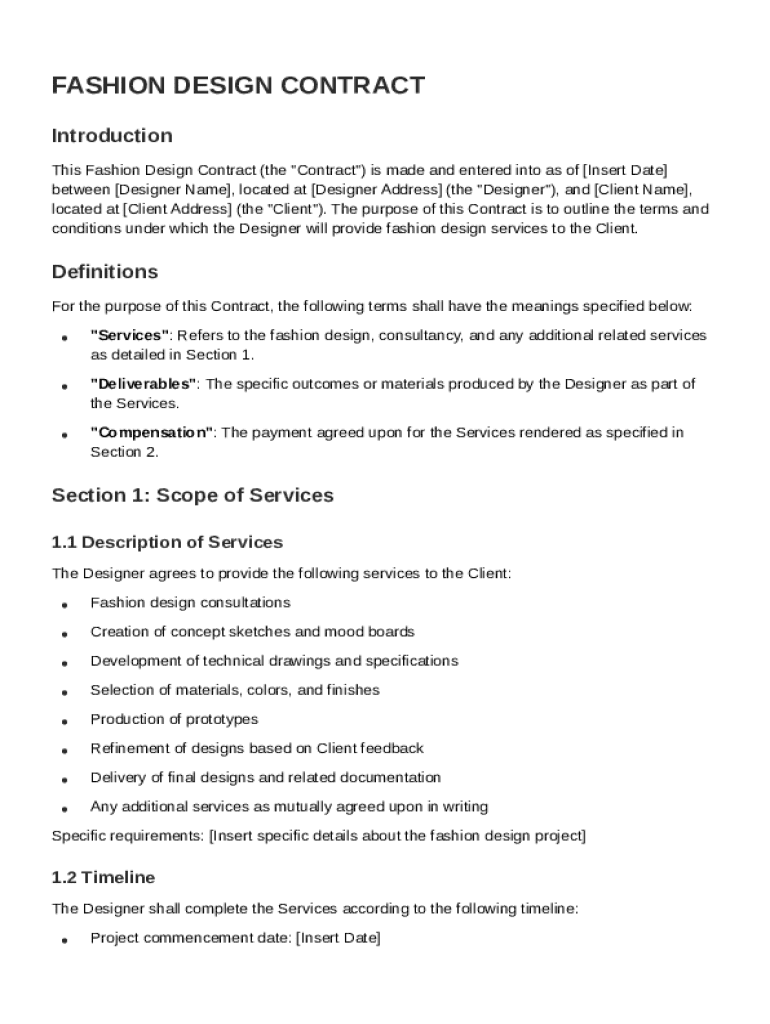
Fashion Design Contract Form
Use a Fashion Design Contract Template template to make your document workflow more streamlined.
What a fashion design contract does
A Fashion Design Contract Form records the business terms between a fashion designer and another party for creative work, production, licensing, or related services. It can identify the parties, define deliverables, establish fees and payment timing, assign intellectual-property rights, address revisions and confidentiality, and document approval. With signNow, upload the contract, allow fields to be detected, review each required entry, send it to named signers, and store the completed document with its audit trail. Specific clauses and governing law should match the transaction.
How the fashion contract workflow works
signNow turns the completed fashion agreement into a controlled signing workflow from upload through archival.
Upload contract: Upload the final Fashion Design Contract Form. Place fields: Review detected fields and add missing assignments. Send agreement: Send the agreement to each required signer. Store completion: Download the signed contract and audit trail.
Inside the fashion contract audit trail
A signNow audit trail documents the technical events that connect each signer to the final Fashion Design Contract Form.
Authenticate signer:
Capture timestamp:
Hash document:
Seal record:
Record actions:
Export evidence:
Ways to send and sign fashion contracts
- Use the signNow web app when a designer prepares a Fashion Design Contract Form from a desktop, checks clauses, places fields, and sends the final document to clients or vendors.
- Use the signNow mobile app when a designer or client reviews contract terms at a studio, showroom, production site, or meeting and needs to complete assigned fields on a phone.
- Use kiosk mode for supervised signing at a showroom or office reception where several parties complete the same fashion agreement on one managed device.
- Use a shareable signing link when clients or production partners need access to the same approved contract without receiving a separate email invitation.
 Best ROI. Our customers achieve an average 7x ROI within the first six months.
 Scales with your use cases. From SMBs to mid-market, airSlate SignNow delivers results for businesses of all sizes.
 Intuitive UI and API. Sign and send documents from your apps in minutes.
Recommended fashion contract setup
Configure signer verification, field controls, audit evidence, encryption, and retention before sending a Fashion Design Contract Form.
| Setting | Recommendation |
|---|---|
| Authentication method | Email verification with SMS OTP |
| Signature type | Typed or drawn electronic signature |
| Audit trail | Capture timestamps, IP addresses, and actions |
| Document retention | Retain contract and certificate under company policy |
| Encryption | TLS 1.2/1.3 and AES-256 |
Mobile options for fashion contracts
Fashion Design Contract Form workflows can move from studio to client meeting through signNow mobile apps, offline signing, and camera capture.
Mobile apps iOS 16 and Android 12 support signNow mobile signing Camera capture Camera capture uploads sketches, measurements, and reference pages Offline signing Offline signing queues completed contract pages for later sync
Use the signNow iOS app on iOS 16 or later and the Android app on Android 12 or later. Camera capture can digitize paper references before contract fields are completed. Offline signing helps when studio connectivity is limited, then synchronizes the completed record when the device reconnects.
Signer security for fashion contracts
PKI signatures:
X.509 certificates:
Two-factor authentication:
SMS OTP:
ID verification:
Audit evidence:



Fashion contract processing timeline
Move a Fashion Design Contract Form from final draft to signed archive through four clearly defined processing stages.
Prepare contract
Deliver to signers
Signer turnaround
Archive completion
Best practices for fashion agreements
Use precise commercial terms, deliberate signer assignments, controlled templates, and evidence-focused records management for each Fashion Design Contract Form.
Define deliverables before sending
Assign every required field
Control approved contract templates
Archive evidence with the agreement
Challenges with fashion design contracts
Unclear ownership language can leave sketches, patterns, photographs, or final garments subject to competing intellectual-property interpretations. Missing revision limits and approval dates can expand a designer’s obligations beyond the agreed production schedule and fee. Unassigned signer fields can delay client approval, vendor acceptance, or payment-related acknowledgments for a specific contract. A flattened or password-protected PDF may prevent automatic field detection and require manual placement before delivery.
Legal standing for fashion contracts
A Fashion Design Contract Form can be admissible when parties demonstrate intent, consent to electronic records, signer attribution, and reliable retention under the federal ESIGN Act, 15 U.S.C. chapter 96, and applicable state law such as UETA. Wills, codicils, testamentary trusts, and certain court orders remain excluded.

Fashion contract troubleshooting questions
Resolve field, signer, evidence, disclosure, and plan questions before sending a Fashion Design Contract Form through signNow.
Upload the original PDF again and check whether its security settings block editing. signNow can detect fillable fields, but a flattened or protected file may require manual field placement before sending.
On the Business plan, use templates and audit trails for recurring fashion agreements. Business Premium adds bulk send when the same contract must reach multiple recipients with individualized signer fields.
Enable SMS OTP or stronger signer authentication when identity evidence matters. ESIGN validity depends on intent, consent, attribution, and record retention; authentication strengthens attribution but does not replace those elements.
Use signNow’s audit trail and completion certificate to preserve timestamps, signer actions, and delivery history. Store the signed contract and certificate together so the agreement can be reproduced during a dispute.
Consumer-facing electronic records may require an ESIGN disclosure explaining paper-record rights, electronic access, and withdrawal procedures under 15 U.S.C. §7001(c). Obtain legal review when a customer is a consumer signer.
The Business plan includes legally binding eSignatures, templates, audit trails, and mobile apps at $8/user/month billed annually. Its annual plan includes 100 signature invites per user, with overage fees.
Key performance indicators that demonstrate SignNow's proven track record.
BE READY TO GET MORE
Get this form now!

If you believe that this page should be taken down, please follow our DMCA take-down process.