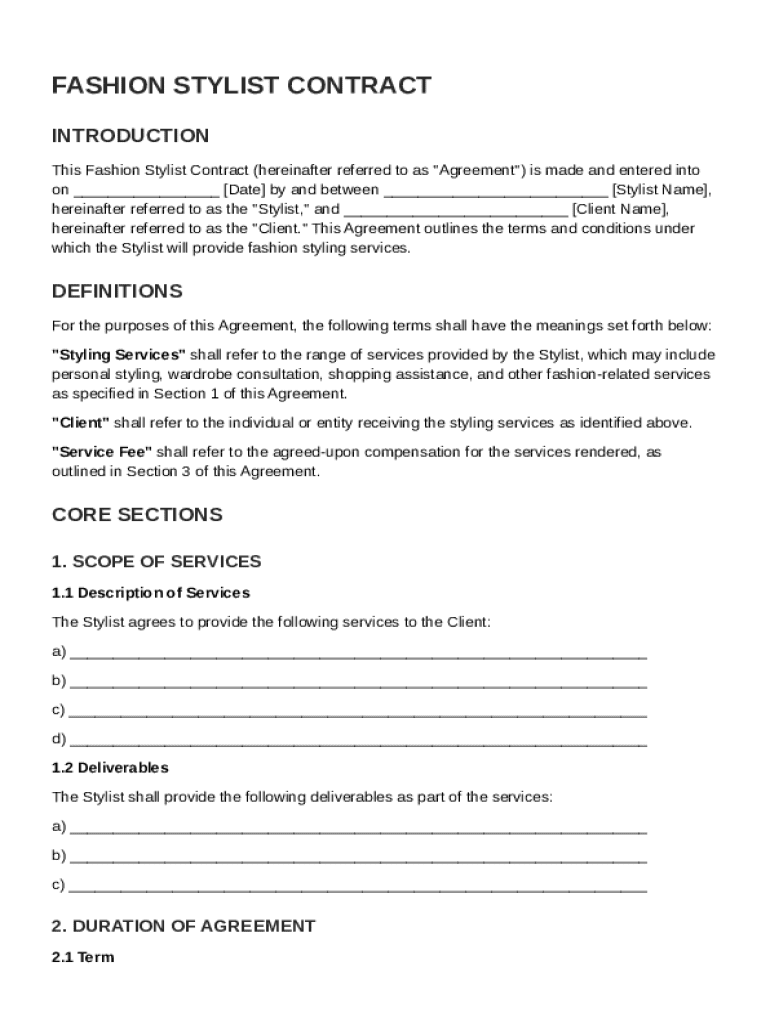
Fashion Stylist Contract Form
Use a Fashion Stylist Contract Template template to make your document workflow more streamlined.
What the contract form covers
A Fashion Stylist Contract Form records the agreement between a stylist and a client, agency, brand, or production company. It identifies the parties, styling services, project dates, fittings, locations, fees, approved expenses, cancellation terms, wardrobe responsibilities, returns, credits, and image or portfolio permissions. Upload the form to signNow, review or add fillable fields, assign each signer, and send it for electronic execution. The completed document and audit trail preserve evidence of intent, attribution, timestamps, and the final agreed version. U.S. electronic transactions generally rely on ESIGN and applicable state law, including UETA or New York ESRA.
Businesses that use styling contracts
Independent stylists, agencies, and production businesses use this form to document creative services and approvals before an engagement begins.
Independent fashion stylists use the form to define client services, rates, fittings, expenses, cancellation terms, and permissions before accepting a project. A reusable signNow template can preserve core clauses while allowing each engagement’s dates and deliverables to be reviewed individually. Fashion agencies use the form to coordinate stylist, brand, production, and client approvals. Shared templates and delegated sending help authorized coordinators issue the correct agreement while retaining a single audit trail for each styling engagement. Production companies and retail brands use the form to document wardrobe responsibilities, on-set services, returns, payment conditions, and image-use permissions. Role-based access helps separate preparation, approval, and signing duties across creative and operations teams.
These tasks are executed by both individual contributors and centralized administrators depending on organizational policy and required controls.
Who uses this contract form
Stylists and agencies
Fashion agencies and independent stylists can use the form for service agreements covering wardrobe sourcing, fittings, shoot attendance, rates, expenses, cancellation terms, credits, and image or portfolio permissions. Each engagement should be reviewed for state-law requirements and signed by authorized parties before work begins.
Clients and productions
Brands, production companies, photographers, and clients can use the form to approve styling services and document payment responsibilities, delivery expectations, returns, and usage permissions. NDAs, HR forms, invoices, and consent forms may require separate documents and should not be treated as contract substitutes.
Features for styling engagements
Fashion Stylist Contract Form workflows keep creative-service terms, approvals, signatures, and execution records together from preparation through completion.
Field placement
Upload the Fashion Stylist Contract Form and place fields for names, dates, fees, services, approvals, and signatures so each party completes the intended section.
Signing order
Send the completed contract to a stylist, client, agency, or representative in a defined signing order, reducing missed approvals before work begins.
Audit trail
Capture timestamps, signer actions, and document history with the completed agreement, creating a reviewable record of how the contract was executed.
Reusable templates
Use reusable templates for recurring styling engagements while updating project-specific services, rates, dates, and usage-rights language before sending.
Mobile signing
Collect signatures through desktop or mobile workflows when fittings, shoots, or approvals occur away from an office, while preserving the same contract record.
Organized records
Store the executed contract and completion evidence together, giving coordinators a single record for payment review, usage permissions, and later contract questions.
 Best ROI. Our customers achieve an average 7x ROI within the first six months.
 Scales with your use cases. From SMBs to mid-market, airSlate SignNow delivers results for businesses of all sizes.
 Intuitive UI and API. Sign and send documents from your apps in minutes.
How the styling contract works
The signNow workflow turns a prepared Fashion Stylist Contract Form into a routed, signed, and traceable agreement.
Upload: Upload the completed contract template. Prepare: Place and review stylist-specific fields. Route: Send to authorized signers in order. Archive: Store the signed contract with its audit trail.
Recommended contract workflow setup
Use a controlled signing workflow that connects each Fashion Stylist Contract Form to verified signers, execution evidence, and an accessible record.
| Setting | Recommendation |
|---|---|
| Authentication method | Email link with SMS OTP |
| Signature type | Typed or drawn electronic signature |
| Audit trail | Export completion certificate with contract |
| Document retention | Three years from filing for tax records |
| Encryption | TLS 1.2/1.3 and AES-256 |
How the contract audit trail works
The audit trail documents how each Fashion Stylist Contract Form moved from signer authentication through completion, sealing, and later evidence retrieval.
Authenticate signer:
Capture timestamp:
Hash document:
Seal record:
Log actions:
Export evidence:
Platform requirements for signing
Fashion Stylist Contract Form can be prepared in Chrome, Firefox, Safari, or Edge on Windows and macOS. signNow also provides iOS and Android apps for mobile review and signing. Use an up-to-date browser and an internet connection protected by TLS 1.2 or TLS 1.3.
Browsers Chrome, Firefox, Safari, Edge Desktop Windows and macOS Mobile iOS and Android apps
Teams can assign preparation and approval responsibilities through signNow user controls, then use mobile apps when stylists or clients work at fittings, studios, or production locations. Confirm device access, signer identity, and record-export permissions before sending contracts outside the organization.



Best practices for contract completion
A reliable Fashion Stylist Contract Form identifies the engagement, defines creative services, and records approvals before styling work starts.
Identify every contracting party and project
Define styling services and deliverables precisely
Record fees, expenses, and usage rights
Verify final terms before requesting signatures
Risks of incomplete contracts
Contract dispute
Payment dispute
Signature challenge
Enforceability gap
Security for signed contracts
Stored document encryption:
Protected data transfer:
Independent controls report:
Information security framework:
U.S. electronic signatures:
Protected health information:
Key performance indicators that demonstrate SignNow's proven track record.
Fashion Stylist Contract Form troubleshooting
Resolve field, signer, plan, and legal-record questions before sending a Fashion Stylist Contract Form for execution.
Upload the original Fashion Stylist Contract Form again and check whether text is selectable. If field detection misses a service, fee, date, or signature area, add that field manually and confirm its recipient before sending.
Business is $8/user/month with annual billing and includes legally binding eSignatures, templates, audit trails, and mobile apps. Business Premium is $15/user/month annually and adds bulk send, which helps agencies issue multiple similar agreements.
A signer can use email delivery or an SMS code when stronger identity confirmation is appropriate. The completed record should retain the signer event and audit trail; ESIGN and UETA evaluate intent, consent, attribution, and record reproducibility.
Consumer-facing electronic records may require an ESIGN disclosure explaining the right to paper records, electronic access, and withdrawal procedures under 15 U.S.C. §7001(c). Review whether the stylist or client is acting as a consumer before sending.
Business Premium includes bulk send, while Business does not. For a single engagement, send one reviewed contract. For repeated agreements, use bulk send only after confirming that variable fees, dates, services, and usage rights populate correctly.
signNow provides audit trails and completion records, but the contract’s legal terms remain the parties’ responsibility. State law may affect independent-contractor classification, restrictive clauses, image rights, cancellation terms, and any required notices.
BE READY TO GET MORE
Get this form now!

If you believe that this page should be taken down, please follow our DMCA take-down process.