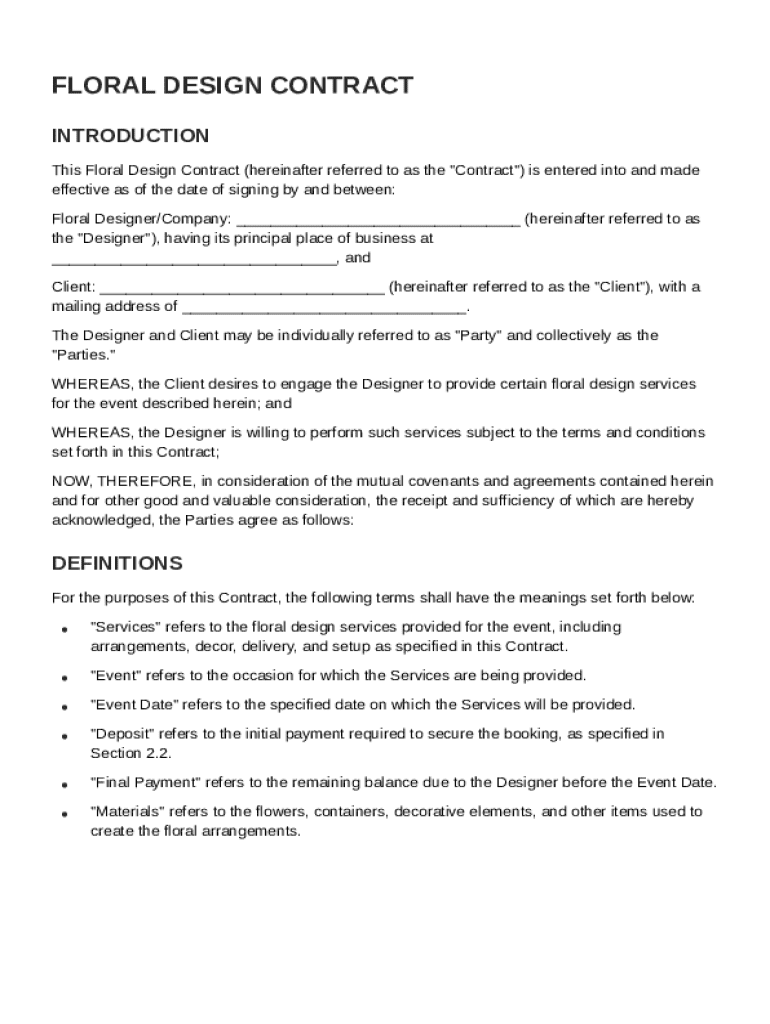
Floral Design Contract Form
Use a Floral Design Contract Template template to make your document workflow more streamlined.
What the floral design contract form does
A Floral Design Contract Form records the agreement between a floral designer or florist and a client for defined services, event details, pricing, delivery, payment, and cancellation terms. In signNow, upload the contract, review automatically detected fillable fields, add signature and date fields, and send it to the required parties. Each signer reviews the document and applies an electronic signature. The completed contract can be stored with its audit trail, which records signing activity and supports later review under applicable U.S. contract and electronic-signature rules.
Who benefits from floral design contracts
The form is most useful when floral services involve defined deliverables, scheduled installation, client approvals, or payment obligations.
Solo florists use the form to document wedding, funeral, corporate, or event arrangements, including flower selections, delivery details, deposits, balances, and cancellation terms before committing resources or ordering inventory. Multi-location floral studios use reusable contract templates and delegated sending to keep event-service terms consistent while managers, designers, and clients complete approvals across different locations and schedules. Event planners and venue teams use the form with floral vendors to confirm scope, installation timing, access requirements, payment responsibilities, and changes before an event date becomes operationally fixed.
These tasks are executed by both individual contributors and centralized administrators depending on organizational policy and required controls.
Key features for floral design contracts
The Floral Design Contract Form becomes easier to prepare, route, sign, and retain when its contract-specific fields and approval evidence remain together.
Field detection
Upload the contract and review detected fields before sending, reducing manual preparation for floral services, event details, pricing, and signature sections.
Flexible fields
Place signer, initials, date, and text fields directly on the Floral Design Contract Form before routing it to each contracting party.
Signer routing
Send the completed draft to clients, venues, or floral businesses using defined signer roles and signing order.
Audit trail
Preserve timestamps, signer actions, and completion evidence with the signed contract for later business review.
Reusable templates
Use reusable templates when the same floral service terms, cancellation language, or payment provisions recur across client engagements.
Mobile signing
Open and complete the contract from signNow mobile apps when event planning or client meetings occur away from the office.
Complete a floral design contract in signNow
Use this workflow to prepare, route, sign, and retain the Floral Design Contract Form without recreating its contract fields.
Upload form:
Upload the Floral Design Contract Form PDF. Check fields:
Review detected fields and add missing signature or date fields. Send contract:
Enter signer details and send the contract securely. Store record:
Collect signatures and store the completed contract with its audit trail.
 Best ROI. Our customers achieve an average 7x ROI within the first six months.
 Scales with your use cases. From SMBs to mid-market, airSlate SignNow delivers results for businesses of all sizes.
 Intuitive UI and API. Sign and send documents from your apps in minutes.
Ways to send and sign floral contracts
- Use the web app to upload the Floral Design Contract Form, place fields, and send it to clients or floral vendors from a desktop workflow.
- Use the mobile app when reviewing event details, collecting a client signature, or updating a contract during an on-site planning meeting.
- Use kiosk mode for supervised signing at a floral studio, venue consultation, or event-services desk when multiple clients sign on one device.
- Share a signing link when a client needs access without a separately prepared email invitation or account-based workflow.
How the signNow audit trail records contracts
A signNow audit trail preserves who handled the Floral Design Contract Form, what changed, and when each signing event occurred.
Authenticate signer:
Capture timestamps:
Hash document:
Seal records:
Log actions:
Retrieve audit trail:
Security controls for floral design contracts
Encrypted records:
Transport security:
Stored data:
SOC 2 Type II:
ISO 27001:
HIPAA support:



Best practices for floral design contracts
Accurate service terms, controlled signing, and organized records help prevent disputes over floral work, delivery expectations, payment, and cancellation obligations.
State every floral service term
Assign clear signer responsibilities
Preserve the signed contract record
Apply the correct retention rule
Privacy challenges in floral contracts
Client addresses, phone numbers, venue details, and payment information may appear in the contract and require controlled access after signing. A missing client consent or signature field can leave delivery terms, cancellation provisions, or pricing changes without clear acceptance. Sharing a completed Floral Design Contract Form through unrestricted links can expose event details, personal information, and negotiated commercial terms. Giving every team member edit access can change floral quantities, prices, or dates without a documented approval trail.
Floral design contract troubleshooting
These answers address field detection, signer routing, plan limits, electronic consent, audit evidence, and document types excluded from ESIGN.
Upload the original Floral Design Contract Form again, then review the detected fields. Add signature, date, initials, or text fields manually where the PDF’s layout does not identify an intended entry area.
Use signNow’s signer settings to assign the floral business and client separately, then verify each email address. The Business plan includes templates and audit trails for routing completed contracts to identified parties.
The Business plan is listed at $8/user/month with annual billing. It includes 100 signature invites per user per year; additional invite charges may apply, so review usage before sending repeated contract batches.
For consumer-facing electronic records, ESIGN requires disclosure of the right to paper, access to the electronic format, and procedures to withdraw consent under 15 U.S.C. §7001(c). Review those requirements before sending to consumers.
signNow identifies its Business plan as ESIGN- and UETA-compliant and provides audit trails. Enforceability still depends on intent, consent, attribution, and reliable record retention for the specific Floral Design Contract Form.
If a floral agreement is actually a will, family law decree, or covered court filing, ESIGN exclusions apply. Do not use this workflow as a substitute for the required legal filing or signing procedure.
Key performance indicators that demonstrate SignNow's proven track record.
BE READY TO GET MORE
Get this form now!

If you believe that this page should be taken down, please follow our DMCA take-down process.