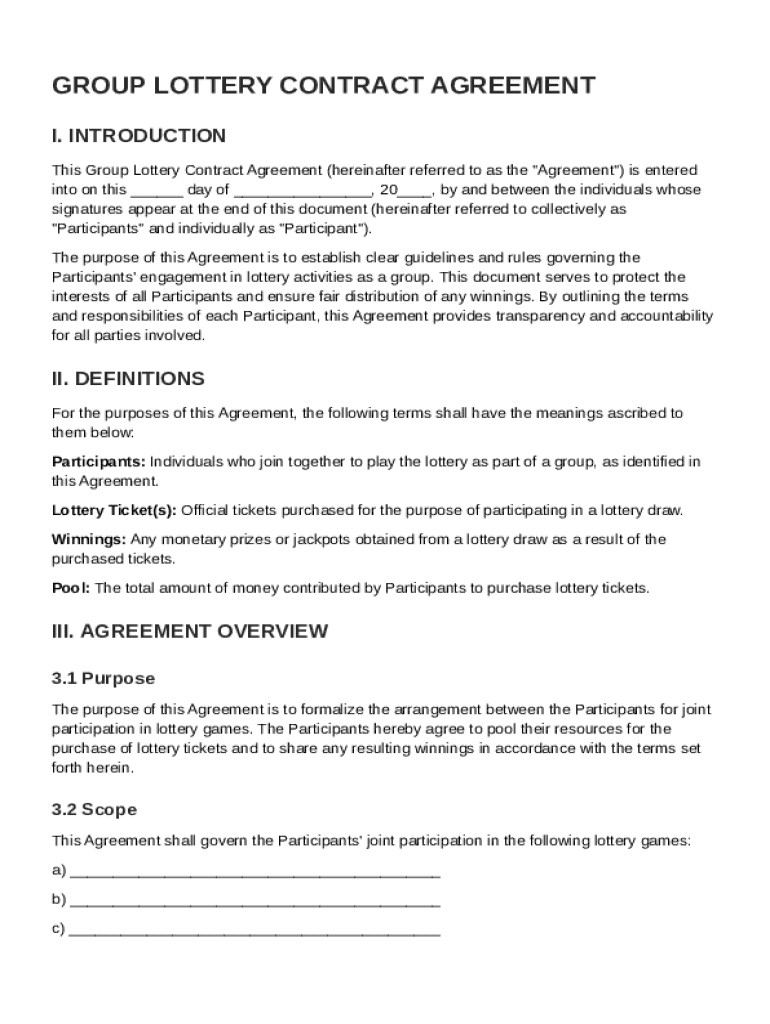
Group Lottery Contract Form
Use a Group Lottery Contract Template template to make your document workflow more streamlined.
What the Group Lottery Contract Form does
The Group Lottery Contract Form records who belongs to a shared lottery pool, what each person contributes, how ownership or payout shares are allocated, and how participants approve those terms. It gives the organizer and participants one signed record instead of relying on informal messages. In signNow, the organizer uploads the agreement, reviews detected fields, assigns signature fields to participants, sends the document, and receives a completed copy with an audit trail. Electronic signing may be supported under ESIGN and applicable state electronic-transactions law when intent, consent, attribution, and record access are established.
Who uses this contract
Lottery pool organizers
A workplace lottery pool organizer can use the form to identify participants, document contribution shares, record payout instructions, and collect signatures before tickets or winnings are managed. The organizer should verify that the agreement reflects the group’s actual arrangement and any applicable state-law requirements.
Group participants
Friends, family members, or coworkers can review the same agreement before signing, confirming their participation, contribution amount, ownership share, and communication details. A completed copy gives each participant a consistent record of the terms accepted by the group.
Features for group lottery agreements
signNow connects the Group Lottery Contract Form’s participant details, contribution terms, signatures, and completion evidence in one controlled workflow.
Structured terms
Add participant names, contribution shares, payout instructions, and signature fields in one organized agreement. Clear field assignments reduce omissions before the group accepts its terms.
Multi-party signing
Route the Group Lottery Contract Form to multiple participants by email, with each signer receiving only the fields assigned to them.
Reusable template
Use templates to preserve approved wording for recurring workplace or family lottery pools while updating participant-specific details for each agreement.
Audit trail
Capture timestamps, signer actions, and completion history alongside the signed agreement, creating a consistent record of how acceptance occurred.
Remote signing
Collect signatures through signNow web and mobile apps when participants cannot meet in one location, while keeping the same document workflow.
Record retrieval
Download the completed contract and supporting audit evidence after all assigned participants sign, helping organizers maintain an accessible record.
Complete and sign the group contract
Use this workflow to prepare participant details, collect signatures, and preserve the completed Group Lottery Contract Form.
Upload form:
Upload the current Group Lottery Contract Form to signNow. Check fields:
Review detected fields and add missing participant signature or date fields. Assign participants:
Assign each field to the correct participant and set signing order. Send agreement:
Send the agreement by email or a controlled signing link. Store records:
Review completed signatures, then download the signed form and audit trail.
 Best ROI. Our customers achieve an average 7x ROI within the first six months.
 Scales with your use cases. From SMBs to mid-market, airSlate SignNow delivers results for businesses of all sizes.
 Intuitive UI and API. Sign and send documents from your apps in minutes.
How the audit trail records signatures
signNow records the technical events behind each completed Group Lottery Contract Form, creating evidence beyond the visible signature.
Authenticate signer:
Capture timestamps:
Hash document:
Seal document:
Build audit trail:
Export evidence:
Privacy and disclosure pitfalls
Participant names, addresses, or payment details may remain visible to every recipient unless document access is limited deliberately. A missing consent record can leave uncertainty about whether participants agreed to electronic delivery and signature procedures. Shared links forwarded outside the group can expose contract terms, signatures, or payout information to unintended viewers. Unrestricted team permissions may allow unauthorized users to edit, send, download, or delete the group agreement.
State rules and document limits
State requirement
No testamentary use
Court process required
Recording may fail
Legal standing of the agreement
A signed Group Lottery Contract Form can provide evidence of participant intent, agreed contributions, and payout terms when the parties consent to electronic records and the record remains accessible. ESIGN and applicable UETA rules support electronic signatures, but wills, certain court orders, and family-law decrees remain excluded under 15 U.S.C. ch. 96.

Best practices for group lottery contracts
Accurate participant data, explicit financial terms, and preserved signing evidence make the completed Group Lottery Contract Form easier to interpret later.
State every economic term
Review each participant roster
Capture informed consent
Archive contract evidence together
Recommended contract workflow setup
Configure the Group Lottery Contract Form around participant identity, explicit consent, signing evidence, and controlled access to completed records.
| Setting | Recommendation |
|---|---|
| Authentication method | Email invitation with SMS verification |
| Signature type | Electronic signature with signer intent |
| Audit trail | Enabled with completion certificate |
| Document retention | Organizer policy with state-law review |
| Encryption | TLS 1.2/1.3 and AES-256 |
Processing stages for the group contract
The agreement moves from participant-term preparation through delivery, signature collection, and final archival without assuming a legally fixed turnaround period.
Prepare document
Deliver to signers
Collect signatures
Complete and archive
Troubleshooting Group Lottery Contract Form
These answers address field assignment, participant access, electronic-signature validity, plan selection, and record preservation for this agreement.
Upload the original Group Lottery Contract Form again and confirm that the file opens correctly before sending. In signNow, review automatically detected fields, then add or reposition signature, date, and text fields where detection missed the agreement’s participant sections.
Open the document’s recipient and field assignments in signNow. Each participant must have the correct signature or acknowledgment field assigned before sending; otherwise, the workflow may remain incomplete even when another participant has already signed.
Use signNow’s audit trail to distinguish an unsigned agreement from a delivery problem. Confirm the recipient address, resend the invitation, or provide a controlled signing link after verifying the participant’s identity and contact details.
Electronic signatures can support the agreement when participants demonstrate intent, consent to electronic records, and retain an accessible copy. ESIGN and applicable UETA rules provide the framework; state law may impose additional requirements for the underlying arrangement.
Business includes legally binding eSignatures, templates, and audit trails at $8 per user per month with annual billing. Business Premium is $15 and adds bulk send, while Enterprise is $30 and adds advanced signer authentication.
Export the signed Group Lottery Contract Form together with its audit trail and preserve both in an access-controlled location. Keep the record for the period required by the organizer’s applicable state, tax, employment, or business-record policy.
Key performance indicators that demonstrate SignNow's proven track record.
BE READY TO GET MORE
Get this form now!

If you believe that this page should be taken down, please follow our DMCA take-down process.