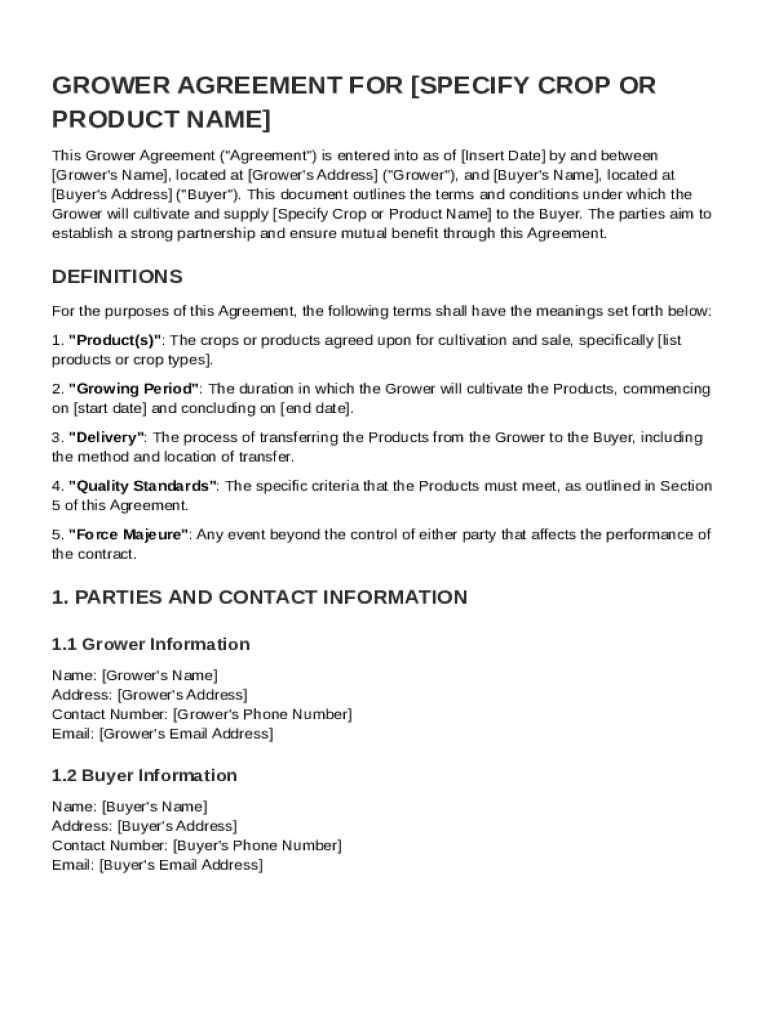
Grower Contract Form
Use a Grower Contract Template template to make your document workflow more streamlined.
What a grower contract form does
A Grower Contract Form records the agreement between a grower and a buyer or agricultural business. It can identify the parties, describe production or delivery obligations, state pricing or payment terms, and capture signatures where those provisions apply. The exact fields depend on the agreement used by the parties; there is no single federally issued Grower Contract Form or universal filing deadline identified in the supplied authorities. With signNow, a business can upload its contract, review detected fields, send it for signature, and preserve the completed document and audit trail.
Who benefits from grower contracts
Grower Contract Forms help agricultural businesses document production and purchasing commitments across individual, cooperative, and enterprise workflows.
Independent growers can document acreage, production obligations, delivery terms, pricing, and signature commitments without repeatedly exchanging paper copies. Agricultural cooperatives can standardize grower agreements, route them to multiple authorized signers, and preserve completed contracts with searchable audit evidence. Food processors and enterprise buyers can coordinate procurement teams, growers, and approvers through reusable templates and controlled access to executed agreements.
These tasks are executed by both individual contributors and centralized administrators depending on organizational policy and required controls.
How a grower contract works
A Grower Contract Form moves from document preparation to signer review, execution, and controlled record storage in four practical steps.
Upload form: Upload the Grower Contract Form to signNow. Check fields: Review detected fields and add missing grower, buyer, date, and signature fields. Send agreement: Enter signer details and send the agreement for completion. Store record: Collect signatures and store the completed contract with its audit trail.
Quick steps for a grower contract
Use this sequence to prepare, route, complete, and preserve a Grower Contract Form in signNow.
Upload:
Upload the completed contract file. Prepare:
Place and verify all fields. Assign:
Add growers, buyers, and approvers. Send:
Send the form for signatures. Archive:
Download the executed record.
 Best ROI. Our customers achieve an average 7x ROI within the first six months.
 Scales with your use cases. From SMBs to mid-market, airSlate SignNow delivers results for businesses of all sizes.
 Intuitive UI and API. Sign and send documents from your apps in minutes.
Recommended grower contract setup
Configure the Grower Contract Form around signer identity, evidence preservation, access control, and the retention rule governing the related business record.
| Setting | Recommendation |
|---|---|
| Authentication and provisioning | Use verified email with role-limited access |
| Signature type | Use typed or drawn electronic signatures |
| Audit trail | Enable completion certificates and action logs |
| Document retention | Retain tax records three years under IRC §6501(a) |
| Encryption | Use TLS 1.2/1.3 and AES-256 protection |
Privacy and disclosure risks for grower contracts
Grower agreements can expose names, addresses, tax details, banking information, and farm data when copies circulate beyond the intended parties. Consumer-facing signing may require clear electronic-record consent and paper-record disclosures under 15 U.S.C. §7001(c). Shared inboxes or unrestricted folders can let unauthorized staff access signed grower contracts and attached personal information. Incomplete signer attribution, missing timestamps, or poorly preserved copies can weaken evidence of consent and contract execution.
Legal standing of grower contracts
A signed Grower Contract Form may be enforceable when the parties demonstrate intent, consent, attribution, and reliable record retention under ESIGN, 15 U.S.C. ch. 96, and applicable state law, including UETA or New York ESRA. These frameworks do not replace contract terms or exclude wills, certain court orders, and other listed records.

Risks of incomplete grower contracts
No provable intent
Contract attribution dispute
Performance disagreement
Evidence preservation failure
Best practices for grower contracts
Accurate party details, complete commercial terms, and preserved execution evidence reduce avoidable disputes over agricultural supply commitments.
Confirm parties before sending
Define production and delivery terms
Verify every required field
Preserve the executed record
Rollout and retention for grower contracts
Set up the Grower Contract Form, route it to the right parties, and retain the executed record according to the applicable rule.
Prepare template:
First send:
Team onboarding:
Seven-day trial:
Signed record:
Tax records:
Understatement exception:
State review:
Features for grower contract workflows
signNow organizes the Grower Contract Form workflow from field preparation through signature collection and preservation of the executed agreement.
Field detection
Upload an existing Grower Contract Form and review detected fields before adding missing dates, initials, signatures, or acknowledgments.
Signer routing
Route the agreement to growers, buyers, and authorized approvers in a defined signing order when the contract requires sequential review.
Audit trail
Capture typed or drawn signatures with timestamps and an action history supporting evidence of the signing event.
Record storage
Keep the executed contract and completion evidence together for later operational, tax, or dispute review.
Reusable templates
Use reusable templates for recurring grower agreements while preserving the specific commercial terms for each transaction.
Controlled access
Apply access controls and signer authentication appropriate to the personal and commercial information contained in the agreement.
How the grower contract audit trail works
The audit trail records technical evidence around the Grower Contract Form without changing the agreement’s underlying commercial terms.
Authenticate signer:
Capture timestamp:
Hash document:
Seal record:
Log actions:
Export trail:
Grower contract troubleshooting
These answers address field setup, signer routing, electronic consent, plan selection, security, and preservation issues specific to Grower Contract Form workflows.
Upload the source Grower Contract Form again and inspect every detected field. signNow’s Business plan includes templates and audit trails, but automatic detection does not confirm that the commercial terms or required fields are legally complete.
Add the grower’s and buyer’s email addresses, assign each signature field, and review the signing order before sending. signNow supports legally binding eSignatures and audit trails on the Business plan; the parties remain responsible for accurate contract terms.
Use a clear electronic-record consent process when the signer is a consumer. ESIGN, 15 U.S.C. §7001(c), requires disclosure of paper-record rights, electronic access, and withdrawal procedures for covered consumer transactions.
Business includes legally binding eSignatures, templates, and audit trails at $8/user/month with annual billing. Business Premium is $15/user/month annually and adds bulk send, which may help distribute recurring grower agreements.
signNow encrypts data in transit with TLS 1.2/1.3 and at rest with AES-256. Encryption protects the record, but authorized users should still restrict access to grower information and contract attachments.
Export the completed Grower Contract Form with its audit trail and retain it under the rule applicable to the underlying record. Federal tax records generally use three years from filing under IRC §6501(a), subject to stated exceptions.
Key performance indicators that demonstrate SignNow's proven track record.
BE READY TO GET MORE
Get this form now!

If you believe that this page should be taken down, please follow our DMCA take-down process.