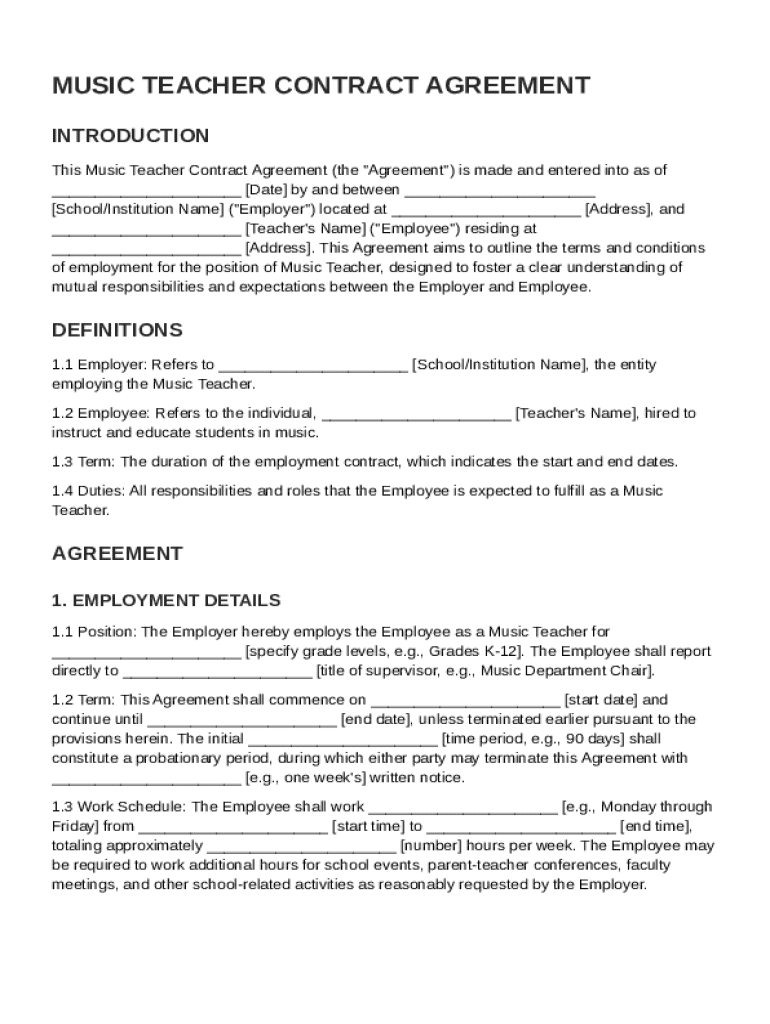
Music Teacher Contract Form
Use a Music Teacher Contract Template template to make your document workflow more streamlined.
What a music teacher contract covers
A Music Teacher Contract Form is a written agreement between a music instructor and a student, parent, school, or education program. It records the teaching services, lesson schedule, fees, payment terms, cancellation policy, materials, make-up lessons, and responsibilities each party accepts. The form can be uploaded to signNow, prepared with fillable fields, sent to the required signers, and completed electronically. Under the federal ESIGN Act and applicable state electronic-transactions law, an electronic signature may carry the same legal effect as a handwritten signature when intent, consent, attribution, and reliable record retention are established.
Who uses music teacher contracts
Independent teachers
Independent music teachers use this form to document lesson scope, rates, scheduling, cancellations, materials, and student or parent responsibilities. A signed copy gives both parties a clear reference for recurring instruction and supports organized electronic records.
Music schools
Music schools and education programs use reusable contracts for instructor engagements, student enrollment, recital services, and parent consent workflows. Administrators can send the same approved terms, collect signatures remotely, and retain completed agreements with their related business records.
Businesses that use teaching contracts
The form fits teaching arrangements where responsibilities, payment, scheduling, and consent must be documented before music instruction begins.
Independent music teachers can use one reusable contract for private lessons, recurring schedules, cancellation rules, payment terms, and parent or adult-student signatures, reducing repeated manual drafting while preserving each engagement’s specific details. Music studios and conservatories can standardize instructor agreements and student enrollment documents, delegate sending to administrators, and maintain separate signing records for teachers, students, parents, and program managers. School-based arts programs can collect instructor, participant, and guardian signatures remotely for lesson arrangements, recital services, and program responsibilities while keeping completed agreements organized for administrative review.
These tasks are executed by both individual contributors and centralized administrators depending on organizational policy and required controls.
Key features for music lesson agreements
Music Teacher Contract Form workflows combine reusable documents, assigned signer fields, electronic signing, audit evidence, and organized storage for lesson administration.
Reusable template
Upload a prepared teaching agreement, place signature and date fields, and reuse approved terms for recurring lessons without recreating the document each time.
Signer routing
Assign separate fields to the teacher, student, parent, or school administrator so every required party signs the correct section in the intended order.
Audit trail
Capture signed lesson terms, timestamps, and document activity in an audit trail that can accompany the completed agreement during record review.
Mobile signing
Let teachers and families review and sign from supported desktop or mobile devices, reducing the need to schedule an in-person paperwork meeting.
System connections
Connect completed contracts with systems such as Google Drive, Microsoft 365, Salesforce, or NetSuite when the school’s administrative workflow requires organized document transfer.
Controlled access
Use access controls and electronic records to keep lesson rates, student details, cancellation terms, and signed responsibilities available to authorized users.
How to complete the contract online
Prepare the lesson agreement in signNow by uploading it, checking its fields, assigning signers, and sending it through the electronic signing workflow.
Upload contract:
Upload the Music Teacher Contract Form to signNow. Add fields:
Review detected fields and add missing signature, date, and initials fields. Assign signers:
Assign fields to the teacher, student, parent, or administrator. Send and monitor:
Send the agreement and monitor completion from the document workspace.
 Best ROI. Our customers achieve an average 7x ROI within the first six months.
 Scales with your use cases. From SMBs to mid-market, airSlate SignNow delivers results for businesses of all sizes.
 Intuitive UI and API. Sign and send documents from your apps in minutes.
Ways to send and sign the contract
- Use the signNow web app when a teacher or school administrator prepares reusable contract templates, assigns fields, and sends agreements from a desktop workflow.
- Use the mobile app when an instructor needs to review or sign a Music Teacher Contract Form from a phone or tablet during travel or on-site instruction.
- Use kiosk mode when a studio has an in-person registration desk and multiple students or parents need to complete assigned forms on one managed device.
- Use a shareable signing link when a school wants to distribute the same approved contract through its website, email, or registration process.
Recommended contract workflow setup
Configure the signing workflow around signer identity, document integrity, access control, and the retention rules applicable to the teaching business.
| Setting | Recommendation |
|---|---|
| Authentication method | Email verification with SMS OTP for sensitive records |
| Signature type | Typed or drawn electronic signature with recorded intent |
| Audit trail | Enable event history and export with every completed contract |
| Document retention | Keep contract and audit trail for the applicable state period |
| Encryption | Use TLS 1.2/1.3 in transit and AES-256 at rest |
How the contract audit trail works
The audit trail documents who interacted with the Music Teacher Contract Form, what happened, and when each signing event occurred.
Authenticate signer:
Capture timestamps:
Hash document:
Seal record:
Record events:
Export evidence:



Platform requirements for signing
Music Teacher Contract Form can be prepared and signed through supported web browsers on Windows and macOS, with mobile access on iOS and Android. Secure connections use TLS 1.2 or TLS 1.3.
Browsers Chrome, Firefox, Safari, and Edge Operating systems Windows, macOS, iOS, and Android Secure connection TLS 1.2 and TLS 1.3 connections
For a music school or independent studio, use managed accounts on supported devices, restrict access by role, and confirm that every signer can review and retain the electronic record. Organizations connecting contract data to other systems should verify API, SSO, and storage requirements before deployment.
Best practices for teaching agreements
A reliable contract process connects precise lesson terms with accurate signer assignment, controlled access, and complete electronic records.
Define every teaching obligation
Assign fields to each signer
Archive the contract and audit trail
Protect student and family data
Music teacher contract processing stages
Use a controlled sequence to prepare lesson terms, obtain every required signature, and preserve the completed teaching agreement.
Prepare the contract
Deliver to signers
Collect signatures
Complete and archive
Legal standing of the agreement
A Music Teacher Contract Form can support a U.S. teaching arrangement when parties show intent to sign, consent to electronic records, signer attribution, and reliable reproduction. ESIGN and UETA generally recognize qualifying electronic signatures, but wills, court orders, and family-law decrees remain excluded from those federal electronic-record rules.

Privacy and disclosure pitfalls
Including a student’s home address, phone number, or payment details unnecessarily increases exposure if the signed contract is shared broadly. A parent or guardian may sign without a clearly documented relationship to the student, creating uncertainty about consent and contractual authority. Giving every instructor access to all student agreements can expose private information beyond the person’s teaching assignment. Failing to identify cancellation, make-up lesson, and refund terms can create avoidable disputes over missed music instruction.
Key performance indicators that demonstrate SignNow's proven track record.
Music teacher contract troubleshooting
Resolve field, signer, plan, privacy, enforceability, and access questions before the teaching agreement is finalized.
Upload the contract as a readable PDF or supported document, then inspect every detected field. Auto-detection can miss an unsigned line, so add and assign signature, initials, date, and payment fields manually before sending.
Open the recipient settings and confirm the teacher, student, parent, or administrator has the correct email address and assigned fields. Resend the invitation after correcting the recipient rather than changing the completed audit trail.
The Business plan includes legally binding eSignatures, templates, audit trails, and mobile apps at $8/user/month with annual billing. Business Premium is $15/user/month annually and adds bulk send and kiosk mode.
signNow supports ESIGN and UETA requirements, but the parties must still demonstrate intent, consent, attribution, and record retention. For a consumer-facing electronic record, review the paper-record disclosure requirements in 15 U.S.C. §7001(c).
Use role-based access and export the completed contract with its audit trail. If the agreement contains protected health information, signNow lists HIPAA compliance with a required BAA; a music lesson contract alone does not automatically create a HIPAA obligation.
If a signer cannot open the invitation, verify the email address, ask them to use Chrome, Firefox, Safari, or Edge, and retry from a supported Windows, macOS, iOS, or Android device. The sender can issue a new invitation after confirming access.
BE READY TO GET MORE
Get this form now!

If you believe that this page should be taken down, please follow our DMCA take-down process.