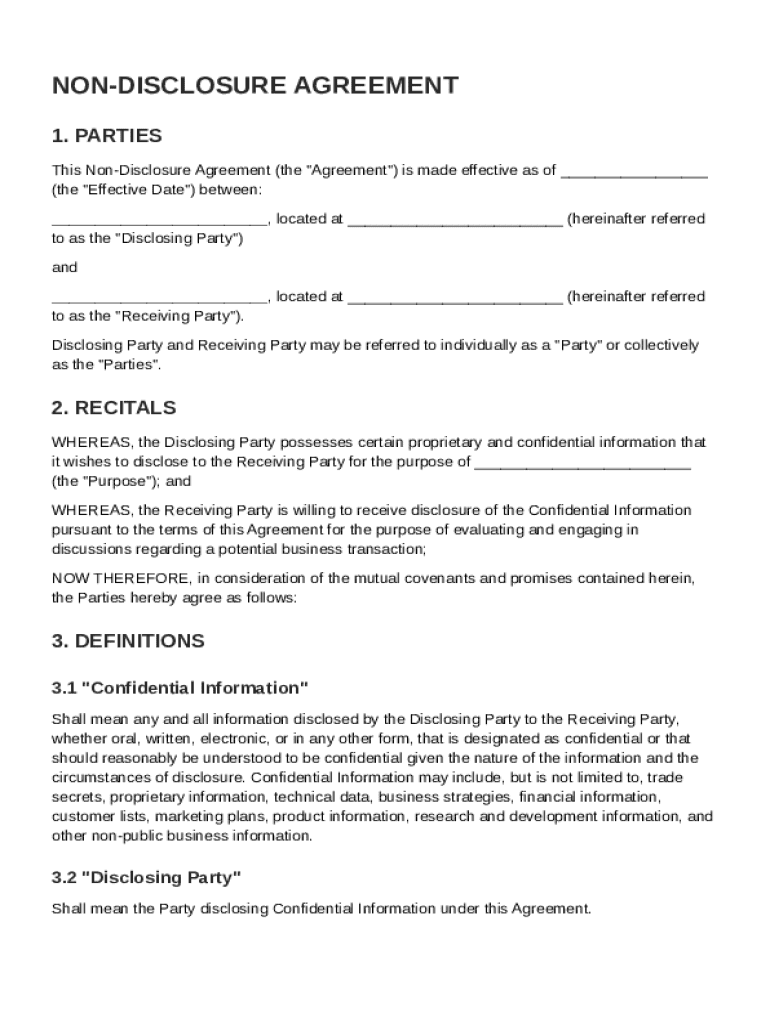
Non Disclosure Contract Form
Use a Non Disclosure Contract Template template to make your document workflow more streamlined.
What this confidentiality form does
A Non Disclosure Contract Form is a business agreement that defines information one party may disclose, how the recipient may use it, and what confidentiality duties apply afterward. It is used before sharing trade secrets, product plans, customer information, financial data, or other protected business material. The form usually identifies the parties, describes confidential information, states exclusions and permitted disclosures, and records signatures. With signNow, the sender uploads the form, reviews detected fields, routes it to signers, and retains the completed agreement with audit evidence.
Business types that use confidentiality agreements
Non Disclosure Contract Form helps businesses document confidentiality obligations before sharing protected information with outside parties.
Solo consultants use Non Disclosure Contract Form before sharing proprietary proposals, client strategies, or product concepts, creating a signed record without purchasing separate contract software. Growing technology companies use Non Disclosure Contract Form for investor discussions, contractor onboarding, and product collaborations, keeping repeatable confidentiality language and signer evidence in one workflow. Enterprise legal and procurement teams use Non Disclosure Contract Form across departments, applying shared templates, delegated sending, role-based access, and audit trails to control sensitive disclosures.
These tasks are executed by both individual contributors and centralized administrators depending on organizational policy and required controls.
Documents and audiences for this form
Technology teams
Technology companies use Non Disclosure Contract Form for product specifications, source-code discussions, investor reviews, and contractor access. The document identifies confidential information, permitted use, and obligations that continue after disclosure, while signNow records signer actions and completion evidence.
Regulated businesses
Healthcare, legal, construction, and financial businesses use Non Disclosure Contract Form before sharing patient-related information, case strategy, bids, or transaction data. The agreement supports controlled disclosure, but regulated records still require the retention and privacy policies applicable to that underlying information.
When a signed confidentiality form carries weight
A Non Disclosure Contract Form may be evidence of the parties’ confidentiality agreement when it shows intent, consent, signer attribution, and a record that can be retained and reproduced. ESIGN and UETA generally recognize qualifying electronic signatures for U.S. business transactions. Wills, codicils, testamentary trusts, court orders, and official court filings remain excluded under ESIGN’s exceptions.

How this confidentiality form works
The signNow workflow turns the Non Disclosure Contract Form into a controlled electronic signing sequence from upload through audit-ready storage.
Upload form: Upload the Non Disclosure Contract Form to signNow. Check fields: Review detected fields and add missing signature or date fields. Send agreement: Send the agreement to each designated signer. Store record: Store the signed form with its completion evidence.
 Best ROI. Our customers achieve an average 7x ROI within the first six months.
 Scales with your use cases. From SMBs to mid-market, airSlate SignNow delivers results for businesses of all sizes.
 Intuitive UI and API. Sign and send documents from your apps in minutes.
What the audit trail records
The signNow audit trail preserves technical evidence around signing the Non Disclosure Contract Form, separate from drafting and sending it.
Signer authentication:
Timestamp capture:
Document hashing:
Tamper-evident sealing:
Audit record:
Audit export:
Features that support this agreement
signNow connects document preparation, signer routing, authentication, and audit evidence for businesses using Non Disclosure Contract Form to protect disclosed information.
Field detection
Upload the Non Disclosure Contract Form and review detected fields before sending, reducing manual placement work while keeping the agreement’s confidentiality provisions intact.
Signer routing
Route the agreement to named recipients in the required order, helping each party review and sign the same controlled version of the form.
Audit trail
Capture timestamps, signer actions, and completion events so the confidentiality agreement has supporting evidence beyond a signature image.
Shared templates
Use a reusable template for recurring disclosures, preserving approved language while allowing transaction-specific fields to be completed before sending.
Signer authentication
Apply SMS-based or other available authentication controls when the parties need stronger evidence connecting a signer to the completed agreement.
Secure storage
Keep the signed Non Disclosure Contract Form and completion record together for later contract administration, internal review, or dispute-related evidence requests.
Recommended setup for this agreement
Configure the Non Disclosure Contract Form around signer identity, approved signature evidence, controlled access, and the retention rule governing the underlying disclosure.
| Setting | Recommendation |
|---|---|
| Authentication method | Email with SMS verification |
| Signature type | Electronic signature with intent |
| Audit trail | Retain completion evidence |
| Document retention | Follow contract and industry policy |
| Encryption | TLS 1.2/1.3 and AES-256 |



Security controls for this agreement
Data in transit:
Data at rest:
Security certification:
Information security:
Healthcare safeguards:
Signer verification:
Challenges when preparing this form
Defining confidential information too broadly can leave recipients uncertain about what the Non Disclosure Contract Form actually protects. Missing permitted-use language may fail to distinguish authorized business review from prohibited copying, disclosure, or competitive use. Using an outdated template can omit governing law, disclosure exceptions, return obligations, or the agreement’s intended duration. Sending the form without verifying signer identity can weaken the evidence connecting the signature to the intended business representative.
Risks from improper form use
Narrower protection
Weaker attribution
Identity dispute
Integrity challenge
ESIGN exception
Record-keeping practices for this form
A Non Disclosure Contract Form is useful only when its signed version, audit evidence, and access controls remain available for the agreement’s business and legal life.
Define the retention rule for this agreement
Export the agreement and audit trail together
Restrict access to signed agreements
Separate executed copies from templates
Questions about completing this form
These answers address signing, evidence, plan capabilities, and document-specific controls for Non Disclosure Contract Form workflows.
Upload the original Non Disclosure Contract Form again, then inspect detected fields before sending. signNow Business includes templates and audit trails; manually add missing signature, date, or initials fields when the source file has no reliable field markers.
A signer can use the email invitation or a configured authentication method without creating a separate signNow account in many workflows. If access fails, resend the invitation, confirm the recipient address, and check whether SMS authentication was configured for that transaction.
signNow Business provides legally binding eSignatures and audit trails at $8 per user per month with annual billing. Business Premium is $15 and adds bulk send; Enterprise is $30 and adds advanced signer authentication.
Electronic signing generally requires intent, consent, attribution, and a retained reproducible record. ESIGN and UETA recognize qualifying electronic signatures for U.S. business transactions, but parties should address consumer disclosures and any state-specific contract requirements.
A Non Disclosure Contract Form does not automatically become a HIPAA record merely because it is signed electronically. If it contains protected health information, use a signNow HIPAA workflow with a required BAA and apply the healthcare organization’s retention policy.
Review the final PDF and completion evidence before treating the agreement as executed. signNow’s audit trail records signing activity, but the parties remain responsible for accurate confidentiality definitions, permitted uses, exceptions, governing law, and signer authority.
Key performance indicators that demonstrate SignNow's proven track record.
BE READY TO GET MORE
Get this form now!

If you believe that this page should be taken down, please follow our DMCA take-down process.