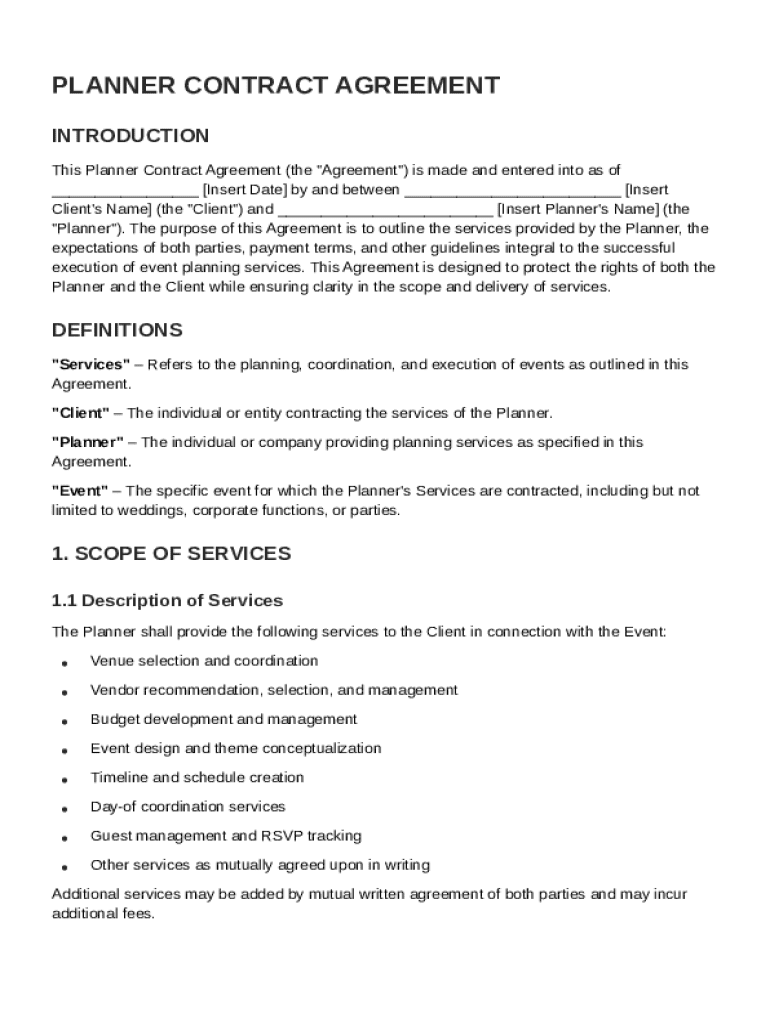
Planner Contract Form
Use a Planner Contract Template template to make your document workflow more streamlined.
Planner Contract Form overview
Planner Contract Form is a business document used to organize planning details, approvals, and signatures in one record. With signNow, upload the form, review automatically detected fillable fields, add or correct signer assignments, and send it for electronic completion. Each signer reviews the document and signs the assigned fields, while signNow records signing events in an audit trail. The completed Planner Contract Form can then be downloaded and retained with its completion evidence. U.S. electronic-signature validity depends on intent, consent, attribution, and record retention under ESIGN and applicable state law.
Who uses Planner Contract Form
Business operations
Project managers, consultants, and operations teams use Planner Contract Form to collect planning approvals, client acknowledgments, and signed service records through a controlled workflow.
Industry workflows
Real estate, construction, and professional-services teams can route Planner Contract Form to multiple participants, preserve completion evidence, and retrieve the signed record when reviewing an engagement.
Who benefits from Planner Contract Form
Planner Contract Form fits organizations that need repeatable preparation, identifiable signers, and a retrievable electronic record for business transactions.
Solo consultants use Planner Contract Form to collect client approvals and signatures without coordinating paper exchanges or separate document attachments. Real estate teams use Planner Contract Form for lease-related approvals, rental documentation, and transaction records requiring multiple signers and a preserved audit trail. Enterprise operations teams use Planner Contract Form with shared templates, administrator controls, and integrations when recurring document workflows require consistent routing and retention.
These tasks are executed by both individual contributors and centralized administrators depending on organizational policy and required controls.
Key Planner Contract Form features
signNow organizes Planner Contract Form preparation, signature collection, and record preservation around the document’s actual completion workflow.
Field detection
Upload the Planner Contract Form once, then use detected fields to prepare a repeatable signing workflow without rebuilding the document manually.
Signer assignment
Assign each Planner Contract Form signature, initials, and date field to the correct signer before delivery.
Signing status
Send the prepared form by email and monitor signing progress from one document workspace.
Audit trail
Preserve timestamps, signer actions, and completion details with the finished Planner Contract Form.
Mobile signing
Let signers complete the Planner Contract Form from supported desktop or mobile workflows when the transaction requires flexibility.
Secure storage
Save the completed form and its audit evidence together for later review, retrieval, or internal recordkeeping.
 Best ROI. Our customers achieve an average 7x ROI within the first six months.
 Scales with your use cases. From SMBs to mid-market, airSlate SignNow delivers results for businesses of all sizes.
 Intuitive UI and API. Sign and send documents from your apps in minutes.
How Planner Contract Form works
Complete the Planner Contract Form in signNow by preparing fields, assigning signers, collecting signatures, and preserving the finished record.
Upload form: Upload the Planner Contract Form PDF to signNow. Review fields: signNow auto-detects fillable fields for review. Send for signature: Assign signature fields and send to signers. Store record: Signers complete the form; signNow stores the audit trail.
What the Planner Contract Form audit trail records
The audit trail connects each Planner Contract Form signature to identity, timing, document integrity, and a retrievable completion record.
Authenticate signer:
Capture timestamp:
Hash document:
Seal record:
Log activity:
Export evidence:
Security for Planner Contract Form
Transport encryption:
Stored encryption:
Control certification:
Security certification:
Healthcare protection:
Electronic signing:
Best practices for Planner Contract Form
Accurate field preparation, documented consent, controlled access, and deliberate retention make Planner Contract Form workflows easier to review and defend.
Review every field before sending
Assign fields to responsible signers
Preserve the completed record
Document electronic consent carefully
Planner Contract Form challenges
Unassigned signature fields can leave the Planner Contract Form incomplete or route required actions to the wrong participant. Auto-detected fields may require manual review when the uploaded Planner Contract Form contains unusual layouts or scanned content. Missing electronic consent evidence can weaken the record when a consumer-facing Planner Contract Form requires ESIGN disclosure procedures. Storing the signed form without its audit trail can make later review of signer identity, timing, and document history more difficult.
Rollout and retention timeline
Move Planner Contract Form from preparation to controlled team use while matching retention decisions to the record’s actual legal purpose.
Account setup:
First upload:
First send:
Team onboarding:
Completion record:
HIPAA records:
Federal tax records:
State policies:
Mobile options for Planner Contract Form
signNow supports Planner Contract Form workflows through iOS and Android mobile apps, including mobile signing and camera-based document capture. Offline signing availability depends on the configured workflow and device environment.
Mobile apps iOS and Android apps Offline access Offline signing availability Document capture Camera document capture
For managed deployments, confirm mobile-device controls, authentication requirements, and synchronization procedures before distributing Planner Contract Form. Teams handling regulated information should also verify access permissions, retention policies, and any required BAA or industry-specific configuration before using mobile workflows.
Planner Contract Form troubleshooting
Resolve Planner Contract Form issues by checking field assignment, signer access, plan limits, authentication, and the legal requirements governing the underlying transaction.
Business includes legally binding eSignatures, templates, and audit trails at $8/user/month with annual billing. If the workflow requires bulk sending, Business Premium adds that capability at $15/user/month annually.
A Planner Contract Form signer can often sign through the delivered request without creating an account. If stronger assurance is required, configure available authentication options, such as SMS-based verification, before sending.
The Business plan includes audit trails and legally binding eSignatures. For records involving protected health information, signNow states that HIPAA compliance requires a BAA; confirm the organization’s plan and configuration before processing PHI.
Electronic signatures generally receive legal recognition under ESIGN and UETA when intent, consent, attribution, and record retention are established. Review whether the underlying Planner Contract Form has separate state-law or transaction-specific requirements.
signNow subscription plans include 100 signature invites per user per year, with overage fees. The Site License uses $1.50 per signature invite and is designed for usage-based deployments with unlimited users.
If auto-detection misses a Planner Contract Form field, add the field manually, assign its signer, and test the completed document before sending. Do not rely on detection without reviewing every required field.
Key performance indicators that demonstrate SignNow's proven track record.
BE READY TO GET MORE
Get this form now!

If you believe that this page should be taken down, please follow our DMCA take-down process.