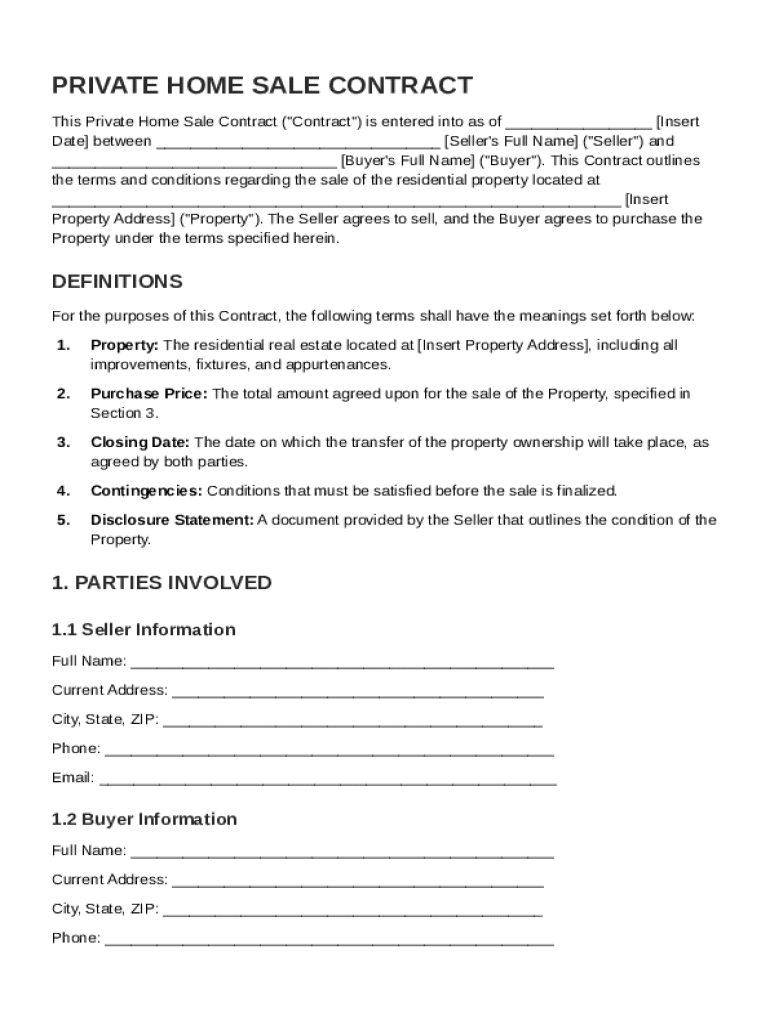
Private Home Sale Contract Form
Use a Private Home Sale Contract Template template to make your document workflow more streamlined.
What this private sale contract does
A Private Home Sale Contract Form records the buyer’s and seller’s agreement for a residential property transaction before closing. It identifies the parties, property, purchase price, deposit, financing, contingencies, included items, inspection rights, possession date, and closing obligations. The parties can complete and electronically sign the agreement through signNow when electronic execution is permitted by applicable law. ESIGN, 15 U.S.C. chapter 96, and UETA generally recognize qualifying electronic signatures, but state rules for disclosures, notarization, deeds, recording, and excluded documents still control.
Who uses this sale contract
Homeowners
Private sellers can use the form to document the agreed price, deposit, contingencies, fixtures, inspection rights, possession date, and closing responsibilities before consulting the appropriate state professionals.
Transaction teams
Real estate attorneys, brokers, title companies, and closing teams can route the agreement for signatures while keeping amendments, signer activity, and completed records organized for the transaction.
Who benefits from this form
The form serves private sellers and transaction professionals who need a documented agreement before title transfer and closing.
Solo homeowners can document negotiated price, deposit, contingencies, fixtures, and possession terms before involving the closing professionals required by state law. Real estate attorneys and brokers can standardize private-sale agreements, route amendments for signatures, and preserve an audit trail alongside transaction records. Title and closing enterprises can connect signed agreements to controlled storage while separating the contract from deed preparation, notarization, and county recording.
These tasks are executed by both individual contributors and centralized administrators depending on organizational policy and required controls.
Features for private home sales
signNow helps parties prepare, sign, document, and retain a private home sale agreement without losing the transaction details that matter.
Complete terms
Keep the agreed purchase price, deposit, financing terms, contingencies, included fixtures, and closing obligations together in one transaction record.
Fillable fields
Place signature, initials, date, and optional attachment fields directly on the private sale agreement before sending it to each party.
Signing order
Send the agreement to buyers, sellers, agents, attorneys, or witnesses in a defined signing order with role-specific fields.
Audit trail
Capture signer activity, timestamps, and document history so parties can preserve evidence of how the agreement was executed.
Signer security
Use SMS authentication or other available controls when the transaction involves sensitive identity, financial, or property information.
Secure storage
Connect completed agreements with Google Drive, Box, Egnyte, or another approved repository for organized transaction records.
 Best ROI. Our customers achieve an average 7x ROI within the first six months.
 Scales with your use cases. From SMBs to mid-market, airSlate SignNow delivers results for businesses of all sizes.
 Intuitive UI and API. Sign and send documents from your apps in minutes.
Avoid contract drafting gaps
Buyers and sellers may omit property condition, included fixtures, financing terms, inspection rights, or the closing date. A vague legal description or missing purchase price can create uncertainty about what the parties actually agreed to transfer. Private sellers may overlook state-specific disclosure duties, lead-based paint rules, title requirements, or deed recording procedures. Unsigned amendments, inconsistent initials, and missing attachments can make later disputes harder to resolve.
Complete the private sale agreement
Prepare the transaction terms first, then use signNow to route the agreement and preserve the completed record.
Upload documents:
Upload the completed agreement and attachments. Check fields:
Review detected fields and place missing fields. Assign parties:
Assign buyer, seller, and witness roles. Send agreement:
Send the agreement for electronic signatures. Archive records:
Download the completed document and audit trail.



What the audit trail records
The audit trail preserves evidence surrounding the private home sale agreement, including signer actions, document history, timestamps, and completion details.
Authenticate signer:
Timestamp activity:
Track version:
Seal record:
Record completion:
Export trail:
Set up the signing workflow
Configure authentication, signature evidence, retention, encryption, and access controls before sending a private home sale agreement.
| Setting | Recommendation |
|---|---|
| Authentication method | Email link with SMS verification |
| Signature type | Electronic signature with signer intent |
| Audit trail | Retain completion certificate and activity history |
| Document retention | Follow applicable state law and transaction policy |
| Encryption | TLS 1.2/1.3 and AES-256 protection |
Security for signed agreements
Transport encryption:
Stored encryption:
Security reporting:
Information security:
Electronic signatures:
Protected health data:
Best practices for private sales
Accuracy, state-law review, controlled signing, and complete recordkeeping reduce uncertainty around a privately negotiated home sale.
Complete every transaction term
Check state disclosure duties
Assign fields before sending
Archive the complete record
Platform requirements for signing
Private Home Sale Contract Form workflows can be opened through Chrome, Firefox, Safari, or Edge on Windows and macOS, with signNow mobile apps available for iOS and Android users. Use a current browser and a secure internet connection when reviewing property terms, signing, or downloading the completed agreement.
Browsers Chrome, Firefox, Safari, and Edge Desktop systems Windows and macOS desktop access Mobile access iOS and Android mobile apps
Organizations handling private sale agreements should manage access through approved devices, user permissions, and retention policies. API, SSO, certificate, and long-term validation requirements depend on the selected signNow plan and the organization’s deployment design. County recording, notarization, and deed requirements remain separate from platform access.
Questions about private sale agreements
These answers address electronic execution, signNow plan capabilities, privacy, audit evidence, and the separate legal requirements that apply to transferring real estate title.
On the Business plan, upload the private home sale agreement, review the fields signNow detects, and add signature, initials, date, and attachment fields manually where the template is incomplete.
Business includes legally binding eSignatures, templates, audit trails, and mobile apps. Business Premium adds bulk send and kiosk mode, while Enterprise adds formula fields, conditional fields, and advanced signer authentication.
For a consumer-facing electronic transaction, provide the ESIGN disclosure, explain the right to receive paper records, confirm electronic access, and explain consent withdrawal procedures under 15 U.S.C. §7001(c).
Electronic execution can satisfy ESIGN and applicable state law when intent, consent, attribution, and record retention are established. State-specific deed notarization or recording requirements still apply separately.
Use signNow’s audit trail and completion certificate to preserve signer activity, timestamps, and document history. Keep the signed agreement according to applicable state-law and transaction-record policies.
A private sale contract does not replace a deed. Deeds generally require acknowledgment before a notary and recording under state law; confirm county requirements before closing.
Key performance indicators that demonstrate SignNow's proven track record.
BE READY TO GET MORE
Get this form now!

If you believe that this page should be taken down, please follow our DMCA take-down process.