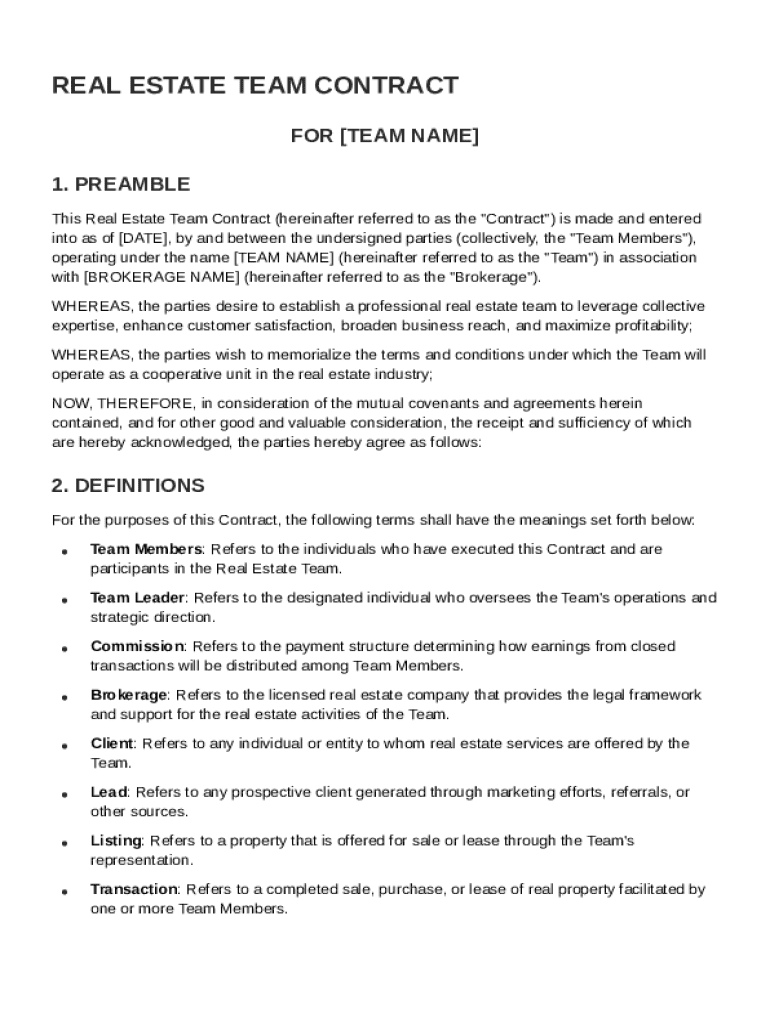
Real Estate Team Contract Form
Use a Real Estate Team Contract Template template to make your document workflow more streamlined.
What the team contract form does
A Real Estate Team Contract Form records how a real estate team will operate, including member roles, commission or compensation arrangements, lead ownership, expenses, confidentiality, responsibilities, dispute handling, and termination terms. The parties complete the agreement, review the business terms, and sign it to create a shared record of their arrangement. With signNow, a sender uploads the approved document, reviews detected fillable fields, routes signature requests, and stores the completed agreement with its audit trail. State brokerage rules and the underlying transaction may require additional review.
Legal standing of the team agreement
A Real Estate Team Contract Form can be admissible when parties demonstrate intent, consent, signer attribution, and reliable record retention under the federal ESIGN Act, 15 U.S.C. chapter 96, and applicable UETA or New York ESRA rules. These frameworks do not cover wills, codicils, testamentary trusts, court orders, or family-law decrees.

Who benefits from team agreements
The form fits independent practitioners, brokerage teams, and multi-office organizations that need written evidence of internal real estate responsibilities.
A solo real estate practitioner can use the form to document a small team’s commission split, lead ownership, expenses, confidentiality duties, and termination terms before collaboration begins. A regional brokerage can standardize team agreements with signNow templates, role-based administration, delegated sending, and audit trails while allowing each team to complete its approved business terms. A multi-office real estate enterprise can connect completed agreements to Salesforce, Microsoft 365, or cloud storage, giving administrators a controlled record of team membership and negotiated responsibilities.
These tasks are executed by both individual contributors and centralized administrators depending on organizational policy and required controls.
Features that support team contracts
Real Estate Team Contract Form workflows benefit from controlled templates, clear signer routing, mobile access, and records that remain available after completion.
Reusable template
A reusable signNow template can preserve approved commission, lead-allocation, expense, confidentiality, and termination language while allowing each new team member’s identifying details to be completed before routing.
Guided fields
Signature, initials, date, and text fields guide each participant through the agreement, reducing omitted approvals and making responsibilities visible before the contract is finalized.
Signer routing
Signer routing sends the agreement to the broker, team leader, and members in a deliberate sequence, helping the brokerage collect approvals without coordinating separate paper copies.
Audit trail
The completed agreement includes an audit trail recording signing activity, timestamps, and document history, giving the brokerage a retrievable record of how the contract was executed.
Mobile signing
Mobile apps allow team members to review and sign from supported devices, which is useful when agents are working away from the brokerage office or meeting clients.
Workflow integrations
Connections to Salesforce, Microsoft 365, Google Drive, or Box can move agreement data or signed files into existing brokerage workflows without rekeying every record manually.
How signNow handles the agreement
The signNow workflow moves the Real Estate Team Contract Form from an approved file to a signed, retrievable agreement.
Upload and detect: Upload the approved agreement and let signNow identify fillable areas. Assign each field: Assign text, signature, initials, and date fields to recipients. Send for signature: Send the agreement through the approved signer sequence. Store the evidence: Store the completed contract with its audit trail.
 Best ROI. Our customers achieve an average 7x ROI within the first six months.
 Scales with your use cases. From SMBs to mid-market, airSlate SignNow delivers results for businesses of all sizes.
 Intuitive UI and API. Sign and send documents from your apps in minutes.
How to complete the team contract
Follow these steps to prepare the approved agreement, collect every required signature, and preserve the completed record.
Upload the form:
Upload the approved Real Estate Team Contract Form to signNow. Check the fields:
Review detected fields and add missing signer fields manually. Route the agreement:
Assign broker, leader, and member recipients in signing order. Complete the form:
Review, sign, and complete every required field. Archive the record:
Download the signed contract and certificate of completion.
What the audit trail records
The audit trail documents how the Real Estate Team Contract Form moved from invitation to completed signatures, supporting later review of execution history.
Authenticate signer:
Capture timestamps:
Track document history:
Seal completion:
Connect audit events:
Retrieve the audit trail:
Recommended agreement workflow settings
Configure the agreement around verified signer identity, deliberate routing, retained execution evidence, and the brokerage’s applicable state-law record policy.
| Setting | Recommendation |
|---|---|
| Authentication method | Email verification with SMS authentication |
| Signature type | Legally binding electronic signature |
| Audit trail | Certificate of completion and action history |
| Document retention | Brokerage policy with state-law review |
| Encryption | TLS 1.2/1.3 and AES-256 protection at rest and transit information |
Security controls for signed team agreements
Transport encryption:
Stored encryption:
Security certification:
Information security:
Electronic signature laws:
Execution records:



Best practices for completing the agreement
Accurate party details, approved terms, deliberate routing, and controlled recordkeeping make this team agreement easier to administer and review.
Complete every negotiated business term
Verify identities and signer routing
Lock the approved agreement template
Preserve the signed record and audit trail
State-law limits to review
Real-estate deed
Family-law decree
State notarization
Wills and codicils
Processing stages for team agreements
Use a controlled sequence from approved drafting through signer delivery, completion, and preservation of the executed Real Estate Team Contract Form.
Prepare the agreement
Deliver to signers
Collect signatures
Complete and archive
Real Estate Team Contract Form troubleshooting
These answers address field assignment, signer verification, plan capabilities, enforceability, and preservation of completed team agreements.
Upload the approved Real Estate Team Contract Form as a PDF or supported document, then inspect the preview before placing fields. If text is not detected correctly, add fields manually and verify every commission, role, and signature area before sending.
Open the document’s field settings and confirm the field is assigned to the intended signer. A field assigned to the wrong recipient can prevent completion or collect a team member’s signature in the broker’s approval area.
Use signer authentication settings appropriate to the agreement’s risk. signNow supports email-based routing and stronger options such as SMS authentication; confirm each recipient’s phone number and email before resending the contract.
Business includes legally binding eSignatures, templates, mobile apps, and audit trails at $8 per user per month with annual billing. Business Premium is $15 per user per month annually and adds bulk send and kiosk mode.
ESIGN and UETA generally recognize electronic signatures when intent, consent, attribution, and record retention are established. For consumer-facing records, review the ESIGN disclosure requirements in 15 U.S.C. §7001(c) before routing.
Download the completed document and certificate of completion from signNow, then retain them under the brokerage’s applicable policy. State law and the agreement’s subject matter may require a longer period than an internal policy.
Key performance indicators that demonstrate SignNow's proven track record.
BE READY TO GET MORE
Get this form now!

If you believe that this page should be taken down, please follow our DMCA take-down process.