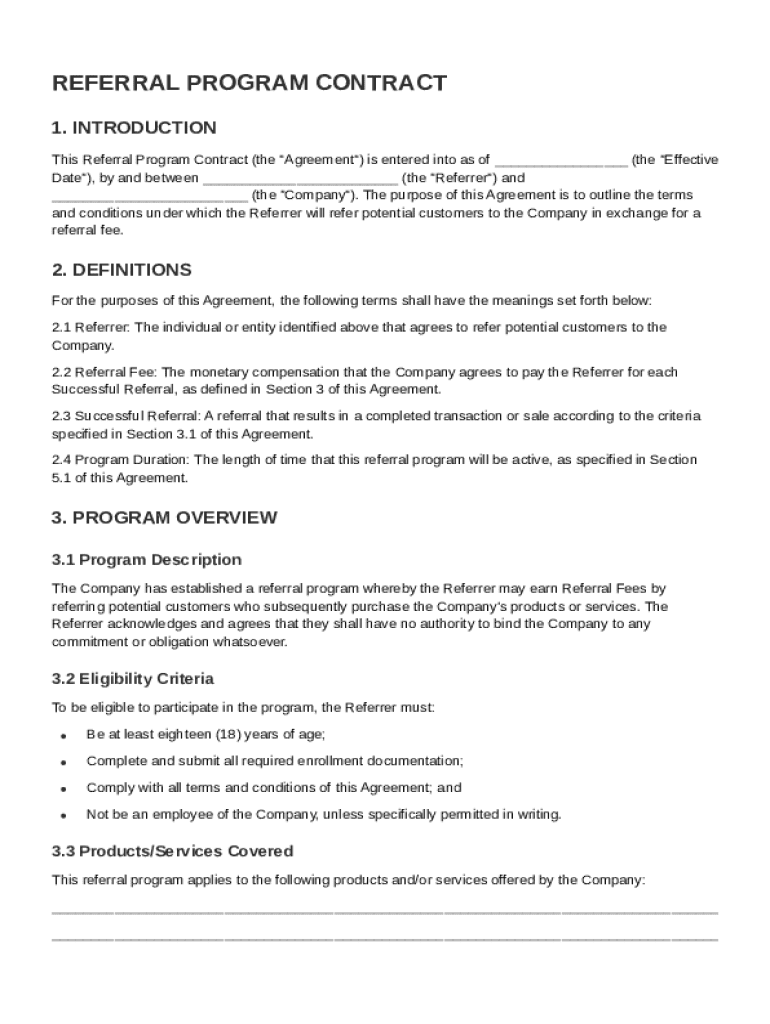
Referral Program Contract Form
Use a Referral Program Contract Template template to make your document workflow more streamlined.
What the Referral Program Contract Form does
Referral Program Contract Form is a business agreement used to record how one party introduces prospects or customers to another business and how the parties handle eligibility, compensation, confidentiality, payment, and termination. It is not an IRS or USCIS filing and has no universal federal filing deadline. In signNow, upload the contract, review auto-detected fields, assign each signature or date field, send it to the referral partner, and store the completed document with its audit trail. ESIGN and UETA can support its electronic execution when intent, consent, attribution, and reproducible records are established.
Who uses this referral contract form
Referral partners
Business development teams use Referral Program Contract Form to document introductions, define when a referral qualifies, set commission terms, and obtain signatures before sharing customer or opportunity information. A controlled template helps sales operations preserve approved language while signNow records delivery, signing, and completion events.
Business teams
Legal, finance, and sales operations teams use the form to approve referral relationships, confirm payment obligations, and retain executed agreements. They can route contracts for signature, export audit evidence, and connect completed records to systems used for partner management and accounting.
Business types that use referral contracts
Referral Program Contract Form helps businesses document partner introductions, compensation terms, and signing responsibilities before referral activity begins.
Solo consultants can use the form to document referral introductions, commission eligibility, confidentiality, and payment expectations before sending a prospect to another business. A reusable signNow template reduces repeated drafting while preserving a signed record for each relationship. Real estate and legal-services firms can route referral agreements between representatives, partners, and clients while preserving role-based signing order. signNow’s audit trail helps operations teams connect each completed contract to the responsible parties and transaction history. Growing enterprises can standardize partner agreements across regional sales teams, connect records with Salesforce or NetSuite, and manage access through administrative controls. Business Premium adds bulk send when the same referral terms must reach multiple partners.
These tasks are executed by both individual contributors and centralized administrators depending on organizational policy and required controls.
How the referral contract works
The signNow workflow turns the Referral Program Contract Form into a trackable agreement from upload through signing and storage.
Upload form: Upload the Referral Program Contract Form into signNow. Detect fields: signNow detects fillable areas for contract details and signatures. Assign signers: Assign fields to the referrer and receiving business. Complete contract: Send, sign, and store the completed agreement with its audit trail.
 Best ROI. Our customers achieve an average 7x ROI within the first six months.
 Scales with your use cases. From SMBs to mid-market, airSlate SignNow delivers results for businesses of all sizes.
 Intuitive UI and API. Sign and send documents from your apps in minutes.
What the referral contract audit trail records
The audit trail documents how each Referral Program Contract Form moved from delivery to completion, supporting attribution and later review.
Authenticate signer:
Capture timestamps:
Hash document:
Seal document:
Track actions:
Retrieve evidence:
Features for referral contract workflows
signNow connects the Referral Program Contract Form to field assignment, signer routing, audit evidence, reusable templates, and mobile review.
Field detection
Upload the Referral Program Contract Form and identify fillable fields before sending, reducing manual placement work when the template contains defined partner and commission sections.
Signer routing
Assign separate fields to the referrer and business representative so each party signs only the obligations and acknowledgments assigned to them.
Remote signing
Send the contract by email or a controlled signing link, allowing referral partners to review without coordinating an in-person meeting.
Audit trail
Capture timestamps, signer actions, and completion evidence with the agreement, creating a reviewable record of the referral transaction.
Reusable templates
Reuse an approved Referral Program Contract Form template while preserving consistent commission, confidentiality, payment, and termination language across partner agreements.
Mobile access
Use signNow mobile apps to review or sign referral agreements while working away from a desktop office.



Referral Program Contract Form challenges
Referral terms may omit commission rates, payment timing, territory limits, or termination rights, creating ambiguity when a referred customer converts. Referral partners may sign without confirming who owns customer data, how introductions are documented, or whether disclosures satisfy applicable privacy obligations. Multiple versions of the contract can produce inconsistent commission promises, signer responsibilities, and effective dates across partners. Manual follow-up makes it difficult to prove when each party reviewed, signed, and received the final Referral Program Contract Form.
Why referral contracts matter
A signed Referral Program Contract Form records the parties’ intent, referral obligations, compensation terms, and consent to electronic records. Under ESIGN and applicable UETA rules, an electronic contract can carry the same legal effect as a paper agreement when intent, attribution, consent, and reliable record retention are established.

State rules and exclusions
Notarization required
Wills and codicils
Court orders
Real-estate deeds
Security for referral agreements
Transport encryption:
Stored data:
Independent controls:
Security management:
U.S. eSignature:
Protected health data:
Recordkeeping practices for referral contracts
Clear retention, audit-trail, access, and version controls help preserve the business record created by each Referral Program Contract Form.
Set a retention rule for payment records
Export the audit trail with each contract
Limit access to partner information
Control contract versions before sending
Referral contract questions and troubleshooting
These answers address field detection, signer delivery, plan selection, electronic consent, evidence, and document exclusions for Referral Program Contract Form.
Upload the original Referral Program Contract Form again and inspect detected fields before sending. signNow templates and field assignment help separate referral partner obligations from the company representative’s signature fields.
Check the recipient email, signing order, and assigned role. Send a fresh invitation from the transaction rather than forwarding an old message, then confirm the signer can access the intended contract version.
The Business plan includes legally binding eSignatures, templates, audit trails, and mobile apps. Business Premium adds bulk send and kiosk mode; choose that plan when repeated partner routing requires those features.
For a consumer-facing referral arrangement, provide the ESIGN consumer disclosure and confirm the signer can access electronic records. 15 U.S.C. §7001(c) also addresses withdrawal procedures and paper-record rights.
Review the completed contract and audit trail together. ESIGN and UETA support electronic signatures when intent, consent, attribution, and record retention or reproduction can be demonstrated.
Do not use the Referral Program Contract Form for wills, codicils, testamentary trusts, court orders, or family-law decrees. ESIGN’s exclusions require the applicable paper, court, or state-law process instead.
Key performance indicators that demonstrate SignNow's proven track record.
BE READY TO GET MORE
Get this form now!

If you believe that this page should be taken down, please follow our DMCA take-down process.