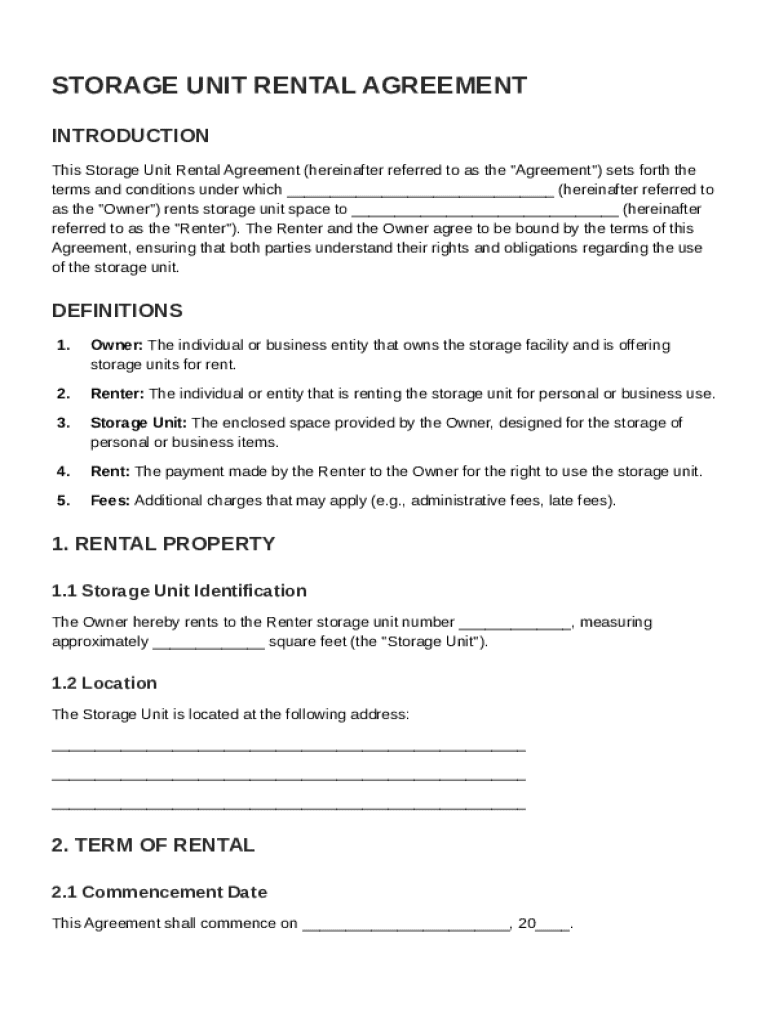
Storage Unit Contract Form
Use a Storage Unit Contract Template template to make your document workflow more streamlined.
What a storage unit contract does
A Storage Unit Contract Form is a written agreement between a storage facility and a renter describing the specific unit, rental charges, payment timing, access conditions, prohibited property, insurance responsibilities, default remedies, notices, and move-out requirements. The facility completes the commercial terms, the renter reviews them, and both parties sign. With signNow, upload the document, use the editor to detect or add fillable fields, send it to the renter, collect signatures, and store the completed agreement with its audit trail. State lien, notice, consumer-protection, and electronic-record rules may affect enforceability.
Who uses this storage contract
Storage facilities
Storage facility operators use the form for unit rental agreements, access rules, payment terms, default notices, and move-out obligations.
Property operations
Property teams use it for recurring locker rentals, location-specific details, and controlled electronic execution by renters and authorized staff.
Key storage contract features
The form connects unit-specific commercial terms with operational rules, signatures, and a retrievable record for each storage rental.
Unit details
Record the facility name, location, unit identifier, renter details, rental rate, due date, deposit, and access terms in one controlled agreement before occupancy begins.
Use rules
Specify prohibited property, insurance expectations, maintenance responsibilities, and access restrictions so renters receive the operational rules attached to their unit rental.
Default terms
Set out late-payment, default, lien, notice, and sale language for review against the facility’s state-specific self-storage requirements before distribution.
Signature fields
Use signNow fields for renter and facility signatures, initials, dates, and required acknowledgments, reducing missing approvals in recurring rental workflows.
Audit trail
A completed contract paired with signNow’s audit trail helps show who signed, when actions occurred, and which document was completed for the identified unit.
Reusable workflow
Templates and mobile apps let facility staff reuse approved language while completing location, unit, pricing, and renter-specific information during on-site leasing.
Recommended storage contract setup
Configure the Storage Unit Contract Form around verified renters, approved terms, documented signing activity, and controlled record access.
| Setting | Recommendation |
|---|---|
| Authentication method | Verified email with SMS OTP |
| Signature type | Electronic signature with intent evidence |
| Audit trail | Enable completion history and export |
| Document retention | Apply facility policy and state law |
| Encryption | TLS 1.2/1.3 and AES-256 |
How storage contract signing works
The signNow workflow moves the storage agreement from an approved template to a signed, retrievable record.
Upload form: Upload the approved Storage Unit Contract Form. Complete fields: Add unit, renter, pricing, and signature fields. Send agreement: Send the agreement to the verified renter. Archive record: Store the signed contract with its audit trail.
 Best ROI. Our customers achieve an average 7x ROI within the first six months.
 Scales with your use cases. From SMBs to mid-market, airSlate SignNow delivers results for businesses of all sizes.
 Intuitive UI and API. Sign and send documents from your apps in minutes.
How the storage contract audit trail works
The audit trail preserves evidence around the Storage Unit Contract Form after fields are completed, rather than replacing the contract setup process.
Authenticate signer:
Record timestamps:
Hash document:
Seal document:
Build certificate:
Retrieve evidence:
Why teams look for DocuSign alternatives
Organizations seek alternatives when they need different pricing models, stronger native automation, simpler bulk affidavit workflows, or more flexible identity-verification options than those available in a legacy envelope-based vendor.

Privacy and disclosure pitfalls
Storage contracts can expose names, addresses, access codes, and payment details when completed documents are emailed without redaction or controlled access. A missing consent record may leave a renter’s electronic communications preference undocumented when the storage agreement is signed remotely. Shared employee accounts can obscure who changed rental terms, unit identifiers, payment details, or access conditions before signature. Unrestricted links may let unintended recipients view a storage agreement containing tenant identity, emergency contacts, or facility access information.
Best practices for storage contracts
Accurate unit details, documented consent, controlled access, and organized records reduce disputes over storage occupancy and payment obligations.
Identify facility and unit terms
Capture informed renter consent
Control template and account access
Archive signed records securely
Security for storage contracts
Transport encryption:
Stored data:
Security certification:
Information security:
Electronic signatures:
Protected health data:



Storage contract use cases
Storage operators and property teams can adapt a controlled agreement workflow to recurring unit rentals and location-specific contract terms.
Storage facility manager
A storage facility manager can prepare a reusable agreement covering unit identification, rent, access rules, prohibited property, insurance, default notices, and move-out terms.
- Reusable storage agreement template
- Verified renter identity and email
Using signNow, the manager uploads the Storage Unit Contract Form, places renter and facility signature fields, sends it electronically, and retains the completed agreement with its audit trail. The workflow supports repeatable leasing while preserving the exact unit and pricing terms accepted by each renter.
Property operations team
A property operations team coordinating storage lockers across multiple buildings can standardize contract language while preserving location-specific unit and access information.
- Location-specific unit records
- Controlled approval before sending
The team can maintain an approved Storage Unit Contract Form template and delegate sending to authorized staff. signNow integrations such as Google Drive, Box, or Microsoft 365 can support document organization, while the audit trail records the signing sequence and completion history.
Mobile options for storage contracts
Storage Unit Contract Form workflows can use the signNow iOS and Android apps, with TLS-protected access through supported mobile operating systems and camera capture for paper records.
iPhone app iOS 15 or later Android app Android 9 or later Document capture Camera capture supported
Offline signing can help facility staff work without continuous connectivity, but synchronize completed records before relying on the final audit trail. Confirm device management, app permissions, camera quality, and account controls before deploying mobile signing across multiple storage locations.
Storage contract troubleshooting
Resolve field, signer, retention, and compliance questions before relying on a completed Storage Unit Contract Form.
Upload the Storage Unit Contract Form as a PDF or supported document, then use signNow’s editor to place renter, facility representative, date, initials, and signature fields. Business includes templates and audit trails, so verify every required term before sending.
Business is listed at $8 per user per month with annual billing and includes legally binding eSignatures, templates, mobile apps, and audit trails. Business Premium adds bulk send at $15 per user per month annually when many tenant agreements use the same structure.
Electronic execution generally requires intent, consent, attribution, and a retained reproducible record under ESIGN and applicable state law. For consumer-facing agreements, provide the ESIGN disclosure and confirm the renter can access electronic records before requesting signature.
If a renter cannot access the signing email, resend the invitation or use a controlled signing link after confirming the recipient’s identity. Avoid forwarding links broadly because the audit trail must connect the completed agreement to the intended signer.
signNow’s audit trail records signing activity, timestamps, and document history. Export the completed Storage Unit Contract Form and its audit record together, then preserve both under the facility’s retention policy and applicable state requirements.
A storage rental agreement is not automatically a HIPAA record. If it contains protected health information for a covered healthcare storage arrangement, confirm whether a BAA and HIPAA-compliant process are required; signNow identifies HIPAA compliance as requiring a BAA.
Key performance indicators that demonstrate SignNow's proven track record.
BE READY TO GET MORE
Get this form now!

If you believe that this page should be taken down, please follow our DMCA take-down process.