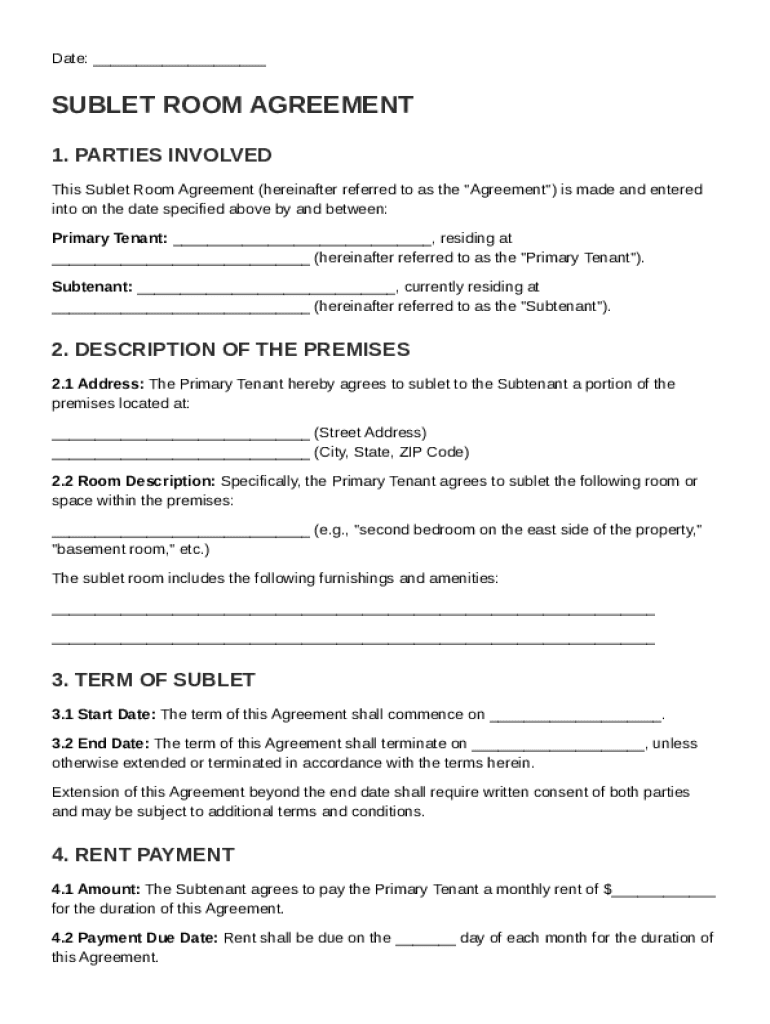
Sublet Room Contract Form
Use a Sublet Room Contract Template template to make your document workflow more streamlined.
What a sublet room contract does
A Sublet Room Contract Form records the arrangement under which an existing tenant permits another person to occupy a room or shared residence. It identifies the landlord, original tenant, subtenant, property, term, rent, deposit, utilities, house rules, and consent requirements. The original lease remains important because a sublet usually cannot override its restrictions. With signNow, the parties can upload the agreement, place fields, send it for electronic signatures, and retain the completed copy with an audit trail. ESIGN and UETA generally recognize qualifying electronic signatures, while state law controls housing requirements and exclusions.
Who uses a sublet room contract
Property management
Property managers and landlords use the form to document consent, room boundaries, rent, deposits, utilities, access, and house rules before approving a subtenant.
Residential occupants
Existing tenants and incoming subtenants use it to confirm occupancy dates, payment duties, maintenance responsibilities, guest limits, and obligations that remain subject to the original lease.
Key features for a room sublet contract
A structured Sublet Room Contract Form helps parties define occupancy, payment, consent, and signing responsibilities before the room changes hands.
Party details
Capture the landlord, original tenant, subtenant, property address, room description, and agreement dates in one structured document.
Payment terms
Record rent, deposits, utilities, payment dates, late charges, and other financial terms for clearer administration.
Signature fields
Assign signature, initials, and date fields to the landlord, tenant, and subtenant before sending.
Room conditions
Preserve house rules, access arrangements, guests, maintenance duties, and permitted-use conditions alongside the financial terms.
Flexible delivery
Send the agreement through email, mobile workflows, kiosk mode, or a shareable signing link based on the parties’ situation.
Audit evidence
Keep the executed agreement with signNow’s audit trail, timestamps, and signing history for later reference.
How the sublet contract works
A sublet agreement moves from accurate tenancy details to signed approval through a controlled digital workflow.
Prepare details: Upload the contract and confirm parties, dates, rent, deposit, and permitted-use terms. Add fields: Place signature, date, and initials fields for the landlord, subtenant, and tenant. Request signatures: Send the completed agreement by email or a shareable signing link. Store records: Download the executed contract and preserve its audit trail for your records.
What the audit trail records
For a Sublet Room Contract Form, the audit trail connects signer identity, document activity, and completion evidence without replacing the contract’s substantive terms.
Authenticate signer:
Capture timestamps:
Hash document:
Seal record:
Log actions:
Export evidence:
 Best ROI. Our customers achieve an average 7x ROI within the first six months.
 Scales with your use cases. From SMBs to mid-market, airSlate SignNow delivers results for businesses of all sizes.
 Intuitive UI and API. Sign and send documents from your apps in minutes.
Ways to send and sign the agreement
- Use the signNow web app when you need to upload the room sublet agreement, assign fields, and coordinate signatures from a desktop workflow.
- Use the signNow mobile app when landlords, tenants, or subtenants need to review and sign the agreement while away from an office.
- Use kiosk mode when parties sign together on one managed device, with each person completing their assigned fields during the same meeting.
- Generate a signing link when a property manager needs to share the same prepared sublet agreement with an identified signer without sending separate email instructions.
Platform requirements for signing
Complete the Sublet Room Contract Form through Chrome, Firefox, Safari, or Edge on Windows 11 or macOS. signNow mobile apps support iOS and Android, while TLS-secured connections protect data in transit.
Browser support Chrome, Firefox, Safari, and Edge Operating systems Windows 11, macOS, iOS, and Android Device access Desktop browsers and signNow mobile apps
Organizations using managed devices should confirm browser updates, mobile-app permissions, and access policies before sending the agreement. Enterprise deployments may also require API access, SSO provisioning, managed retention, or certificate configuration based on internal controls and the records involved.
Recommended workflow setup
Configure the signing workflow around the parties, lease consent, residential payment terms, and recordkeeping obligations of the room sublet.
| Setting | Recommendation |
|---|---|
| Authentication method | Email verification with SMS OTP |
| Signature type | Typed or drawn electronic signature |
| Audit trail | Enabled with completion certificate |
| Document retention | Follow state and lease records policy |
| Encryption | TLS 1.2/1.3 and AES-256 |
Security for sublet agreements
Transport encryption:
Stored encryption:
Security assurance:
Information security:
U.S. eSignature:
Protected health data:
Challenges when preparing a sublet agreement
Leaving the landlord’s consent, subtenant identity, or original tenant’s obligations unclear can create disputes about authorization and responsibility. Omitting rent, security deposit, utilities, dates, or permitted occupancy terms makes the agreement harder to administer and enforce. Using a sublet agreement without checking the underlying lease or state law can conflict with landlord restrictions or notice requirements. Sending unsigned or partially completed copies leaves parties uncertain about acceptance, effective dates, and the final governing terms.
Processing stages for the sublet agreement
The agreement progresses from verified tenancy details through signer delivery, completion, and organized record storage.
Document preparation
Delivery to signers
Signer turnaround
Completion and archival
Best practices for this sublet contract
Accurate parties, consistent lease terms, complete payment details, and controlled records make the signed agreement easier to administer and review.
Identify parties and premises completely
Document all payment obligations
Check the underlying lease first
Archive the signed record securely
Legal value of a signed sublet agreement
A signed Sublet Room Contract Form gives parties a dated record of consent, payment duties, occupancy terms, and room-use obligations. Under ESIGN and UETA, qualifying electronic signatures can carry the same legal effect as handwritten signatures, subject to state law, lease restrictions, and excluded document categories.

Troubleshooting sublet contract workflows
These answers address field detection, electronic-signature validity, consent, plan selection, landlord approval, and record evidence for this agreement.
Upload the agreement again as a readable PDF, then review signNow’s detected fields before sending. Auto-detection can miss handwritten or unusually formatted blanks, so verify every party, date, rent, deposit, and signature field manually.
A sublet contract may be signed electronically when the parties demonstrate intent, consent, attribution, and record retention. ESIGN, 15 U.S.C. ch. 96, and applicable state law, including UETA or New York ESRA, govern the analysis.
The Business plan includes templates and audit trails at $8 per user per month when billed annually. Business Premium is $15 and adds bulk send; Enterprise is $30 and adds advanced signer authentication and integrations.
If the agreement includes consumer-facing electronic records, provide the ESIGN disclosure required by 15 U.S.C. §7001(c), including paper-record access and withdrawal procedures. Obtain consent before relying on electronic delivery or signatures.
Check the underlying lease, landlord-consent requirement, property rules, and applicable state law before sending. signNow records signatures and audit events, but it does not determine whether the proposed sublet is authorized.
Use the completed PDF and signNow audit trail together. The audit trail can show signer actions, timestamps, and delivery events, while the contract supplies the agreed rent, term, property, and room-use obligations.
Key performance indicators that demonstrate SignNow's proven track record.
BE READY TO GET MORE
Get this form now!

If you believe that this page should be taken down, please follow our DMCA take-down process.