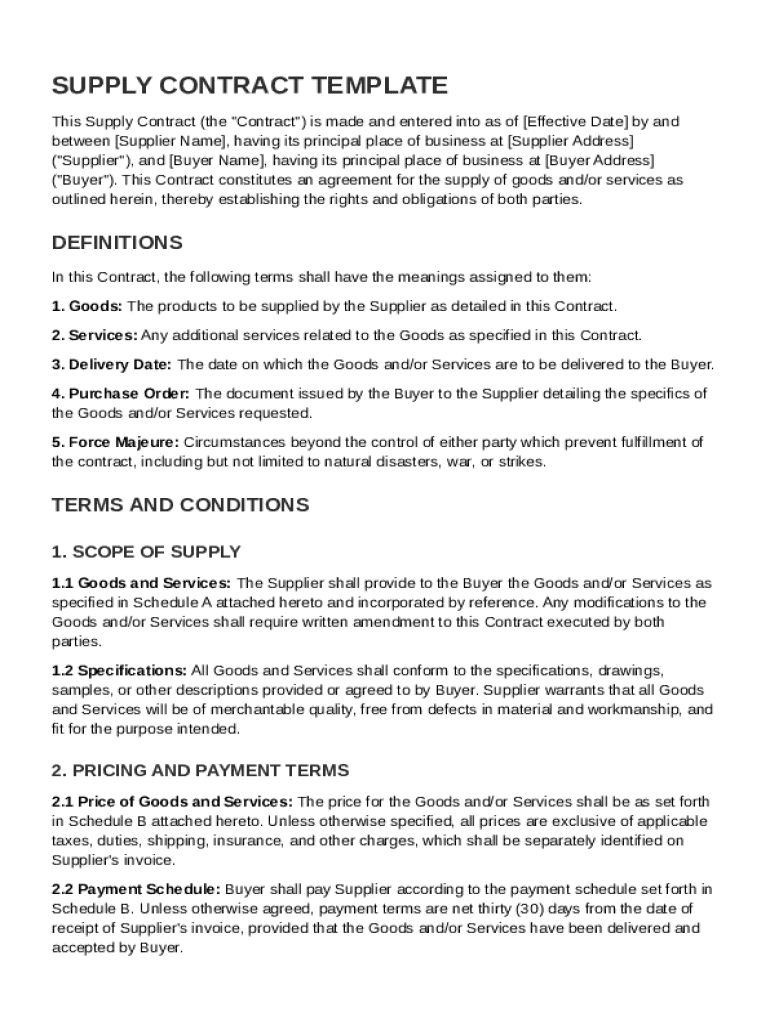
Supply Contract Form
Use a Supply Contract Template template to make your document workflow more streamlined.
What a supply contract form does
A Supply Contract Form records the commercial terms between a buyer and a supplier for goods or services. It commonly identifies the parties, products or services, quantities, prices, delivery dates, payment terms, warranties, and signatures. In signNow, upload the approved document, place or verify fillable fields, assign signing roles, and send it electronically. Each signer reviews the contract and applies an electronic signature; signNow then provides the completed document and audit trail. ESIGN and applicable state law generally support electronic business contracts when intent, consent, attribution, and reliable records are present.
Who uses supply contract forms
Procurement teams
Procurement teams use Supply Contract Form for supplier agreements, purchase terms, delivery schedules, pricing exhibits, and change orders requiring buyer and vendor signatures.
Manufacturers and distributors
Manufacturers and distributors use the form to document quantities, specifications, delivery obligations, warranties, and approved commercial terms with business suppliers.
Business types using supply contract forms
Supply Contract Form fits organizations that negotiate recurring purchases, supplier obligations, delivery terms, and commercial approvals.
Solo purchasing consultants can prepare supplier agreements, collect signatures, and preserve contract evidence without coordinating paper exchanges or maintaining separate signature files. Manufacturing businesses can standardize recurring supply contracts while updating product specifications, quantities, delivery terms, and pricing schedules for each approved vendor. Enterprise procurement departments can route high-volume supplier agreements through shared templates, delegated sending, role-based controls, and integrations with systems such as NetSuite or Procore.
These tasks are executed by both individual contributors and centralized administrators depending on organizational policy and required controls.
Features that support supply contracts
signNow connects document preparation, supplier signing, evidence capture, and downstream record handling for Supply Contract Form workflows.
Field preparation
Upload an existing Supply Contract Form and identify signature, date, initials, text, and checkbox fields before sending it to procurement staff or suppliers.
Role assignment
Assign buyer, supplier, and witness roles in signing order so each party completes the correct supply terms without circulating editable files by email.
Audit evidence
Capture supplier signatures, timestamps, signer actions, and document history in one audit trail that supports contract review and later dispute analysis.
Reusable templates
Reuse an approved Supply Contract Form template for recurring vendors while keeping pricing, delivery schedules, and product specifications editable where needed.
Mobile signing
Collect signatures from desktop or mobile devices, allowing suppliers and purchasing teams to complete contracts without coordinating an in-person meeting.
Workflow connections
Connect contract completion with Salesforce, NetSuite, Google Drive, Box, or Procore to reduce duplicate entry across purchasing and project records.
How to prepare a supply contract
Complete these steps to move Supply Contract Form from an approved draft to a signed, traceable supplier agreement.
Upload form:
Upload the approved Supply Contract Form. Check fields:
Let signNow detect fields, then verify them. Assign roles:
Assign buyer and supplier signing roles. Send document:
Send the contract by email or link. Store evidence:
Review completion evidence and download the signed copy.
 Best ROI. Our customers achieve an average 7x ROI within the first six months.
 Scales with your use cases. From SMBs to mid-market, airSlate SignNow delivers results for businesses of all sizes.
 Intuitive UI and API. Sign and send documents from your apps in minutes.
Recommended supply contract setup
Configure Supply Contract Form workflows around supplier identity, contract evidence, secure transfer, and controlled document access.
| Setting | Recommendation |
|---|---|
| Authentication method | Email verification with SMS OTP |
| Signature type | Legally binding electronic signature |
| Audit trail | Export certificate of completion |
| Document retention | Retain under procurement policy |
| Encryption | TLS 1.2 or 1.3 and AES-256 |
What the supply contract audit trail records
The audit trail documents signing evidence separately from the commercial terms written in Supply Contract Form.
Signer authentication:
Timestamp capture:
Action logging:
Document integrity:
Completion certificate:
Evidence export:
Security for supply contract records
Transport encryption:
Stored encryption:
Security reporting:
Information security:
Electronic signatures:
Protected health information:



Platform requirements for supply contracts
Supply Contract Form can be prepared and signed through supported desktop browsers, while signNow mobile apps provide access on iOS and Android devices. Use an up-to-date browser and a secure internet connection for document upload, field placement, authentication, and completion.
Browsers Chrome, Firefox, Safari, and Edge Desktop systems Windows and macOS desktop access Mobile access iOS and Android mobile apps
Organizations should also manage device access, user permissions, and storage destinations before sending supplier contracts. Teams using Salesforce, NetSuite, Google Drive, Box, or Procore should confirm administrator settings and integration permissions so completed Supply Contract Form records reach the intended business system.
Best practices for supply contract execution
Use document controls that preserve the commercial terms, signer identity, approval history, and final evidence for Supply Contract Form.
Confirm parties before preparing the form
Review every commercial term
Control the signing sequence
Archive the final evidence
Supply contract processing stages
Processing time depends on document readiness, signer availability, and internal approval requirements rather than a universal filing deadline.
Document preparation
Delivery to signers
Signer turnaround
Completion and archival
Supply contract risks to control
Incomplete execution
Performance dispute
Version dispute
Attribution challenge
Supply contract form troubleshooting questions
Use these answers to resolve field, authentication, compliance, and audit-trail questions while preparing a Supply Contract Form.
Upload the final Supply Contract Form to signNow, then use its field-detection tools or place required fields manually. Confirm supplier names, quantities, prices, delivery terms, and signature assignments before sending.
The Business plan includes legally binding eSignatures, templates, mobile apps, and audit trails. Business Premium adds bulk send, while Enterprise adds advanced signer authentication and conditional fields for complex supply workflows.
ESIGN and UETA generally recognize electronic signatures for business contracts when intent, consent, attribution, and record retention are established. Review state contract law and obtain legal advice for unusual procurement terms.
signNow encrypts data in transit with TLS 1.2 or 1.3 and at rest with AES-256. Its SOC 2 Type II and ISO 27001 certifications support security controls, but your organization remains responsible for access policies.
Use signNow’s audit trail to preserve signer identity, timestamps, actions, and the completed document. Export the certificate of completion with the contract and retain both according to your company’s procurement policy.
A signer can open the email or signing link without a signNow account in many workflows. Add SMS authentication or stronger controls when supplier identity, pricing, or regulated information requires additional verification.
Key performance indicators that demonstrate SignNow's proven track record.
BE READY TO GET MORE
Get this form now!

If you believe that this page should be taken down, please follow our DMCA take-down process.