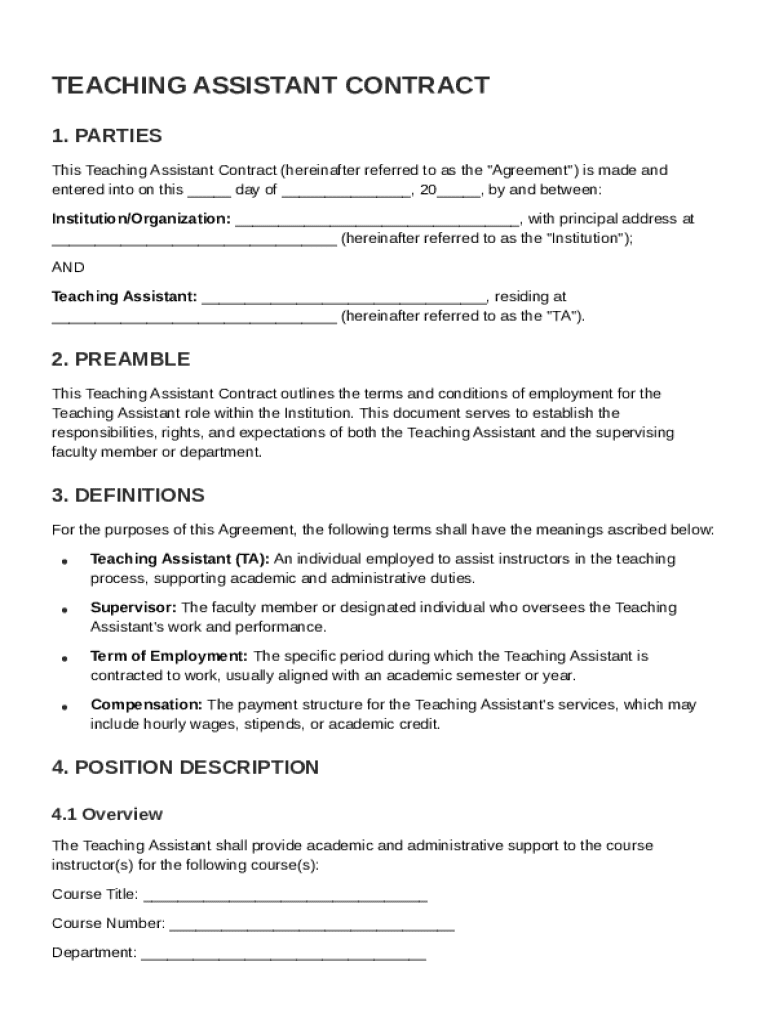
Teach Assistant Contract Form
Use a Teach Assistant Contract Template template to make your document workflow more streamlined.
What this contract form does
Teach Assistant Contract Form is a written agreement for documenting the responsibilities, expectations, and terms of a teaching-assistant engagement. It can identify the parties, describe assigned duties, record scheduling or payment provisions, and capture signatures in a single document. With signNow, the sender uploads the form, reviews or adds fillable fields, assigns each field to a recipient, and sends the document for electronic signing. The completed contract and audit trail provide an organized record of the signing event. Specific clauses and state-law requirements depend on the underlying engagement.
Features for this contract workflow
signNow organizes the Teach Assistant Contract Form from field preparation through signature collection, completion evidence, and controlled record storage.
Field placement
Upload the Teach Assistant Contract Form and place signature, date, initials, and text fields without rebuilding the document from scratch.
Signer roles
Assign each required field to the teacher, assistant, administrator, or other named participant so every obligation has a clear signer.
Remote signing
Send a completed contract by email or signing link, allowing recipients to review and sign without printing or scanning pages.
Audit trail
Capture invitation activity, signer actions, timestamps, and completion evidence in the audit trail associated with the contract.
Reusable template
Reuse a prepared Teach Assistant Contract Form template when an education provider executes similar assistant agreements repeatedly.
Mobile access
Access the document through signNow web and mobile apps when staff review or sign away from a desk.
How the contract workflow works
The signNow flow keeps the teaching-assistant agreement intact while routing each required field to the correct participant.
Upload: Upload the form Review: Review detected fields Assign: Assign each recipient Complete: Track completion
Complete the contract in signNow
Prepare Teach Assistant Contract Form by uploading it, checking detected fields, assigning recipients, sending invitations, and storing the signed record.
Upload:
Upload the contract PDF Detect fields:
Let signNow detect fillable fields Assign:
Assign fields to each signer Send:
Send the contract for signature Store:
Download the completed record
 Best ROI. Our customers achieve an average 7x ROI within the first six months.
 Scales with your use cases. From SMBs to mid-market, airSlate SignNow delivers results for businesses of all sizes.
 Intuitive UI and API. Sign and send documents from your apps in minutes.
Choose how to send and sign
- Use the signNow web app to upload Teach Assistant Contract Form, place fields, and send it when you need a full desktop editing workspace.
- Use the signNow mobile app when a teacher or administrator must review and sign Teach Assistant Contract Form from an iOS or Android device.
- Use kiosk mode for supervised completion on a shared device when multiple staff members need to complete Teach Assistant Contract Form in sequence.
- Share a signing link when recipients should open Teach Assistant Contract Form independently without receiving a separately addressed email invitation.
Configure a controlled signing workflow
Set authentication, signing, audit, retention, encryption, and access controls before sending Teach Assistant Contract Form to teachers or administrators.
| Setting | Recommendation |
|---|---|
| Authentication method | Email invitation with SMS verification |
| Signature type | Typed or drawn electronic signature |
| Audit trail | Enable certificate of completion |
| Document retention | Retain under written contract policy |
| Encryption | Use AES-256 and TLS protection |



Protect completed contract records
Data at rest:
Data in transit:
Security reporting:
Information security:
Electronic signatures:
Privacy controls:
Platform requirements for signing
Open Teach Assistant Contract Form through Chrome, Firefox, Safari, or Edge on Windows or macOS. signNow also provides iOS and Android apps for mobile review and signing.
Web browsers Chrome, Firefox, Safari, Edge Operating systems Windows, macOS, iOS, Android Mobile apps signNow iOS and Android apps
Organizations should manage browser updates, mobile permissions, and access controls before distributing this form. Teams using API access, SSO provisioning, or regulated workflows should confirm the selected signNow plan and configure authentication and certificate requirements before deployment.
Avoid privacy and signing mistakes
Placing a signer’s field under the wrong recipient can leave the assistant’s required signature unassigned and delay contract completion. Collecting student or staff information without a defined access policy can expose personal data in completed contract records. Skipping electronic-record consent for a consumer-facing signer can undermine the disclosure and access requirements under 15 U.S.C. §7001(c). Using a shared account instead of individual recipients weakens attribution evidence for the person who signed the contract.
Best practices for contract execution
Clear field assignment, version control, access limits, and record preservation reduce disputes about the teaching-assistant agreement.
Verify parties and assigned fields
Control the contract version
Preserve the complete record
Restrict access after signing
Troubleshoot signing and records
Resolve invitation, field, plan, enforceability, and retention questions before distributing the completed Teach Assistant Contract Form.
signNow Business includes templates, audit trails, mobile apps, and legally binding eSignatures. Upload the Teach Assistant Contract Form, map each signer, and place required fields before sending it for completion.
A missing signature field prevents completion because the assigned signer has no required action. Reopen the document in the editor, add a signature field to the correct recipient, then resend the updated Teach Assistant Contract Form.
If a recipient cannot open the document, confirm the invitation address, resend the request, and check spam filtering. A shareable signing link can provide another access route without changing the form content.
ESIGN and UETA generally recognize an electronic signature when intent, consent, attribution, and record retention are established. For consumer-facing use, review the electronic-record disclosure requirements in 15 U.S.C. §7001(c).
The Business plan includes 100 signature invites per user per year, with overage fees. Business Premium adds bulk send, while Enterprise adds advanced signer authentication and conditional fields.
Download the completed Teach Assistant Contract Form and its certificate of completion from signNow, then preserve both under your organization’s records policy. Legal retention depends on the contract’s subject and applicable state law.
Key performance indicators that demonstrate SignNow's proven track record.
BE READY TO GET MORE
Get this form now!

If you believe that this page should be taken down, please follow our DMCA take-down process.