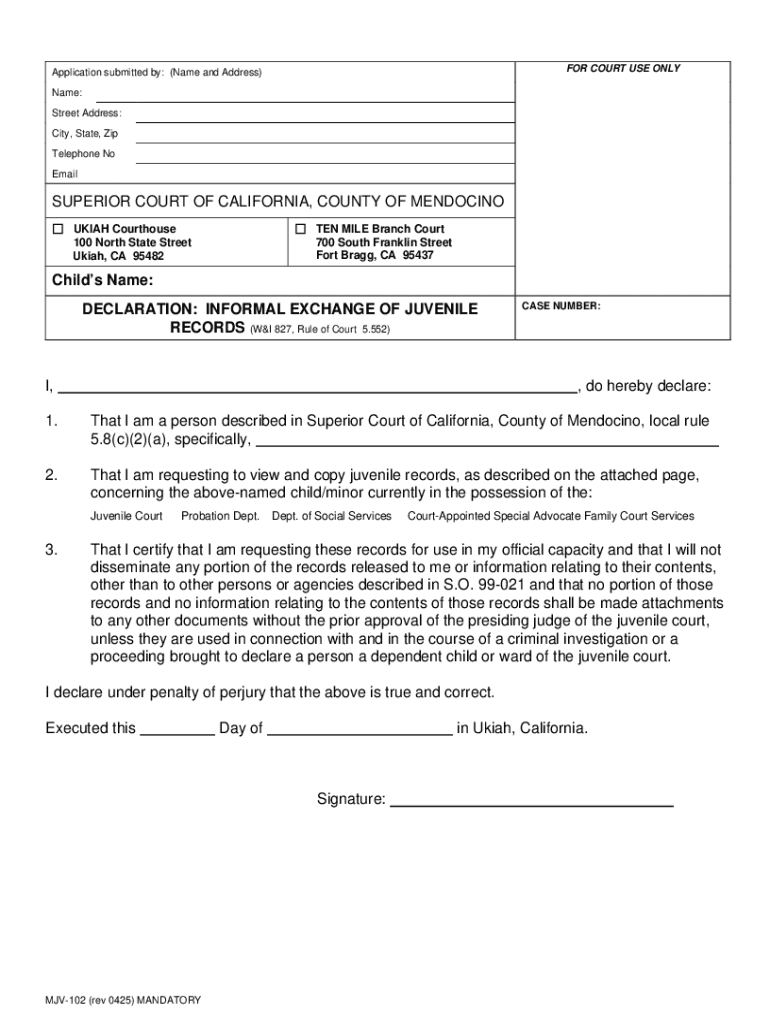
J 16 Juvenile Case File Access Form
Use a J 16 juvenile case file access fillable pdf template to make your document workflow more streamlined.
What the J 16 form does
The J 16 Juvenile Case File Access Form records a request to access a juvenile case file and documents the people, authority, scope, and approvals involved. It is not a general contract, tax form, or employment form. In signNow, an authorized office uploads the J 16 document, reviews detected fields, assigns requester and approval roles, and sends it for completion. SignNow records signing activity and produces a completion history. The records office must still verify legal authority, protect juvenile information, and apply the retention and disclosure rules that govern its jurisdiction.
Who uses this juvenile access form
Records offices
Juvenile courts, county records offices, and authorized legal representatives can use the J 16 Juvenile Case File Access Form to document a request for controlled access to a juvenile case file. Staff should identify the requester, confirm authority, and limit disclosed material to the approved scope.
Authorized requesters
Attorneys, guardians, caseworkers, and other authorized parties may use the form when a juvenile file request requires documented consent or review. Contracts, NDAs, HR forms, invoices, and broad commercial documents are separate workflows and should not replace this specialized access request.
Features for J 16 access requests
signNow connects the J 16 Juvenile Case File Access Form workflow from field preparation through authorized signing, audit evidence, and controlled record handling.
Field detection
Upload the J 16 form and review signNow’s detected fields before assigning the requester, custodian, approval, and date fields needed for a complete access record.
Role assignment
Assign each signature, acknowledgment, or date field to a named participant so the completed J 16 request shows who supplied or approved each entry.
Controlled delivery
Send the juvenile access request through email or a controlled signing link, giving authorized recipients a clear route to review and complete the document.
Audit trail
Capture timestamps, signer actions, and completion history with the form so administrators can examine the transaction record when access decisions are reviewed.
Mobile signing
Use mobile apps to review or sign the J 16 request when an authorized caseworker is away from a records office and policy permits mobile access.
Organized records
Store the completed form and its completion evidence together, helping the records team preserve the request’s scope, authorization, and signing history.
How the juvenile access form works
The process moves from document preparation to authorized review, signature, and controlled record storage.
Upload the form: Upload the juvenile access form to signNow. Check fields: Review detected fields and add missing signer, date, or acknowledgment fields. Assign roles: Assign each field to the authorized requester or records custodian. Complete and store: Send the completed request and retain the signed record with its audit trail.
 Best ROI. Our customers achieve an average 7x ROI within the first six months.
 Scales with your use cases. From SMBs to mid-market, airSlate SignNow delivers results for businesses of all sizes.
 Intuitive UI and API. Sign and send documents from your apps in minutes.
How the audit trail records J 16 activity
The audit trail documents the signing event separately from the juvenile access request’s substantive authorization and scope.
Authenticate signer:
Capture timestamp:
Hash document:
Seal record:
Verify history:
Export evidence:
Choose a signing method for this form
- Use the signNow web app when a juvenile records office prepares, reviews, and sends the form from a desktop workflow.
- Use the signNow mobile app when an authorized caseworker needs to review or sign the access request away from the office.
- Use kiosk mode when a records counter provides a controlled device for an authorized requester to complete the form onsite.
- Use a shareable signing link when approved recipients need direct access without a separate email-by-email invitation.
Recommended setup for juvenile access requests
Configure the J 16 workflow around verified requester identity, limited access, complete audit evidence, and controlled storage.
| Setting | Recommendation |
|---|---|
| Authentication method | Two-factor authentication for authorized signers |
| Signature type | Typed or drawn electronic signature |
| Audit and retention | Export completion record with signed form |
| Encryption | TLS 1.2/1.3 and AES-256 protection |
| User provisioning | Role-based access through managed users |
Signer authentication and certificates
Two-factor authentication:
ID verification:
PKI signatures:
X.509 certificates:
Timestamp evidence:
Audit history:
Platform requirements for this form
The J 16 Juvenile Case File Access Form can be prepared through signNow using Chrome, Firefox, Safari, or Edge on Windows or macOS. Authorized users can also review signing requests through signNow mobile apps on iOS and Android, subject to their organization’s device and access policies.
Browsers Chrome, Firefox, Safari, and Edge Operating systems Windows, macOS, iOS, and Android Device access Desktop browser and mobile app access
Organizations handling juvenile records should use managed devices, current browser security updates, and role-based access controls. Teams requiring system-to-system intake can evaluate API access, SSO provisioning, and connected storage with their signNow administrator. The platform choice does not replace state confidentiality rules or the records office’s authorization process.
Record-keeping practices for J 16
Preserve the completed access request, its authorization details, and its audit evidence under the records office’s applicable retention and confidentiality policy.
Export the signed form and audit trail
Confirm the governing retention rule
Archive with restricted access
Check scope before archival
Troubleshooting J 16 form workflows
These answers address field detection, authorization, audit evidence, protected records, plan selection, and mobile access for this juvenile case file request.
Upload the original J 16 Juvenile Case File Access Form again and confirm that the file is a supported PDF or document format. In signNow, review detected fields before sending; manually add fields when the source file contains no usable form controls.
Check that every required field is assigned to the correct signer or recipient. signNow templates and role assignments can separate requester information from records-office approval, reducing incomplete submissions caused by unassigned fields.
Business includes legally binding eSignatures, audit trails, templates, mobile apps, ISO 27001, and SOC 2. For juvenile records involving protected health information, HIPAA compliance requires a BAA and appropriate organizational controls.
Use signNow’s audit trail to review timestamps, signer actions, and the completion history. ESIGN and UETA support electronic signatures when intent, consent, attribution, and record retention requirements are satisfied; state confidentiality rules still govern file access.
Business Premium includes bulk send, which can help when an office sends the same J 16 request structure repeatedly. For an isolated request, upload the document directly and assign the specific authorized participants instead.
The signNow mobile apps support document review and signing on iOS and Android. Confirm that the device is managed under the organization’s juvenile-records policy before opening or storing sensitive case information on it.
Key performance indicators that demonstrate SignNow's proven track record.
BE READY TO GET MORE
Get this form now!

If you believe that this page should be taken down, please follow our DMCA take-down process.