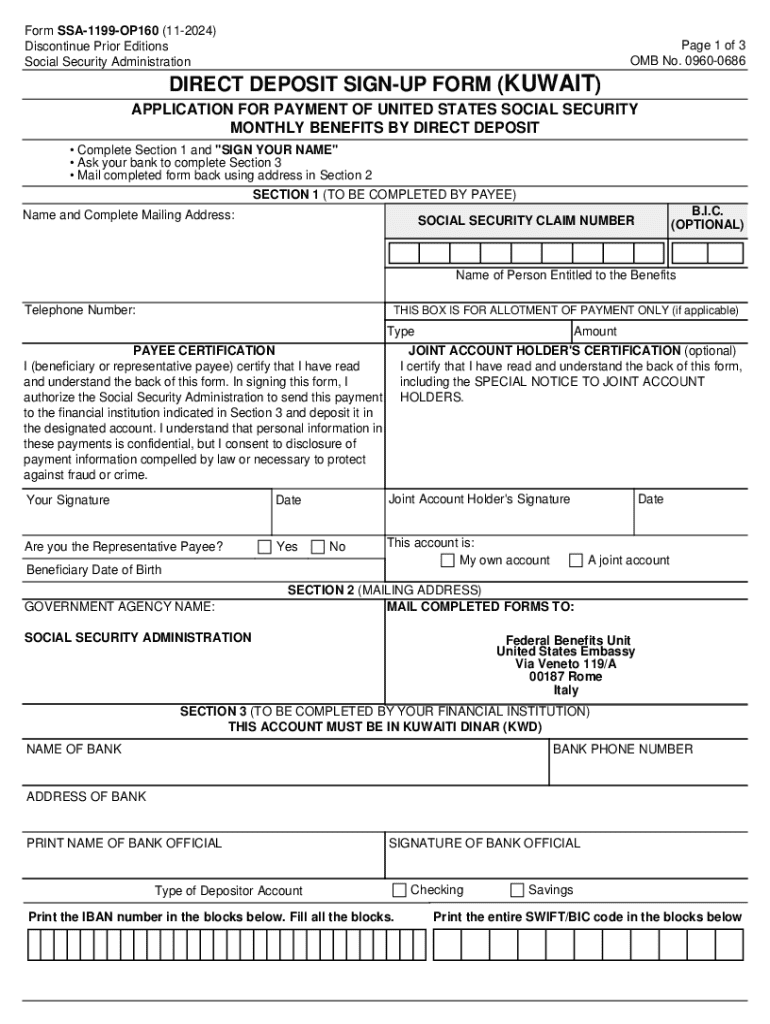
Direct Deposit Sign Up Form Kuwait
Use a DIRECT DEPOSIT SIGN UP FORM KUWAIT template to make your document workflow more streamlined.
What the Kuwait form does
The Direct Deposit Sign Up Form Kuwait is an employee authorization record for providing bank details to an employer or payroll administrator for direct-payroll deposits. It generally identifies the employee, financial institution, account type, routing information, account number, and authorization signature. The form is not a federal IRS filing and has no IRS filing deadline. Employers should verify the exact fields and authorization language required by their payroll provider, bank, and applicable state law. With signNow, an employer can upload the form, detect fields, send it, collect an electronic signature, and retain the completed record with an audit trail.
Who uses this direct deposit form
Payroll departments
Payroll departments collect employee banking details, verify authorization, and retain the signed Kuwait form with completion evidence before changing direct-deposit instructions.
U.S. employers
U.S. employers use the form for employee onboarding, account changes, and replacement of outdated payroll deposit authorizations.
How this form moves through signNow
The signNow workflow turns the Kuwait direct deposit form into a controlled electronic record from upload through employee authorization and archival.
Upload form: Upload the Kuwait direct deposit form to signNow. Detect fields: Auto-detect fillable banking and signature fields. Send form: Send the prepared form to the employee. Store record: Store the completed form with its audit trail.
Choose the right signing method
- Use the signNow web app when preparing the Kuwait direct deposit form on a desktop and coordinating multiple payroll or finance reviewers.
- Use the signNow mobile app when employees need to complete bank details and sign the Kuwait direct deposit form from an iOS or Android device.
- Use kiosk mode when staff assist employees onsite and need each person to complete the Kuwait direct deposit form on a shared device.
- Use a shareable signing link when distributing the Kuwait direct deposit form through an internal portal, email, or payroll communication.
How the audit trail protects records
The audit trail records identity, timing, document integrity, and retrieval details after a Kuwait direct deposit form is completed through signNow.
Signer authentication:
Timestamp capture:
Document hashing:
Tamper sealing:
Event logging:
Trail export:
 Best ROI. Our customers achieve an average 7x ROI within the first six months.
 Scales with your use cases. From SMBs to mid-market, airSlate SignNow delivers results for businesses of all sizes.
 Intuitive UI and API. Sign and send documents from your apps in minutes.
Recommended form workflow setup
Configure the Kuwait direct deposit workflow around sensitive banking information, signer attribution, audit evidence, controlled access, and the employer’s documented payroll retention policy.
| Setting | Recommendation |
|---|---|
| Authentication method | Email verification with SMS OTP |
| Signature type | Typed or drawn electronic signature |
| Audit trail | Detailed completion history and timestamps |
| Document retention | Organization-defined payroll retention schedule |
| Encryption and provisioning | AES-256 storage with role-based access |
Signer authentication and certificates
PKI support:
X.509 certificates:
Two-factor authentication:
SMS OTP:
ID verification:
Signing evidence:
Use mobile devices for signing
Employees can review the Kuwait direct deposit form through signNow mobile apps for iOS and Android, including workflows that use camera-based document capture and offline signing.
Mobile apps iOS and Android apps Offline signing Offline signing support Document capture Camera document capture
Mobile signing is useful when payroll staff collect the Kuwait form away from a desk. Confirm that the device is managed, the screen is private, and the completed banking record synchronizes to the employer’s controlled signNow workspace before payroll processing.



Processing stages for this form
The Kuwait direct deposit form moves through preparation, controlled delivery, employee authorization, and archival before payroll updates the payment instruction.
Prepare the form
Deliver to signer
Signer turnaround
Complete and archive
Retain and protect signed records
Keep the signed Kuwait direct deposit form and its audit evidence according to the payroll record schedule that applies to your organization and state.
Document the applicable retention rule
Export the audit trail with the form
Archive banking information securely
Validate every banking field before sending
Risks from incomplete authorization
Payroll deposit failure
Consent evidence gap
Disputed bank change
Weaker transaction evidence
Privacy and disclosure pitfalls
Bank account numbers and routing details can remain visible to unauthorized recipients when access permissions are broader than the payroll team requires. A signer may complete the Kuwait direct deposit form without reviewing the electronic-record disclosure or confirming consent to use electronic signatures. Shared links sent through unmanaged channels can expose employee banking information to unintended viewers or allow access after the intended signing period. A completed form may lack reliable evidence if identity checks, timestamps, or the final audit trail are not retained with the signed record.
Legal standing of electronic authorization
A signed Direct Deposit Sign Up Form Kuwait can provide evidence of employee authorization when intent, consent, attribution, and record reproducibility are established under ESIGN, 15 U.S.C. ch. 96, and applicable state law, including UETA or New York ESRA. Wills, court orders, and other statutory exceptions remain outside this framework.

Features for this direct deposit workflow
signNow provides document preparation, electronic signing, audit evidence, mobile completion, integrations, and controlled handling for the Kuwait direct deposit authorization process.
Field detection
Upload the Kuwait form and let signNow identify fillable employee, bank, account, and signature fields before sending it for completion.
Electronic signing
Collect a typed or drawn employee signature while preserving the signing event and authorization record.
Audit trail
Capture timestamps, signer actions, and completion history for payroll review and later record retrieval.
Mobile completion
Use mobile apps when employees complete the Kuwait form away from a payroll desk or office.
Workflow connections
Connect completed authorizations with storage or business systems such as Google Drive, Box, NetSuite, or Microsoft 365.
Data protection
Protect sensitive routing and account details through controlled access, encryption, and documented retention procedures.
Troubleshoot direct deposit signing
Resolve field, access, identity, plan, payroll, and electronic-consent issues before relying on a signed Kuwait direct deposit authorization.
Upload the original Kuwait form again and confirm that its fields are readable. signNow’s auto-detection depends on document structure; manually place fields when labels or bank-detail boxes are not detected correctly.
Open the signing request from the latest email or link, then verify the recipient address. If access still fails, ask the sender to resend the request rather than forwarding an older invitation.
Use SMS OTP or another configured authentication method before signing. Stronger attribution supports the electronic-record evidence required under ESIGN and applicable state law, but the employer remains responsible for selecting appropriate controls.
Business includes legally binding eSignatures, audit trails, templates, and mobile apps at $8 per user per month when billed annually. Business Premium adds bulk send and kiosk mode at $15 per user per month annually.
A completed form is not a payroll-system update by itself. Export or route the signed record through the employer’s payroll process, then independently verify the requested banking change under internal controls.
For employee banking information, provide the required electronic-record disclosure and ensure the signer can access and retain the record. ESIGN, 15 U.S.C. §7001(c), governs consumer disclosures where applicable.
Key performance indicators that demonstrate SignNow's proven track record.
BE READY TO GET MORE
Get this form now!

If you believe that this page should be taken down, please follow our DMCA take-down process.