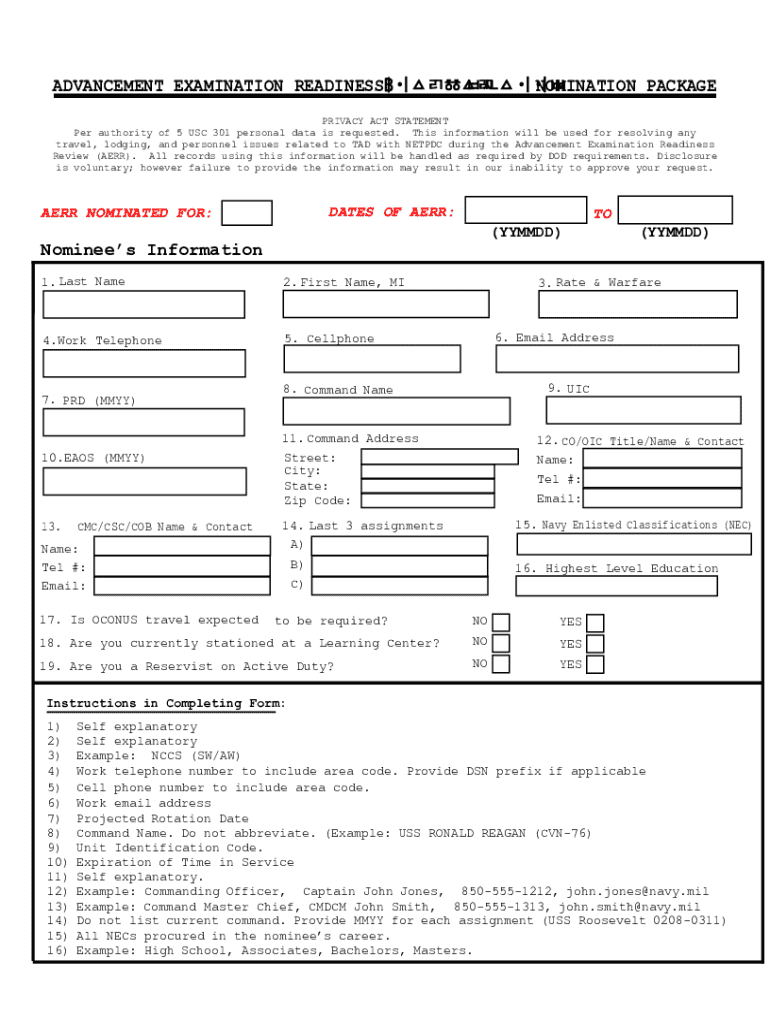
Nomination Package Form
Use a Nomination Package template to make your document workflow more streamlined.
What the nomination package does
A Nomination Package Form collects the information, approvals, and signatures needed to document a nomination decision. Because the name does not identify a single federally issued form, its required fields, issuing authority, filing deadline, and legal effect depend on the organization and program using it. In signNow, a sender uploads the package, places and assigns fillable fields, sends it to the nominee or reviewers, and receives a signed record with an audit trail. ESIGN and UETA generally recognize electronic records when intent, consent, attribution, and reliable reproduction are established; exclusions such as wills and court filings still apply.
Who benefits from nomination packages
Nomination Package Form workflows fit individual submitters, review committees, and organizations managing repeat nominations across departments.
Solo consultants can use a reusable Nomination Package Form template to collect nominee details, supporting explanations, and an electronic signature without rebuilding the document for each submission. Human resources and committee teams can route nomination packages through assigned reviewers, preserving the final approval record and signNow audit trail for internal recognition or advancement decisions. Large organizations can connect nomination workflows with Salesforce, Microsoft 365, or enterprise storage, applying access controls and repeatable routing across departments while retaining authorized records.
These tasks are executed by both individual contributors and centralized administrators depending on organizational policy and required controls.
How the nomination package works
signNow turns the Nomination Package Form into a controlled digital workflow from upload through completed, auditable storage.
Upload document: Upload the Nomination Package Form document. Add assigned fields: Place and assign nominee and signer fields. Send package: Send the package through signNow routing. Store completion: Review signatures and store the completed record.
Features that support nomination packages
signNow combines structured fields, signer routing, mobile completion, audit evidence, reusable templates, and connected storage for nomination workflows.
Assigned fields
Upload the Nomination Package Form and place name, contact, date, initials, and signature fields where nominees and reviewers must complete them. Clear assignments reduce omissions and make the requested information easier to review before signing.
Signing order
Send the completed package to each nominee or approving party in a defined sequence. Recipient assignments clarify who supplies information, who signs, and who receives the final record without relying on email instructions alone.
Audit trail
Capture signer actions, timestamps, and document history with the completed package. The resulting record helps demonstrate when the nomination was reviewed and signed, supporting internal review under ESIGN and UETA.
Reusable template
Reuse a prepared Nomination Package Form template when the same nomination process repeats. Templates preserve field placement and routing logic, reducing manual rebuilding while allowing authorized users to update nominee-specific information.
Mobile signing
Complete the package from signNow’s web or mobile applications when nominees work remotely or on site. Mobile access keeps the form process moving without requiring printed pages or an in-person handoff.
Connected records
Connect nomination records to supported services such as Salesforce, Microsoft 365, Google Drive, or NetSuite. Routing documents into existing systems reduces duplicate entry and keeps the signed package available to authorized teams.
 Best ROI. Our customers achieve an average 7x ROI within the first six months.
 Scales with your use cases. From SMBs to mid-market, airSlate SignNow delivers results for businesses of all sizes.
 Intuitive UI and API. Sign and send documents from your apps in minutes.
Mobile options for nomination forms
signNow mobile apps support Nomination Package Form completion on iOS and Android devices. Users can work with the document through the app, including offline signing workflows and camera-based document capture where the device and application support those functions.
Mobile apps iOS and Android Offline work Offline signing available Document capture Camera-based capture
Organizations should manage mobile access through approved devices, user permissions, and retention procedures. Regulated teams should confirm that authentication, audit-trail retrieval, storage, and any required API or SSO configuration match their internal controls before deploying the nomination workflow.



Security for nomination documents
Transport encryption:
Stored data:
Security assurance:
Information security:
Protected health data:
Electronic signatures:
Inside the nomination audit trail
The audit trail documents how each Nomination Package Form moved from signer authentication through completion, preservation, and authorized retrieval.
Signer authentication:
Timestamp capture:
Document history:
Tamper evidence:
Event logging:
Audit export:
Best practices for nomination packages
A controlled field, routing, identity, and records process makes each Nomination Package Form easier to review and defend.
Map every required field
Set a deliberate signing order
Verify each signer
Preserve the final record
Risks of an incomplete package
Incomplete nomination
Missing signature
Identity ambiguity
No audit trail
Uncontrolled revisions
Nomination package form troubleshooting
Resolve field, signer, plan, and compliance questions before treating a completed Nomination Package Form as final.
How can I correct a missing nominee field?
Open the Nomination Package Form document in signNow, edit the fillable field, and resend the revised document. Business plans include templates and audit trails; preserve the original record and document why the correction was made. ESIGN and UETA support electronic records when intent, attribution, and reproducibility are maintained.
How can I handle an unverified signer identity?
Use signNow authentication options appropriate to the document’s risk, including email verification or stronger controls available on eligible plans. Enterprise adds advanced signer authentication. Record the authentication event in the audit trail and avoid treating an unsigned nomination as complete.
Does signNow Business include an audit trail?
Yes. signNow’s Business plan includes audit trails, templates, legally binding eSignatures, and mobile apps. The audit trail records signing activity and supports evidence of intent and attribution. Export and retain the completed Nomination Package Form according to your organization’s records policy.
Key performance indicators that demonstrate SignNow's proven track record.
BE READY TO GET MORE
Get this form now!

If you believe that this page should be taken down, please follow our DMCA take-down process.