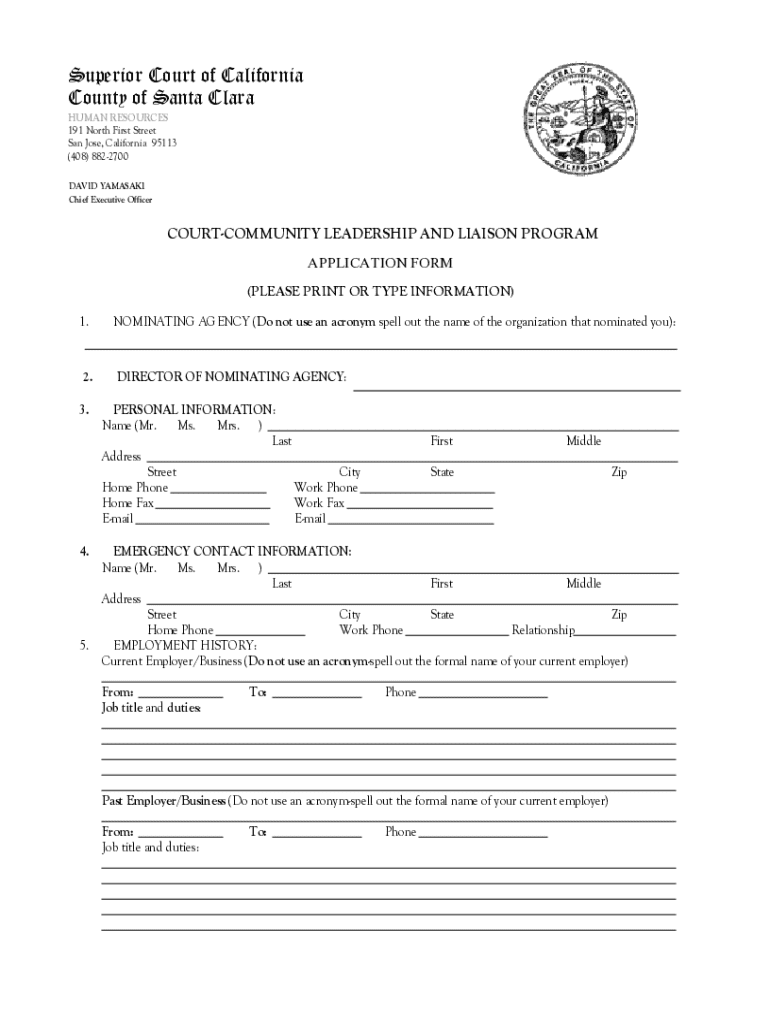
Court Community Leadership And Liaison Program Application Form
Use a Court community Leadership And Liaison Program Application Form template to make your document workflow more streamlined.
What this application form does
The Court Community Leadership And Liaison Program Application Form is a structured document for collecting information and approvals from people seeking participation in a court community leadership and liaison program. Because the form’s issuing authority, official field list, filing deadline, and state-specific requirements are not identified here, applicants should follow the instructions supplied by the responsible court or program office. signNow can convert the PDF into a fillable workflow, route it to designated signers, capture consent and signature events, and preserve the completed record with an audit trail.
Who uses this application form
Program applicants
Court program applicants use the form to provide requested background, contact, service, and participation information before review by authorized program personnel.
Court administrators
Court administrators or liaison coordinators review submissions, request corrections, and retain signed applications according to applicable court and records policies.
How the application works online
The workflow moves from the original application PDF to verified fields, signer delivery, completed signatures, and an auditable electronic record.
Upload form: Upload the Court Community Leadership And Liaison Program Application Form PDF. Check fields: Review detected fields and add missing applicant information fields. Send securely: Send the completed application to authorized signers by email. Archive record: Store the signed form with its audit trail.
Complete the application in signNow
Use the source application and the responsible program office’s instructions while preparing this signNow workflow.
Upload document:
Upload the current application PDF to signNow. Verify fields:
Review detected fields against the source application. Assign participants:
Assign applicant and reviewer fields carefully. Send application:
Send the application through the approved signing workflow. Retain evidence:
Download the signed form and audit trail.
 Best ROI. Our customers achieve an average 7x ROI within the first six months.
 Scales with your use cases. From SMBs to mid-market, airSlate SignNow delivers results for businesses of all sizes.
 Intuitive UI and API. Sign and send documents from your apps in minutes.
Recommended application setup
Configure the application around signer identity, signature evidence, secure transmission, and the retention policy issued by the responsible court or program office.
| Setting | Recommendation |
|---|---|
| Authentication method | Email verification with SMS for sensitive applications |
| Signature type | Typed or drawn electronic signature |
| Audit trail | Retain completion certificate and action history |
| Document retention | Follow the responsible program office’s written policy |
| Encryption | Use TLS in transit and AES-256 at rest |
Privacy and disclosure pitfalls
The completed application may expose addresses, phone numbers, employment details, or other personal information when recipients receive unrestricted copies. Sending the form without documented electronic-record consent can create uncertainty about whether an applicant agreed to transact electronically. Shared templates or broad team permissions can let unauthorized users alter the application or access completed applicant records. Using the application for a court filing, family-law decree, or other excluded document can leave required formalities unsatisfied.
Application processing timeline
No official preparation, signing, or filing deadline is provided for this form; confirm each timeframe with the responsible court or program office.
Prepare the application
Deliver to signers
Collect signatures
Complete and archive
What the audit trail records
The audit trail links the Court Community Leadership And Liaison Program Application Form to signer activity, completion evidence, and the retained final document.
Authenticate signer:
Capture timestamp:
Seal record:
Export evidence:
Review integrity:
Archive securely:
Best practices for this application
Accuracy, signer clarity, and controlled record handling matter because this application’s official instructions and receiving authority are not identified in the supplied form name.
Verify the official application version
Assign fields to the correct person
Document electronic consent clearly
Control completed application records



Security for application records
Transport encryption:
Stored data:
Security certification:
Information security:
Electronic signatures:
Health information:
Troubleshooting the application workflow
Resolve the issues that affect completion, signer consent, evidence, and lawful use of the Court Community Leadership And Liaison Program Application Form.
Upload the exact Court Community Leadership And Liaison Program Application Form PDF, then use signNow’s field detection and manually verify every applicant, contact, acknowledgment, and signature field before sending.
The Business plan includes templates and audit trails, while Business Premium adds bulk send. Choose Business Premium when the same Court Community Leadership And Liaison Program Application Form must reach many applicants.
Use signNow’s signer authentication options, including SMS verification where appropriate, and retain the completed form with its audit trail. ESIGN and UETA support electronic signatures when intent, consent, attribution, and record reproduction are established.
For consumer-facing applicants, provide the electronic-record disclosure required by 15 U.S.C. §7001(c), including paper access and withdrawal procedures. Do not rely on the signature event alone to establish consent.
A completed application may be admissible when the record shows signer intent, consent, attribution, integrity, and reliable reproduction. ESIGN and applicable state law, including UETA or New York ESRA, govern the transaction.
If the form is being used for a will, family-law decree, court filing, or another ESIGN exception, do not represent signNow as replacing required formalities. Confirm the applicable court or state rule before electronic execution.
Key performance indicators that demonstrate SignNow's proven track record.
BE READY TO GET MORE
Get this form now!

If you believe that this page should be taken down, please follow our DMCA take-down process.