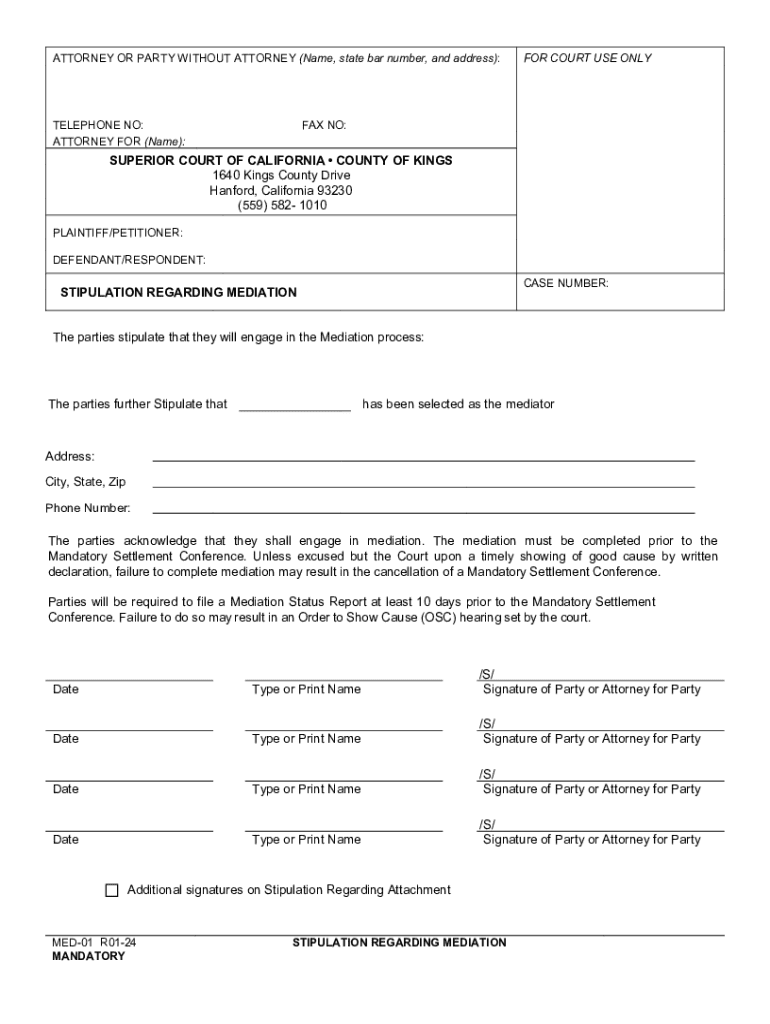
Mediation And Arbitrationsuperior Court Of Cacounty Form
Use a Mediation And ArbitrationSuperior Court Of CACounty template to make your document workflow more streamlined.
What this county dispute form does
The Mediation And Arbitrationsuperior Court Of Cacounty Form is a county-level record for documenting a mediation or arbitration matter and the parties’ related acknowledgments. In practical terms, the user uploads the supplied form, checks names, case details, dates, and required provisions, then assigns the appropriate fields to each participant. signNow can detect fillable areas, route the document for electronic signatures, and preserve the completed form with an audit trail. The exact filing, notarization, and submission requirements still depend on the issuing court and applicable California law.
Who uses this county court form
Mediation professionals
Mediation professionals use the form to document negotiated terms, participant consent, settlement provisions, and signatures in one organized record.
Arbitration participants
Arbitration participants use it to record agreed procedures, submissions, rulings, and acknowledgments before preserving the completed matter file.
Who benefits from this county form workflow
The form is most useful when several participants must review, acknowledge, or sign the same mediation or arbitration record.
Solo mediators can prepare participant acknowledgments and settlement-related records without rebuilding the county form for every matter. Small law firms can route mediation or arbitration documents to clients, opposing parties, and counsel while retaining one completed matter file. Enterprise legal departments can standardize county-form workflows, delegate sending, and preserve audit trails across distributed dispute-resolution teams.
These tasks are executed by both individual contributors and centralized administrators depending on organizational policy and required controls.
 Best ROI. Our customers achieve an average 7x ROI within the first six months.
 Scales with your use cases. From SMBs to mid-market, airSlate SignNow delivers results for businesses of all sizes.
 Intuitive UI and API. Sign and send documents from your apps in minutes.
Key features for county dispute forms
Mediation and arbitration teams can organize the county form, assign signing responsibilities, and preserve a clear record without changing the document’s substantive legal terms.
Field detection
Upload the county mediation or arbitration document, then review detected fields before assigning each required signature, date, initials, or text field.
Signer routing
Send the completed mediation record to the correct participants in a defined sequence, reducing missed signatures and unclear responsibility for each section.
Electronic signing
Capture participant intent through electronic signatures, with signing activity associated with the document and its completion record for later review.
Audit trail
Keep the completed county form with its audit trail, helping counsel, administrators, and participants connect the signed record to the signing events.
Reusable templates
Use reusable templates for recurring mediation agreements or arbitration submissions while reviewing every matter-specific name, date, and provision before sending.
Remote access
Route documents from desktop or mobile workflows when participants are not in one location, while preserving the same completed document record.
How the county form workflow works
The signing workflow keeps the county form intact while directing each required action to the correct mediation or arbitration participant.
Upload form: Upload the supplied county form Check details: Review names, case details, and provisions Assign signers: Assign fields to each participant Store record: Complete, download, and preserve the record
Quick steps for completing this form
Complete the county form in signNow by checking the document first, routing each field correctly, and preserving the final signed record.
Upload form:
Upload the county document into signNow. Review fields:
Review detected fields and correct assignments. Send document:
Add participants and send invitations. Complete record:
Collect signatures and download the record.
Inside the audit trail for this form
A signNow audit trail connects the county form to signer activity, timestamps, document history, and the final record for later review.
Authenticate signer:
Capture timestamp:
Protect document:
Seal record:
Track activity:
Export evidence:
Recommended county form setup
Set up the document around participant identity, signing intent, court requirements, and a retained copy of the completed county record.
| Setting | Recommendation |
|---|---|
| Authentication method | Email verification with SMS code |
| Signature type | Electronic signature with recorded intent |
| Audit trail | Detailed completion record retained |
| Document retention | Follow the county and matter policy |
| Encryption | TLS 1.2/1.3 and AES-256 protection |
Best practices for this county form
Careful version control and filing verification matter because county mediation and arbitration procedures can impose requirements beyond the signature workflow.
Verify the county form before sending
Assign every required field carefully
Retain the signed form and audit trail
Confirm court submission requirements
Troubleshooting this county form
Use these answers to resolve field, participant, consent, plan, and court-procedure questions before treating the completed form as final.
Check the uploaded PDF’s page order and field placement, then use signNow’s field detection and manually correct any missing or misplaced signature, date, or text fields before sending.
Business includes legally binding eSignatures, templates, audit trails, and mobile apps at $8 per user per month with annual billing. Confirm the plan’s current invite allowance before sending multiple matters.
signNow states that ESIGN and UETA compliance supports electronic transactions, but the county court may impose separate filing, notarization, or personal-appearance requirements. Verify those requirements before relying on electronic execution.
Use participant-specific fields and review the routing order before sending. If the wrong person signs, void or correct the transaction according to your matter process and preserve the resulting audit history.
For consumer-facing records, ESIGN requires disclosure of the right to paper, electronic-access capability, and procedures for withdrawing consent under 15 U.S.C. §7001(c). Apply those disclosures where the transaction qualifies.
Business Premium adds bulk send at $15 per user per month with annual billing. It may help repeated county-form workflows, but review each matter’s names, dates, and provisions individually.
Key performance indicators that demonstrate SignNow's proven track record.
BE READY TO GET MORE
Get this form now!

If you believe that this page should be taken down, please follow our DMCA take-down process.