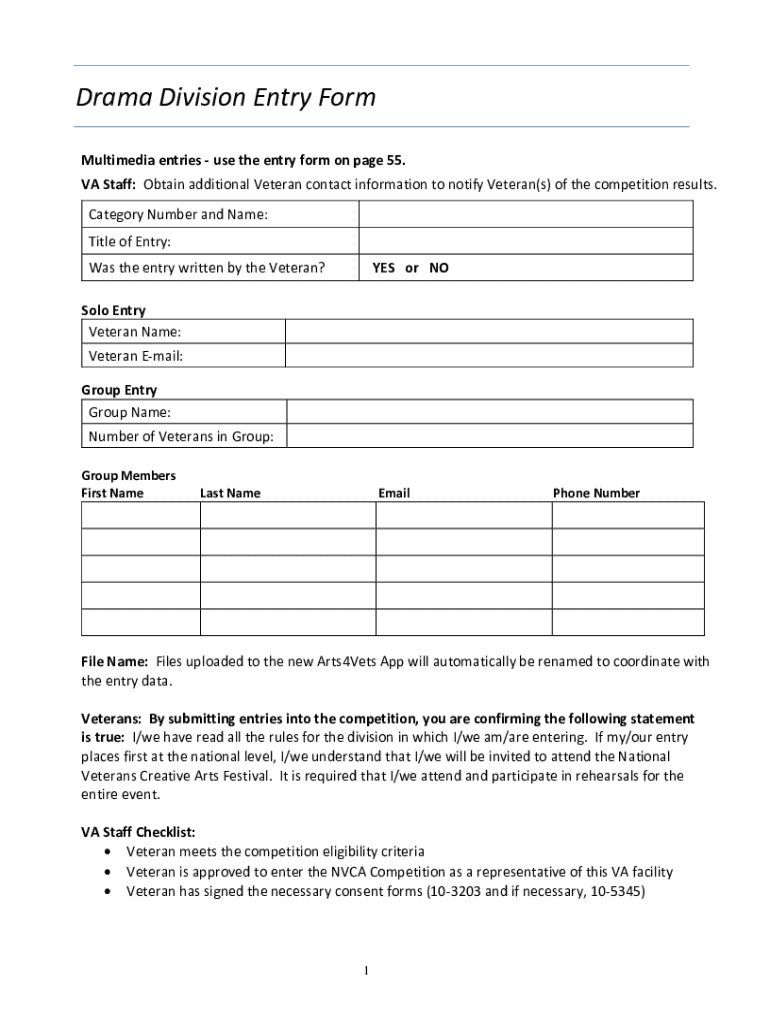
Drama Division Entry Form
Use a Drama Division Entry Form template to make your document workflow more streamlined.
What the Drama Division Entry Form does
The Drama Division Entry Form is a document used to collect information and signatures for a drama-division process; the supplied materials do not identify its issuing agency, required fields, filing deadline, or statutory purpose. In signNow, a sender uploads the approved file, reviews or adds fillable fields, assigns those fields to named signers, and sends the request. Signers review the document, provide required information, and apply their electronic signatures. The completed PDF and audit trail can then be retained according to the organization’s applicable policy.
How to complete the entry form
Prepare the approved file in signNow, verify its fields, route it to the right signers, and preserve the completed record.
Upload form:
Upload the approved Drama Division Entry Form file. Check fields:
Review detected fields and add missing signature, date, or text fields. Assign signers:
Assign each field to the correct signer and set the signing order. Finish workflow:
Send the request, monitor completion, and download the signed record.
Legal standing for business use
A signed Drama Division Entry Form may be evidence when the signer demonstrates intent, consents to electronic records, can be identified, and the record remains reproducible. ESIGN and applicable UETA laws generally support electronic transactions, but wills, certain court orders, family-law decrees, and other statutory exclusions remain outside that framework.

Security controls for the form
Storage encryption:
Transport encryption:
Security reporting:
Security management:
Electronic signatures:
Signer verification:
 Best ROI. Our customers achieve an average 7x ROI within the first six months.
 Scales with your use cases. From SMBs to mid-market, airSlate SignNow delivers results for businesses of all sizes.
 Intuitive UI and API. Sign and send documents from your apps in minutes.
Platform requirements for signing
The Drama Division Entry Form can be prepared and signed through a current web browser on Windows or macOS. signNow also provides mobile apps for iOS and Android, allowing signers to review the form and complete assigned fields from supported mobile devices.
Browsers Chrome, Firefox, Safari, and Edge Desktop systems Windows and macOS computers Mobile systems iOS and Android mobile devices
Organizations should manage access through approved devices, workspace permissions, and documented retention procedures. Teams connecting the form to business systems should also review API, SSO, and identity requirements for their selected signNow plan. Confirm browser versions, mobile availability, and any network controls before deployment.



Processing stages for the entry form
Use a controlled sequence from document preparation through signer delivery, completion, and archival; the form materials do not specify a statutory processing deadline.
Prepare the form
Deliver to signers
Collect signatures
Complete and archive
Record-keeping practices for this form
Preserve the completed Drama Division Entry Form, its audit trail, and the policy that governs retention, access, and deletion.
Set the retention rule before sending
Export the audit trail with the form
Archive signed records securely
Separate final records from drafts
What the audit trail records
The audit trail documents the technical and signer events that connect the completed Drama Division Entry Form to its signing process.
Authenticate signer:
Capture timestamps:
Hash document:
Seal record:
Log activity:
Export evidence:
Pricing considerations for this workflow
For a Drama Division Entry Form workflow, signNow pricing and plan capabilities are verified below; competitor values remain unverified where the supplied reference contains no data.
| Features | signNow | DocuSign | Adobe Sign | PandaDoc | Dropbox Sign |
|---|---|---|---|---|---|
| Annual starting price | $8/user/month Business plan | Not verified | Not verified | Not verified | Not verified |
| Free trial availability | 7 days, no card required | Not verified | Not verified | Not verified | Not verified |
| Bulk send availability | Business Premium includes bulk send | Not verified | Not verified | Not verified | Not verified |
| Audit trail availability | Included with Business plan | Not verified | Not verified | Not verified | Not verified |
| HIPAA support | Available with required BAA | Not verified | Not verified | Not verified | Not verified |
Troubleshooting the entry-form workflow
Resolve field, plan, identity, retention, and legal-scope questions before treating a completed Drama Division Entry Form as the final record.
Upload the approved Drama Division Entry Form rather than a draft, then inspect signNow’s detected fields. Add or correct fields manually before assigning recipients, because automatic detection does not establish which fields your process requires.
The signNow Business plan includes templates, audit trails, and legally binding eSignatures at $8 per user per month with annual billing. Business Premium adds bulk send at $15 per user per month. Confirm plan limits before sending large batches.
A signNow audit trail records signing activity and supports the evidence needed to show attribution and timing. ESIGN and applicable UETA law also require intent, electronic-record consent, and reproducible records; review consumer disclosures when the signer is a consumer.
If the Drama Division Entry Form contains protected health information, use a signNow workflow with the required business associate agreement. HIPAA’s retention rule is six years under 45 CFR §164.530(j), while state rules may require longer retention.
Use signNow’s authentication options, including SMS one-time passwords or stronger controls available under the selected plan, when email access alone is insufficient. Document the identity process in internal procedures and preserve the resulting audit evidence with the completed form.
ESIGN and UETA generally support electronic signatures when intent, consent, attribution, and record reproducibility are present. They do not cover wills, codicils, certain court orders, or family-law decrees, so confirm the Drama Division Entry Form’s legal purpose before routing it electronically.
Key performance indicators that demonstrate SignNow's proven track record.
BE READY TO GET MORE
Get this form now!

If you believe that this page should be taken down, please follow our DMCA take-down process.