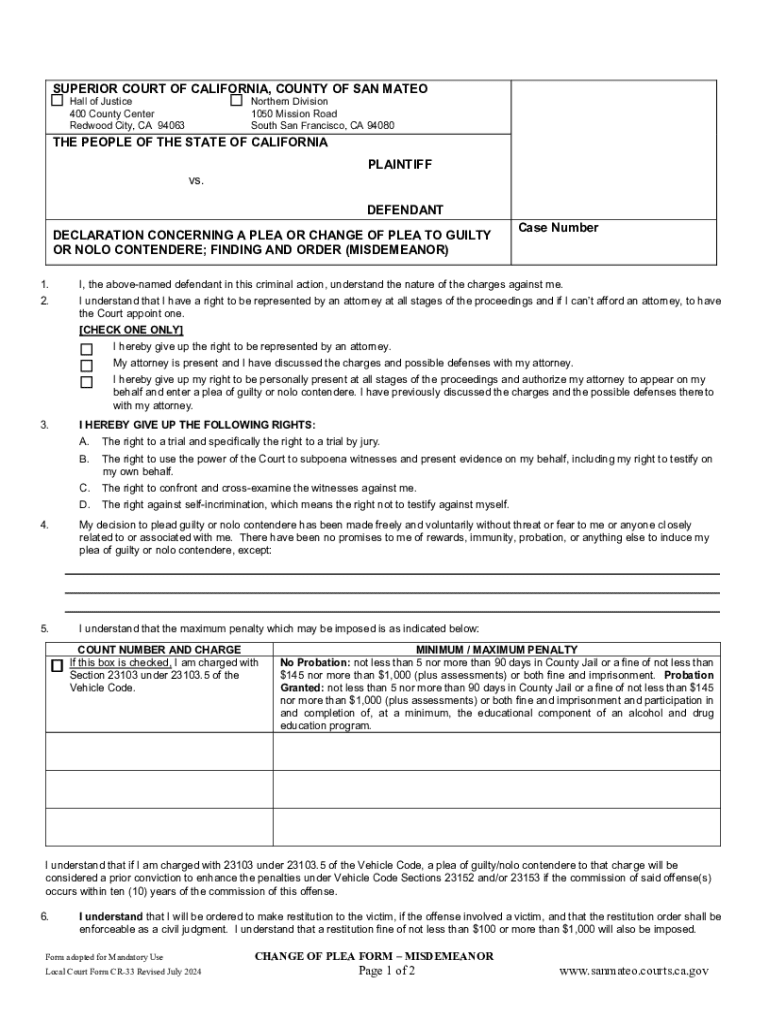
Declaration Concerning A Plea Or Change Of Plea To Guilty Or Nolo Form
Use a Declaration Concerning A Plea Or Change Of Plea To Guilty Or Nolo template to make your document workflow more streamlined.
What this plea declaration does
The Declaration Concerning A Plea Or Change Of Plea To Guilty Or Nolo Form records a defendant’s decision to plead guilty or nolo contendere, or to change an existing plea, in a criminal proceeding. It generally identifies the defendant, court, case, charge, requested plea, rights and consequences acknowledged, and required signatures. The exact fields and acceptance procedure depend on the issuing court and state law. signNow can upload the court-provided document, detect fillable fields, route assigned signatures, and preserve the completed record, but court acceptance must be confirmed before electronic submission.
Who benefits from a controlled workflow
The form is most useful to legal teams that must coordinate accurate plea information, participant signatures, and a reproducible case record.
A criminal defense attorney can prepare the declaration from the court-approved template, verify the charge and plea language, and route it to the defendant for review and signature with an audit trail. A public defender’s office can use reusable signNow templates for recurring plea-change matters while restricting access to assigned case teams and preserving each completed declaration separately. A court-connected legal department or enterprise legal team can standardize authorized workflows, but must still follow the specific clerk, judge, and state-court requirements governing electronic acceptance.
These tasks are executed by both individual contributors and centralized administrators depending on organizational policy and required controls.
Complete the plea declaration online
Use signNow to prepare the declaration, route it to the required participants, and preserve the signed record.
Upload the form:
Upload the completed plea declaration and check every required field before sending. Review case details:
Confirm the defendant, case, charge, and plea information matches the court record. Assign signers:
Assign the defendant, attorney, and other required participants to signature fields. Complete and store:
Send the declaration, then download the completed copy and audit trail.
Avoid errors in the plea declaration
Entering a plea or charge that does not match the court docket can create inconsistencies requiring correction before acceptance. Leaving defendant, counsel, judge, or case-number fields incomplete can delay review and signature routing. Using an outdated local template may omit language required by the court or state criminal procedure rules. Sending the declaration without confirming signer identity can weaken the record connecting the signed document to the defendant.
 Best ROI. Our customers achieve an average 7x ROI within the first six months.
 Scales with your use cases. From SMBs to mid-market, airSlate SignNow delivers results for businesses of all sizes.
 Intuitive UI and API. Sign and send documents from your apps in minutes.
Set up a controlled plea workflow
Configure the declaration workflow around signer identity, court recordkeeping, and the applicable state or local filing procedure.
| Setting | Recommendation |
|---|---|
| Authentication method | Email link with SMS OTP |
| Signature type | Typed or drawn electronic signature |
| Audit trail | Export the completed audit trail |
| Document retention | Retain under applicable court policy |
| Encryption | AES-256 at rest and TLS 1.2/1.3 |
Choose a signing method for the declaration
- Use the signNow web app when counsel or court staff prepare the declaration on a desktop, verify fields, assign signers, and monitor completion.
- Use the signNow mobile app when authorized participants review or sign the plea declaration away from an office, subject to court acceptance.
- Use kiosk mode for supervised signing on one device when a clerk or authorized representative manages the participant’s signing session.
- Generate a shareable signing link when the authorized recipient needs a controlled way to open and sign the assigned declaration.
How the audit trail supports this form
The signNow audit trail documents the signing sequence separately from the plea declaration’s substantive legal statements.
Authenticate signer:
Record timestamp:
Protect document:
Seal evidence:
Export records:
Control retrieval:
Protect the signed plea record
PKI signatures:
X.509 certificates:
Two-factor authentication:
SMS OTP:
ID verification:
Signing evidence:
Follow reliable plea-form practices
Accuracy, signer attribution, and preservation matter because this declaration may become part of a court-controlled criminal case record.
Verify the court-approved wording
Assign each participant carefully
Export the audit trail
Follow the applicable retention rule
Check court and state exclusions
Verify electronic filing
Follow state procedure
Excluded under ESIGN
Exclusions may apply
Court rules control



Troubleshoot plea declaration signing
Resolve field, identity, acceptance, and recordkeeping questions before submitting this court-related declaration.
Upload the court-approved Declaration Concerning A Plea Or Change Of Plea To Guilty Or Nolo Form as a PDF, then use signNow’s field detection and manually verify every field. The Business plan includes templates and audit trails for repeat use.
A typed or drawn signature can satisfy ESIGN and UETA when the signer intends to sign, consents to electronic records, and the record remains reproducible. Confirm that the relevant court accepts electronic signatures before relying on this method.
The Business plan costs $8 per user per month when billed annually and includes legally binding eSignatures, templates, mobile apps, and audit trails. Business Premium adds bulk send and kiosk mode at $15 per user per month annually.
Use SMS OTP or another available authentication control when the court or counsel requires stronger attribution. signNow records the signing event and action history, but authentication requirements remain subject to court and state procedure.
Export the completed document and audit trail after signing, then store them according to the court, attorney, or agency record policy. ESIGN requires retention and accurate reproduction, but it does not set one universal retention period for this plea form.
ESIGN and UETA generally recognize electronic signatures, but they exclude wills, testamentary trusts, court orders, official court filings, and certain family-law documents. Ask the court clerk or attorney whether this declaration is accepted electronically in the relevant proceeding.
Key performance indicators that demonstrate SignNow's proven track record.
BE READY TO GET MORE
Get this form now!

If you believe that this page should be taken down, please follow our DMCA take-down process.