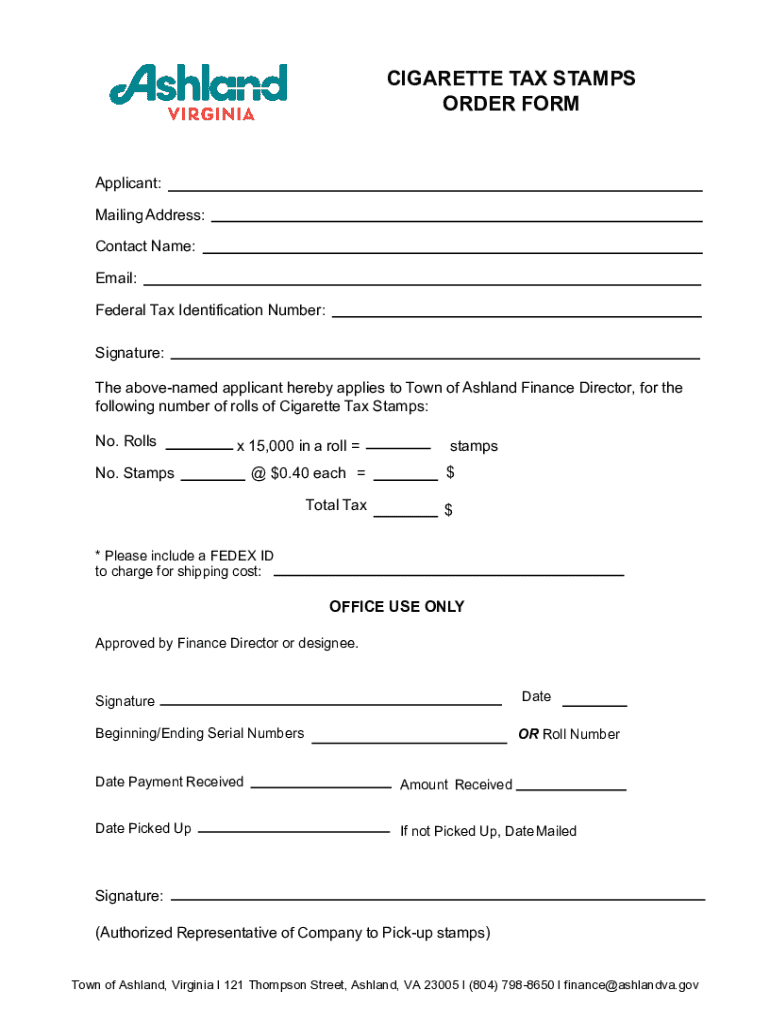
Cigarette Tax Stamps Order Form
Use a Cigarette Tax Stamps Order Form template to make your document workflow more streamlined.
What the cigarette tax stamp order form does
A Cigarette Tax Stamps Order Form records a purchaser’s request for tax stamps and the details needed for the responsible tax operation or state authority. It is not a universal federal filing because stamp formats, payment instructions, authorized purchasers, and submission rules vary by state. With signNow, upload the form, let the platform detect fillable fields, assign the authorized signer, send it for completion, and retain the signed PDF with its audit trail. Confirm the destination state’s requirements before treating the electronic record as a completed filing.
Features for cigarette tax stamp orders
signNow connects form preparation, signer routing, evidence capture, and record storage for teams processing Cigarette Tax Stamps Order Forms.
Field detection
Place signer, date, and required order fields on the uploaded form, reducing manual preparation before the cigarette tax stamp request is routed.
Signer routing
Send the completed order to an authorized recipient by email, preserving the intended signing sequence and reducing paper handling for tax operations teams.
Audit trail
Capture signer actions, timestamps, and document history in an audit trail that supports review of the completed order and its approval path.
Signer identity
Use SMS OTP or other configured authentication controls when the order requires stronger evidence that the intended recipient completed the signature.
Secure records
Keep the signed PDF and completion evidence available for controlled storage, supporting retention procedures for the underlying federal or state tax record.
Storage integrations
Connect order workflows with Google Drive, Box, Egnyte, or Microsoft 365 when approved storage and document access need to remain centralized.
Steps to complete the order
Follow these steps to prepare a Cigarette Tax Stamps Order Form and route it to the person authorized to sign.
Upload form:
Upload the current order form. Check fields:
Review detected fields and quantities. Assign signer:
Assign the authorized signer. Send form:
Send the form for signature.
How signNow handles the order
Complete the Cigarette Tax Stamps Order Form through a controlled upload, signing, and record-retention flow.
Upload form: Upload the Cigarette Tax Stamps Order Form. Detect fields: Auto-detect and review fillable order fields. Route signature: Assign the authorized signer and send. Store evidence: Store the signed PDF with its audit trail.
 Best ROI. Our customers achieve an average 7x ROI within the first six months.
 Scales with your use cases. From SMBs to mid-market, airSlate SignNow delivers results for businesses of all sizes.
 Intuitive UI and API. Sign and send documents from your apps in minutes.
Recommended order workflow setup
Configure the Cigarette Tax Stamps Order Form around signer identity, evidence capture, secure storage, and the rule governing the underlying tax record.
| Setting | Recommendation |
|---|---|
| Authentication method | Email verification with SMS OTP |
| Signature type | Typed or drawn electronic signature |
| Audit trail | Enable completion evidence and event history |
| Document retention | Apply IRC §6501(a) or state period |
| Encryption | TLS 1.2/1.3 and AES-256 |
Cigarette tax stamp order processing
Use this sequence to prepare, route, sign, and retain a Cigarette Tax Stamps Order Form without losing order details.
Prepare the order
Deliver to signers
Complete signer actions
Complete and archive
How the audit trail protects orders
The audit trail connects each Cigarette Tax Stamps Order Form signature event with evidence that can be reviewed during a tax-record inquiry.
Authenticate signer:
Capture timestamps:
Hash document:
Seal record:
Record events:
Export audit trail:
Record-keeping practices for orders
Keep the signed order, supporting information, and audit evidence together while applying the federal and state rule that governs the underlying tax record.
Apply the applicable IRS period
Export the audit evidence
Archive the complete record
Verify state requirements
Risks of inaccurate orders
Incorrect agency
Missing payment
Lost audit trail
Wrong quantities
Security for signed order records
Transport encryption:
Stored encryption:
Security reporting:
Information security:
Electronic records:
Privacy controls:
Troubleshooting cigarette tax stamp orders
Resolve the specific signing, authentication, retention, and state-filing questions that arise when completing this order form online.
Business includes legally binding eSignatures, templates, and audit trails at $8/user/month with annual billing. The completed record can support ESIGN and UETA evidence requirements when intent, consent, attribution, and retention are documented.
The Business plan includes audit trails, while Business Premium adds bulk send at $15/user/month billed annually. Bulk send is useful when the same Cigarette Tax Stamps Order Form must reach multiple approved recipients.
Consumer-facing records require disclosure of the right to receive paper, access the electronic format, and withdraw consent under 15 U.S.C. §7001(c). Configure the workflow to capture that consent before signing when applicable.
Use SMS OTP or another available authentication control when email-only attribution is insufficient. Advanced signer authentication is listed with Enterprise at $30/user/month billed annually; configure controls according to your risk assessment.
signNow encrypts data in transit with TLS 1.2/1.3 and at rest with AES-256. Its compliance documentation includes SOC 2 Type II and ISO 27001, while ESIGN and UETA support electronic-signature validity.
A signed Cigarette Tax Stamps Order Form does not replace a state tax agency’s filing, payment, or stamp-order requirements. Confirm the destination agency’s rules separately, then retain the signed record and audit trail for applicable tax records.
Key performance indicators that demonstrate SignNow's proven track record.
BE READY TO GET MORE
Get this form now!

If you believe that this page should be taken down, please follow our DMCA take-down process.