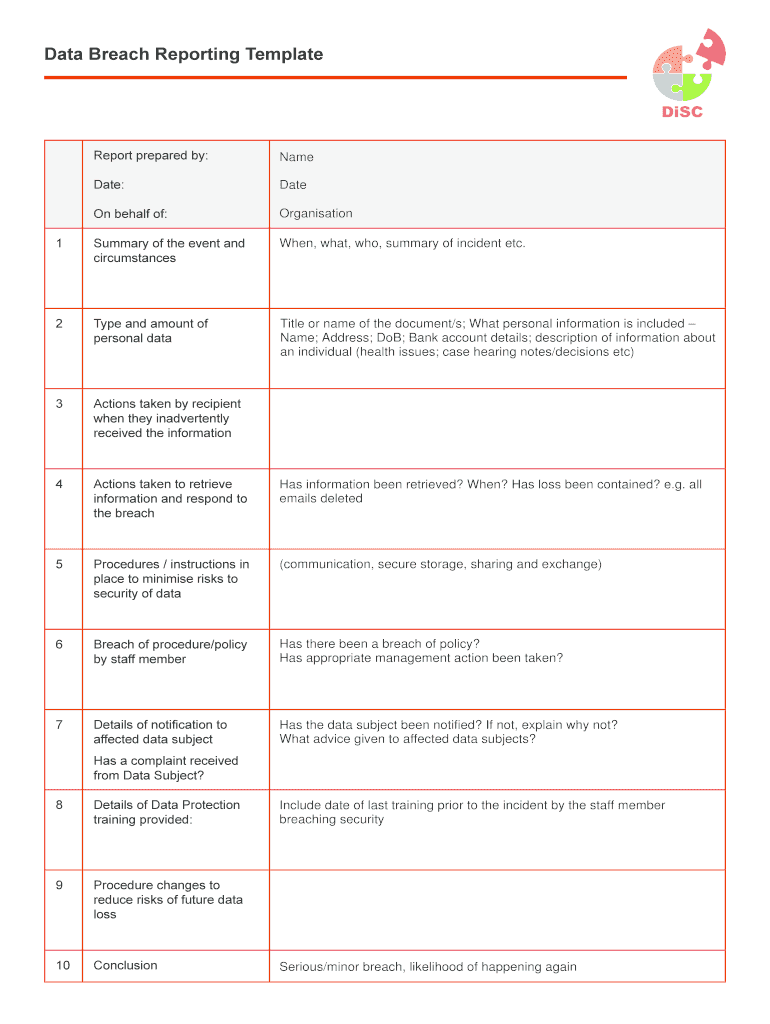
Data Breach Reporting Form
Use a Data Breach Reporting Template template to make your document workflow more streamlined.
What Data Breach Reporting Form does
Data Breach Reporting Form is an internal record for documenting what happened, what information may have been exposed, how the incident was contained, and which response actions remain outstanding. It can identify the discovery date, affected systems, data categories, responsible contacts, notifications, and approvals. In signNow, upload the form, review auto-detected fields, route it to authorized reviewers, collect electronic signatures, and preserve the completed document with an audit trail. The form itself does not replace legally required notices to individuals, regulators, or law enforcement; those duties depend on applicable federal and state law.
Organizations that use this form
Data Breach Reporting Form is most useful when several teams must review the same incident record without losing field history, approvals, or signer evidence.
Healthcare providers document suspected exposure of protected health information, coordinate compliance review, and preserve signed records under HIPAA workflows requiring a BAA with signNow where applicable. Financial services teams record affected accounts, containment steps, reviewer approvals, and notification decisions while routing sensitive incident details only to authorized participants. Enterprise security departments standardize incident documentation across business units, using templates, delegated sending, audit trails, and integrations with systems such as Salesforce or Microsoft 365.
These tasks are executed by both individual contributors and centralized administrators depending on organizational policy and required controls.
Key features for breach reporting
Data Breach Reporting Form combines incident facts, assigned approvals, electronic signatures, and an auditable completion record for U.S. response workflows.
Structured facts
Record discovery dates, affected systems, exposed data categories, containment steps, and responsible contacts in one structured document for review.
Field detection
Auto-detected fields reduce manual preparation when converting the breach report template into a signable signNow document.
Controlled routing
Assign reviewers and signers in sequence so security, legal, and compliance teams approve the same incident record.
Audit history
Capture timestamps, signer actions, and document history to support internal investigation and later evidence review.
Secure storage
Keep the signed report and completion evidence together in the organization’s controlled recordkeeping process.
Named integrations
Connect reporting workflows to Salesforce, NetSuite, Google Drive, Box, or Microsoft 365 for organized document handling.
How Data Breach Reporting Form works
The signNow workflow turns a breach report into a controlled record: prepare the incident details, route approvals, collect signatures, and preserve evidence.
Upload form: Upload the Data Breach Reporting Form template. Check fields: Auto-detect fillable fields and verify incident details. Route document: Send assigned sections to authorized reviewers and signers. Archive record: Store the completed form with its audit trail.
How the audit trail records breach forms
A completed Data Breach Reporting Form carries an auditable history showing who handled the record, when actions occurred, and how the final document was preserved.
Authenticate signer:
Timestamp events:
Hash document:
Seal record:
Track activity:
Export history:
 Best ROI. Our customers achieve an average 7x ROI within the first six months.
 Scales with your use cases. From SMBs to mid-market, airSlate SignNow delivers results for businesses of all sizes.
 Intuitive UI and API. Sign and send documents from your apps in minutes.
Mobile options for breach reporting
The signNow mobile apps let authorized users review and sign Data Breach Reporting Form records on iOS and Android devices, including offline workflows.
iPhone app iOS 15 or later Android app Android 10 or later Offline mode Offline signing available
Camera-based capture can help convert paper incident notes into a document for review, but users should verify every extracted field against the original evidence. Managed-device controls, authentication policies, and connectivity requirements remain the organization’s responsibility when handling sensitive breach information.



Security controls for breach forms
Transport encryption:
Storage encryption:
Control assurance:
Security management:
Healthcare protection:
Signer verification:
Privacy pitfalls in breach reporting
Including names, credentials, or medical details beyond the incident scope can expose personal information unnecessarily when the report is shared for approval. Sending one report to multiple recipients without individualized access controls can reveal incident facts to people outside the response team. Missing signer consent or attribution evidence weakens the record’s ability to demonstrate who approved a breach assessment and when. Retaining the signed report without its audit trail can make later review harder because the document lacks surrounding event history.
Best practices for breach records
Accurate retention, limited disclosure, and complete audit evidence make Data Breach Reporting Form more useful during investigation, review, and later record requests.
Match retention to the underlying record
Export the audit trail with completion evidence
Minimize sensitive information before sharing
Archive securely under documented policy
Retention rules for breach records
Choose the retention rule that matches the information recorded in the Data Breach Reporting Form, because federal and state obligations depend on the underlying record type.
Six years — HIPAA records
Three years — tax records
Six years — major understatement
Three years — I-9 records
Thirty years — exposure records
Legal standing of the completed record
A signed Data Breach Reporting Form can support business evidence when the signer’s intent, electronic consent, attribution, and record retention are demonstrated under ESIGN and applicable UETA or New York ESRA rules. The form does not replace legally required breach notices, and wills, court orders, and certain family-law documents remain excluded from ESIGN.

Pricing and feature comparison
signNow pricing and included capabilities are shown first; competitor figures and features are marked Not verified when the supplied vendor data does not establish them.
| Features | signNow | DocuSign | Adobe Sign | PandaDoc | Dropbox Sign |
|---|---|---|---|---|---|
| Starting annual price | $8/user/month Business | Not verified | Not verified | Not verified | Not verified |
| Free trial availability | 7 days, no card | Not verified | Not verified | Not verified | Not verified |
| Bulk sending | Business Premium | Not verified | Not verified | Not verified | Not verified |
| Audit trail | Included in Business | Not verified | Not verified | Not verified | Not verified |
| HIPAA support | BAA required | Not verified | Not verified | Not verified | Not verified |
Troubleshooting breach reporting workflows
Resolve signing, privacy, retention, and compliance questions before distributing a completed Data Breach Reporting Form.
The signNow Business plan includes audit trails and legally binding eSignatures. Upload the completed form, place signature and date fields, and send it through the workflow. ESIGN and UETA support electronic signatures when intent, consent, attribution, and record retention requirements are met.
For consumer-facing electronic records, provide the ESIGN consumer disclosure under 15 U.S.C. §7001(c), explain the right to receive paper records, confirm electronic access, and provide a withdrawal process. Configure the workflow before requesting a signature.
Business Premium includes bulk send, which is useful when identical notices or acknowledgments must be sent to multiple recipients. Do not use bulk send to combine different incident facts or expose one recipient’s information to another.
Healthcare organizations can use signNow for HIPAA-related workflows when a Business Associate Agreement is required and applicable controls are configured. Retain HIPAA records for six years from creation or the last effective date under 45 CFR §164.530(j).
Enterprise adds advanced signer authentication, while Site License supports SSO, full API access, and HIPAA or 21 CFR Part 11 add-ons. Select controls based on the organization’s risk assessment and regulatory obligations.
A typed, drawn, or click-to-sign signature can be legally effective when intent, consent, attribution, and record retention are demonstrated. signNow audit trails preserve event details, but they do not replace required breach notifications or agency filings.
Key performance indicators that demonstrate SignNow's proven track record.
BE READY TO GET MORE
Get this form now!

If you believe that this page should be taken down, please follow our DMCA take-down process.