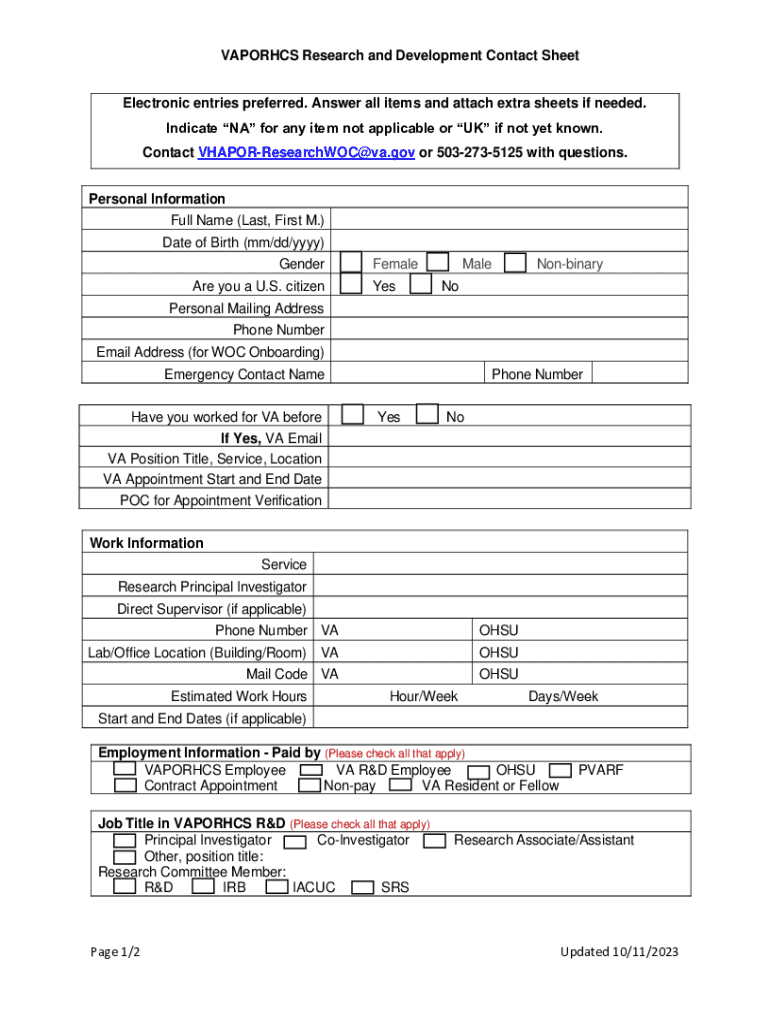
Vaporhcs Research And Development Contact Sheet Form
Use a Vaporhcs Research And Development Contact Sheet template to make your document workflow more streamlined.
What this research contact sheet does
The Vaporhcs Research And Development Contact Sheet Form is a structured document for recording and coordinating research-and-development contacts. It can consolidate names, affiliations, communication details, and project relationships so authorized participants review the same information. In signNow, a sender uploads the form, checks automatically detected fillable fields, assigns fields and signature roles, and sends it by email or signing link. Recipients review and complete their assigned sections, while signNow records signing actions, timestamps, and the completed document for controlled retrieval.
Who uses this research contact sheet
R&D teams
Research and development teams use the Vaporhcs Research And Development Contact Sheet Form to record project contacts, organizational details, and communication references in one controlled document. signNow lets authorized staff complete designated fields, route the contact sheet for signature when required, and preserve the completed record with an audit trail.
Project administrators
Project administrators can use the form to coordinate internal stakeholders, external collaborators, and vendor contacts. A reusable signNow template helps standardize field placement, signer order, and record handling while reducing duplicate data entry across research and development projects.
Business types using research contact sheets
The form is most useful where research contacts change across projects and several people must review, sign, or preserve the same record.
A university research group can use the form to organize investigators, study contacts, and external collaborators, then route updates for review without rebuilding the document for each project. A biotechnology startup can maintain a controlled contact sheet for laboratory, regulatory, and development partners, using signNow templates and audit trails to document approved information changes. An enterprise research organization can coordinate many project teams through role-based access, reusable templates, and integrations that connect contact-sheet records with systems such as Salesforce, NetSuite, or Google Drive.
These tasks are executed by both individual contributors and centralized administrators depending on organizational policy and required controls.
Complete the contact sheet in signNow
Use this workflow to prepare, route, and preserve the Vaporhcs Research And Development Contact Sheet Form without losing field assignments or completion evidence.
Upload form:
Upload the latest contact sheet PDF. Check fields:
Review automatically detected fields and correct placement. Assign roles:
Assign contact, reviewer, and signature fields. Send form:
Send the completed form through signNow. Store records:
Download the signed record and audit trail.
 Best ROI. Our customers achieve an average 7x ROI within the first six months.
 Scales with your use cases. From SMBs to mid-market, airSlate SignNow delivers results for businesses of all sizes.
 Intuitive UI and API. Sign and send documents from your apps in minutes.
Features for this research contact sheet
signNow features address the form’s preparation, routing, review, signing, and record-preservation needs without changing the document’s underlying purpose.
Field detection
Upload the Vaporhcs contact sheet and check automatically detected fields before assigning participants, reducing manual reconstruction of recurring contact information and project references.
Reusable templates
Route the same contact-sheet structure through a reusable template, preserving field ownership and signer order when research projects use recurring approval steps.
Remote signing
Collect signatures and approvals remotely through email delivery or signing links, allowing collaborators to review the form without coordinating a shared meeting.
Audit trail
Capture timestamps, signer actions, and document history so project administrators can review how the completed contact sheet moved through the workflow.
Mobile access
Use signNow mobile apps to review or sign the contact sheet from supported iOS and Android devices when project staff work away from a desk.
System connections
Connect contact-sheet workflows with systems such as Salesforce, NetSuite, Google Drive, Box, or Procore to reduce duplicate record handling after completion.
Platform requirements for the contact sheet
The Vaporhcs Research And Development Contact Sheet Form can be prepared in a browser on Windows 10 or later and macOS using Chrome, Firefox, Safari, or Edge. signNow mobile apps support iOS and Android workflows for reviewing, completing, and signing documents. Use an internet connection for upload, delivery, and audit-trail access; confirm your organization’s device policy before handling restricted research contacts.
Supported browsers Use Chrome, Firefox, Safari, or Edge on Windows 10 or later and macOS for browser-based completion and sending. Mobile apps Sign on iPhone or iPad using the signNow iOS app, or on Android phones and tablets using the signNow Android app. Operating systems Use Windows, macOS, iOS, or Android devices with reliable internet access for document upload, field completion, and audit-trail retrieval.
Organizations using managed devices should enforce screen locks, current operating-system updates, and approved storage locations before staff access the contact sheet. Enterprise deployments may also connect signNow through API access or SSO provisioning, subject to the selected plan and configuration. Store exported documents and audit trails in an approved repository, and apply the organization’s own retention and access rules.



Security for research contact records
Encrypted data protection:
Independent controls report:
Information security certification:
Protected health information workflows:
Privacy compliance controls:
U.S. electronic signature compliance:
Best practices for completing the contact sheet
Accurate field mapping, controlled access, and paired record storage reduce errors when this contact sheet moves through research workflows.
Verify every contact-sheet field before sending
Create a controlled template for recurring projects
Confirm recipients and protect project details
Archive the signed form with its audit trail
Challenges when managing research contacts
A scanned or revised Vaporhcs contact sheet may contain labels that automatic field detection interprets incorrectly, leaving names, affiliations, or project references assigned to the wrong fields. Multiple research contributors can create inconsistent contact details when no template, field ownership, or review step establishes who validates the completed sheet. Sending a contact sheet to the wrong collaborator can disclose project relationships or personal contact information before the sender notices the recipient error. Separating the signed document from its audit trail makes it harder to demonstrate who completed the contact sheet, when actions occurred, and whether the final file changed.
How the contact sheet audit trail works
The audit trail supplies evidence about identity, actions, timing, and document integrity after the contact sheet is completed.
Authenticate signer:
Capture timestamp:
Hash document:
Seal record:
Preserve history:
Export evidence:
Why teams look for DocuSign alternatives
Organizations seek alternatives when they need different pricing models, stronger native automation, simpler bulk affidavit workflows, or more flexible identity-verification options than those available in a legacy envelope-based vendor.

Troubleshooting the research contact sheet
These answers address field placement, plan selection, privacy, enforceability, audit evidence, and signature-invite limits for this contact-sheet workflow.
Upload the latest PDF again, then review signNow’s detected fields individually. Scanned layouts, overlapping labels, or revised pages can affect placement. Move or add fields manually, assign each field to the correct participant, and send only after comparing the prepared document with the source contact sheet.
The Business plan includes templates, audit trails, mobile apps, and legally binding eSignatures at $8/user/month with annual billing. If the workflow requires bulk sending, Business Premium is listed at $15/user/month annually and includes bulk send. Verify plan suitability before routing many contact sheets.
A contact sheet containing protected health information requires an appropriate organizational workflow and a business associate agreement where HIPAA applies. signNow identifies HIPAA compliance as available with a BAA required. Confirm that the form’s actual data and all connected repositories meet your healthcare privacy obligations.
For U.S. business transactions, ESIGN provides electronic-signature validity for interstate or foreign commerce, while UETA generally governs covered intrastate transactions in adopting jurisdictions. The contact sheet still requires signer intent, consent where applicable, attribution, and retention allowing accurate reproduction.
Use signNow’s audit trail and certificate of completion to review recipient actions, timestamps, and document history. If a reviewer cannot open the file, confirm recipient permissions and resend the completed document and exported audit trail through your approved storage channel.
The Business plan is listed at $8/user/month with annual billing, while the documented seven-day trial requires no credit card. Paid subscription plans include 100 signature invites per user per year, with overage fees; Site License pricing is $1.50 per signature invite for its usage model.
Key performance indicators that demonstrate SignNow's proven track record.
BE READY TO GET MORE
Get this form now!

If you believe that this page should be taken down, please follow our DMCA take-down process.