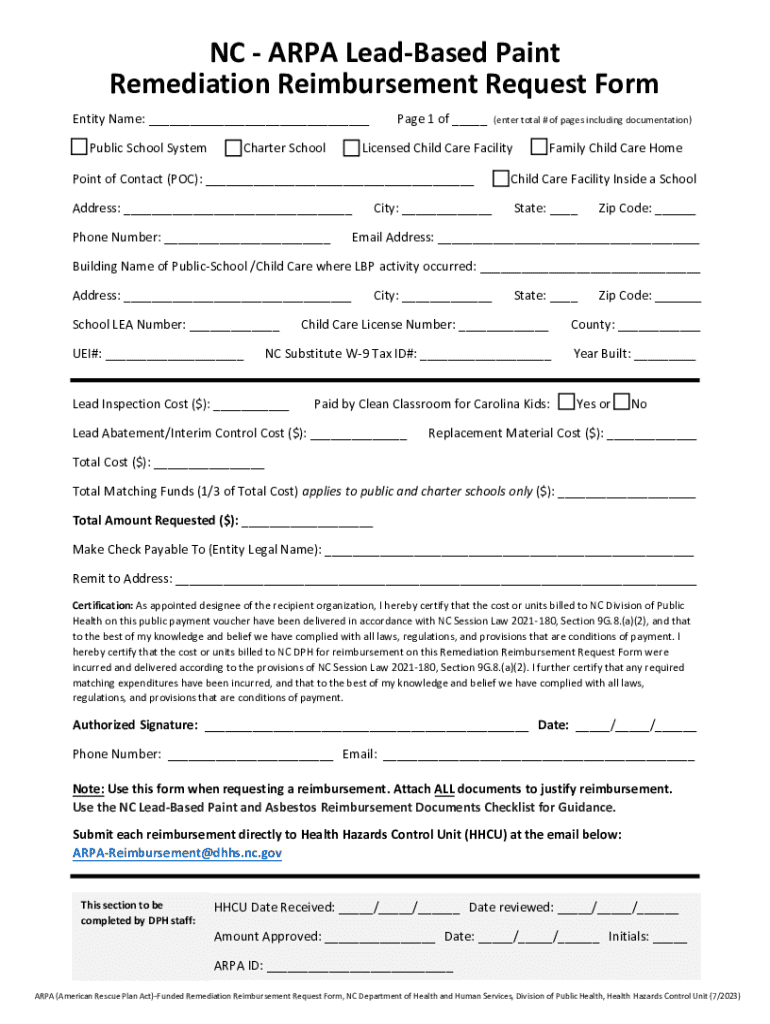
Nc Arpa Lead Based Paint Remediation Reimbursement Request Form
Use a Nc Arpa Lead based Paint Remediation Reimbursement Request Form template to make your document workflow more streamlined.
What this North Carolina ARPA form does
The Nc Arpa Lead Based Paint Remediation Reimbursement Request Form is used to request reimbursement for eligible North Carolina ARPA lead-based paint remediation work. It organizes the request for review, supporting project or cost information, authorized approval, and record retention. With signNow, the sender uploads the form, reviews automatically detected fillable fields, adds signer fields where needed, and sends it for signature. After completion, the signed PDF and audit trail can be retained together. Eligibility, required attachments, approval authority, and submission timing remain governed by the applicable North Carolina ARPA program instructions, not by signNow.
Who benefits from this reimbursement workflow
The form is most useful for organizations coordinating North Carolina ARPA lead-based paint remediation costs, supporting records, and authorized approvals.
North Carolina property owners can assemble remediation cost documentation, route the reimbursement request for authorized signatures, and retain the completed record with its audit trail. Lead remediation contractors can use the form workflow to return signed cost and project documentation to the organization requesting ARPA reimbursement. Municipal or program administrators can standardize intake, review signer activity, and preserve submitted reimbursement records across multiple remediation projects.
These tasks are executed by both individual contributors and centralized administrators depending on organizational policy and required controls.
How the request workflow works
The signNow workflow turns the North Carolina ARPA request into a reviewable, signed record without changing the program’s eligibility rules.
Upload document: Upload the North Carolina ARPA reimbursement request form. Detect fields: Auto-detect fillable areas and verify required information. Route for signature: Send the prepared request to authorized signers. Archive record: Store the signed form with its audit trail.
Complete and sign the reimbursement request
Use this sequence to prepare the North Carolina ARPA reimbursement request and preserve a complete signing record.
Upload form:
Upload the completed North Carolina ARPA reimbursement request form to signNow. Check fields:
Review detected fields and add missing signer, date, or attachment fields. Send request:
Enter the authorized reviewer’s email and send the request securely. Store record:
Review the signed copy and audit trail before retaining the reimbursement record.
 Best ROI. Our customers achieve an average 7x ROI within the first six months.
 Scales with your use cases. From SMBs to mid-market, airSlate SignNow delivers results for businesses of all sizes.
 Intuitive UI and API. Sign and send documents from your apps in minutes.
Recommended reimbursement workflow setup
Prepare the North Carolina ARPA request with controlled access, signer attribution, an exportable audit trail, and secure record storage.
| Setting | Recommendation |
|---|---|
| Authentication method | Email verification with SMS authentication |
| Signature type | Electronic signature with signer intent |
| Audit trail | Export the completed audit trail |
| Document retention | Retain under the applicable North Carolina policy |
| Encryption | TLS 1.2/1.3 and AES-256 encryption |
What the audit trail records
The audit trail separates technical completion evidence from the North Carolina ARPA program’s substantive eligibility and reimbursement review.
Authenticate signer:
Capture timestamp:
Hash document:
Seal record:
Verify activity:
Export evidence:
Platform requirements for the reimbursement form
Complete the North Carolina ARPA reimbursement request in a current browser such as Chrome, Firefox, Safari, or Edge on Windows or macOS. signNow mobile apps support iOS and Android document review and signing. Use a current browser with TLS 1.2 or TLS 1.3 enabled for secure access.
Browsers Chrome 120+, Firefox 121+, Safari 17+, and Edge 120+ Operating systems Windows 10+, macOS 12+, iOS 16+, and Android 10+ Mobile apps signNow mobile apps support document review and signing
Organizations handling property, contractor, or payment information should use managed Windows, macOS, iOS, or Android devices. Administrators can control access, export audit trails, and connect workflows through signNow integrations or API options when the reimbursement process requires centralized records, SSO, or system-based provisioning.
Security for reimbursement records
Transport encryption:
Stored encryption:
Security certification:
Information security:
Electronic signatures:
Protected information:
Challenges when preparing the reimbursement request
Applicants may lack complete invoices, project records, or eligible-cost documentation when preparing the North Carolina ARPA reimbursement request. Unclear descriptions of lead-based paint remediation work can make it harder to connect requested reimbursement with documented project activities. Missing signatures, dates, or supporting attachments can delay review of the completed reimbursement request form. Sharing sensitive property and payment information without controlled access can create unnecessary privacy and record-management exposure.
Record-keeping practices for the request
A complete reimbursement file connects the signed request with supporting costs, remediation evidence, approvals, and the applicable North Carolina program requirements.
Define the applicable retention rule
Export the completed audit trail
Restrict access to project records
Reconcile amounts before signature
Practical use cases for this form
Organizations coordinating lead-based paint remediation can use signNow to route this specialized reimbursement request through documented approval steps.
Property management
A North Carolina property-management team needs signed reimbursement documentation after coordinating lead-based paint remediation across residential properties.
- Upload the request and supporting cost records.
- Route approval to the authorized program representative.
signNow can keep the completed reimbursement request, signer activity, and supporting documents associated in one auditable file. The platform does not determine eligibility or approve reimbursement; the organization must still follow the applicable North Carolina ARPA program instructions and retain records under the governing policy.
Construction administration
A construction organization preparing remediation documentation needs a consistent way to obtain signatures from project and finance personnel.
- Send the request from a reusable signNow template.
- Review the audit trail before archival.
A structured signNow workflow can reduce missing signature steps when several people review the same reimbursement request. The signed document and audit trail provide completion evidence for internal records, while program officials and the applicable North Carolina requirements control what supporting documentation must accompany the request.
Key performance indicators that demonstrate SignNow's proven track record.
Troubleshooting the reimbursement request workflow
These answers address signing, field detection, security, retention, and plan questions that can arise when processing this North Carolina ARPA form.
Upload the original PDF again and allow signNow to scan it for fillable fields. If the North Carolina ARPA request contains fixed text areas, add fields manually and compare every required entry with the source form before sending.
Use signNow’s Business plan for legally binding eSignatures, templates, and audit trails at $8/user/month with annual billing. ESIGN and UETA provide the relevant U.S. legal framework, but program submission rules still control acceptance.
Review the signer email, field assignment, and routing order before resending. The recipient can open the signing link, review the North Carolina request, complete assigned fields, and receive a completed copy after all required signatures are finished.
signNow encrypts data in transit with TLS 1.2/1.3 and at rest with AES-256. If the request includes protected health information, HIPAA compliance requires a business associate agreement and appropriate organizational controls.
Export the completed audit trail with the signed PDF and supporting records. The audit trail documents signer actions and timestamps; retain the package under the North Carolina ARPA program’s applicable record policy.
The Business Premium plan is $15/user/month annually and includes bulk send; Business is $8/user/month annually. Select a plan based on the number of reimbursement requests and required workflow features, not on eligibility or program rules.
BE READY TO GET MORE
Get this form now!

If you believe that this page should be taken down, please follow our DMCA take-down process.