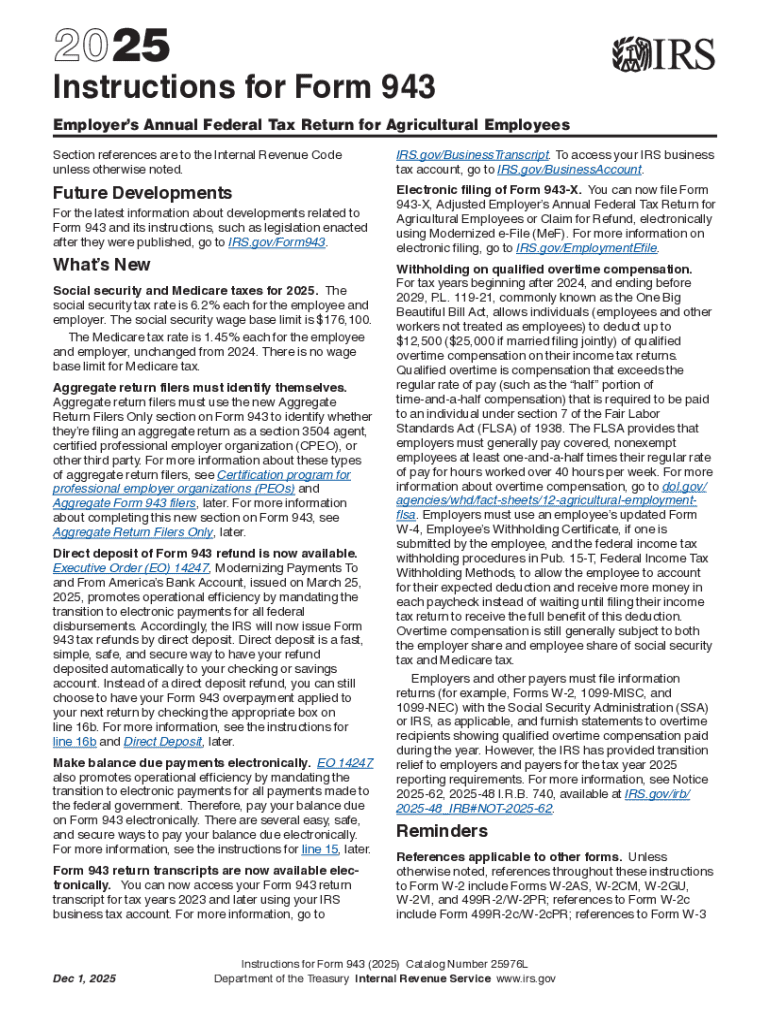
Instructions For Form 943
Use a Instructions For Form 943 template to make your document workflow more streamlined.
What Instructions For Form 943 covers
Instructions For Form 943 explains how employers complete and handle the IRS Form 943 filing for agricultural employees. It guides the filer through the information needed to report federal employment taxes, review calculated amounts, apply relevant adjustments, and complete the employer certification. In signNow, the instructions document can be uploaded, reviewed for fillable fields, routed to authorized personnel, and preserved with an audit trail. Electronic signing may satisfy ESIGN and UETA requirements when intent, consent, attribution, and record retention are established, while IRS filing and payment obligations remain separate responsibilities.
How Instructions For Form 943 works
Use signNow to prepare the Instructions For Form 943 document, route it to authorized participants, and preserve evidence of completion.
Upload form: Upload the Instructions For Form 943 file. Check fields: Review detected fields and add missing ones. Send securely: Send the prepared document to authorized signers. Archive record: Store the signed form with its audit trail.
Who uses Instructions For Form 943
The document serves agricultural employers and the payroll, accounting, and tax teams responsible for reviewing Form 943 information.
Agricultural employers use the form instructions to coordinate payroll-tax reporting, prepare information for authorized reviewers, and preserve a signed record showing who completed the employer-facing documentation for the IRS filing process. Payroll and accounting teams use signNow templates, assigned fields, audit trails, and exportable records to coordinate Form 943 preparation without treating the eSignature platform as a substitute for IRS filing guidance. Enterprise tax departments can connect signNow with NetSuite, Microsoft 365, or Google Drive to route Instructions For Form 943 records, control access, and retain completed copies under internal tax-record policies.
These tasks are executed by both individual contributors and centralized administrators depending on organizational policy and required controls.
Complete Instructions For Form 943 online
Follow this focused signNow workflow to prepare the instructions document and preserve a defensible completion record.
Upload document:
Upload the current Instructions For Form 943 PDF. Review fields:
Review auto-detected fields and insert missing fields. Assign roles:
Assign each field to an authorized participant. Complete record:
Send, sign, download, and retain the audit trail.
 Best ROI. Our customers achieve an average 7x ROI within the first six months.
 Scales with your use cases. From SMBs to mid-market, airSlate SignNow delivers results for businesses of all sizes.
 Intuitive UI and API. Sign and send documents from your apps in minutes.
Recommended Form 943 workflow setup
Configure preparation, signing, evidence, protection, and retention around the IRS Form 943 record rather than a generic document workflow.
| Setting | Recommendation |
|---|---|
| Authentication method | Email invitation with SMS verification |
| Signature type | Electronic signature with recorded intent |
| Audit trail | Export completed document history |
| Document retention | Three years from filing under IRC §6501(a) |
| Encryption | TLS 1.2/1.3 and AES-256 protection |
What the Form 943 audit trail records
A signNow audit trail connects signer activity, timestamps, document history, and completion evidence to the Instructions For Form 943 record.
Authenticate signer:
Capture timestamps:
Record document:
Seal history:
Export evidence:
Retain evidence:
Security for Form 943 records
Transit encryption:
Stored encryption:
Security certification:
Information security:
Electronic signatures:
Completion evidence:



Risks when Form 943 instructions are ignored
Incorrect reporting
Missed filing
Weak evidence
Record loss
Form 943 record retention schedule
Retain the completed Instructions For Form 943 record according to the federal tax limitation period and any longer applicable requirement.
Three years from filing
Six years for 25% understatement
Indefinite for fraud
Indefinite without return
Longer applicable rule
Instructions For Form 943 troubleshooting
Resolve field, delivery, authentication, plan, compliance, and retention questions before Instructions For Form 943 leaves your control.
If a required field is missing, reopen the document in signNow, review its detected fields, and add any missing IRS-related information before sending. Business plans include templates and audit trails, helping document each revision and signing event for later review.
A signer can receive the document through an email invitation or signing link. If delivery fails, verify the address, resend from the signNow workspace, and review the audit trail. Business Premium includes quick invite links for distributing documents to intended recipients.
Business includes audit trails, while Enterprise adds advanced signer authentication. Choose authentication that matches the record’s sensitivity and retain evidence showing intent, attribution, consent, and reproducibility under ESIGN and applicable state law.
Business includes 100 signature invites per user annually when billed under the verified subscription structure. Additional invite charges may apply. Site License pricing is usage-based at $1.50 per signature invite and is intended for high-volume document programs.
signNow supports electronic signatures under ESIGN and UETA, but the platform does not replace IRS filing instructions or determine whether a particular signer is authorized. Confirm the completed Form 943 information and submission obligations with the IRS.
Export the completed document and its audit trail from signNow, then apply the retention rule for the underlying tax record. Federal tax records generally require three years from filing under IRC §6501(a), with longer periods in specified circumstances.
Key performance indicators that demonstrate SignNow's proven track record.
BE READY TO GET MORE
Get this form now!

If you believe that this page should be taken down, please follow our DMCA take-down process.