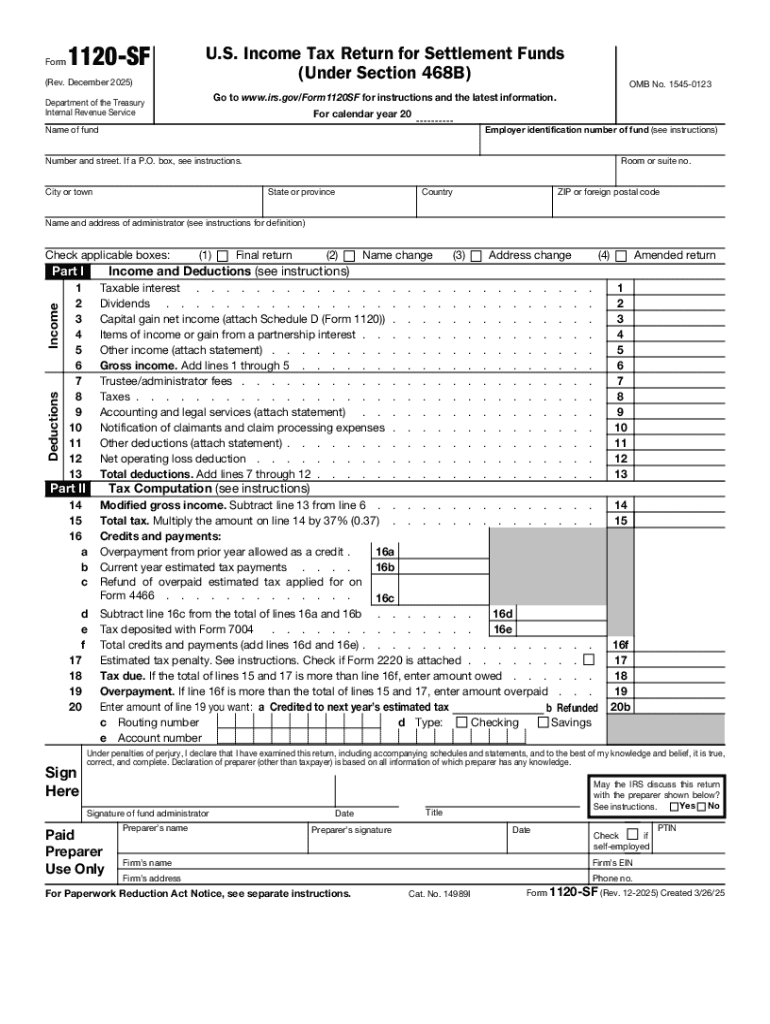
About Form 1120 SF, U S Income Tax Return For
Use a About Form 1120 SF, U S Income Tax Return For template to make your document workflow more streamlined.
About Form 1120 SF, U S Income Tax Return For
About Form 1120 SF, U S Income Tax Return For is a U.S. tax-return document used to present an organization’s reported information to the Internal Revenue Service. The form’s filer, tax year, schedules, amounts, signature, and supporting records must match the applicable IRS instructions and filing method. signNow can prepare the PDF for completion, place or detect fillable fields, route it to authorized signers, and preserve the executed copy with an audit trail. Confirm the form’s exact IRS filing requirements before submission; signing software does not replace tax review or IRS filing rules.
Business types that use this return
The form is most useful where tax preparers, reviewers, and authorized representatives must coordinate one controlled return record.
A solo tax practitioner can upload one client’s About Form 1120 SF return, check detected fields, collect the authorized signature, and export the completed PDF with its audit trail for the client file. A regional accounting firm can use shared templates, delegated sending, and role-based access to coordinate preparers, reviewers, and officers across multiple business tax-return workflows without mixing signer responsibilities. An enterprise finance department can connect signNow with NetSuite, Microsoft 365, or Google Drive to route approved returns while preserving access controls, signed records, and audit evidence for internal governance.
These tasks are executed by both individual contributors and centralized administrators depending on organizational policy and required controls.
Who uses this income tax return
Tax preparers
Tax preparers and accounting teams use About Form 1120 SF, U S Income Tax Return For to collect reviewed financial information, coordinate authorized signatures, and preserve the completed PDF. They should verify the applicable IRS instructions, tax year, schedules, attachments, and filing method before sending the record through signNow.
Business representatives
Business owners, officers, and authorized representatives review and sign the return after accounting approval. They can receive the document through signNow, complete assigned signature fields, and retain the executed copy with its audit trail, while the organization remains responsible for accurate IRS reporting and timely submission.
How this tax-return workflow works
Prepare the tax-return PDF first, then use signNow to route the correct fields and signatures.
Upload form: Upload the applicable About Form 1120 SF PDF to signNow. Check fields: Review detected fields and add missing tax-year fields. Assign roles: Assign preparer, authorized signer, and reviewer responsibilities. Route for signing: Send the completed record for signature and audit capture.
 Best ROI. Our customers achieve an average 7x ROI within the first six months.
 Scales with your use cases. From SMBs to mid-market, airSlate SignNow delivers results for businesses of all sizes.
 Intuitive UI and API. Sign and send documents from your apps in minutes.
Steps to complete this tax return
Use signNow to prepare, route, sign, and retain the return; verify every tax requirement separately with the IRS instructions.
Upload PDF:
Upload the correct About Form 1120 SF PDF. Review fields:
Review auto-detected fields and add missing fields. Assign roles:
Assign preparer and authorized signer roles. Send return:
Send the reviewed return for signature. Store evidence:
Download the signed PDF and audit trail.
How the audit trail records this form
The audit trail connects each signer action to the completed About Form 1120 SF, U S Income Tax Return For record.
Authenticate signer:
Capture timestamps:
Hash document:
Seal document:
Log events:
Export evidence:
Recommended workflow setup for this return
Use controlled authentication, signature routing, audit evidence, and IRS-aligned retention when preparing this return.
| Setting | Recommendation |
|---|---|
| Authentication method | SMS OTP for higher-risk signers |
| Signature type | Typed or drawn electronic signature |
| Audit trail | Export with completed return |
| Document retention | Three years from filing (IRC §6501(a)) |
| Encryption | TLS 1.2/1.3 and AES-256 |
Challenges when preparing this tax return
Entering tax-year data in the wrong version can misstate fields, schedules, or filing status. Missing authorized signatures can delay acceptance even when financial information is complete. Uploading an incomplete PDF may omit schedules, attachments, or required supporting statements. Sending sensitive tax information without role controls can expose taxpayer identification and financial data.
Record-keeping practices for this return
Retain the executed tax return, supporting records, and signing evidence according to IRS rules and the organization’s documented retention policy.
Apply the IRS tax-record retention periods
Export the audit trail with the completed return
Limit access to tax-return information
Complete an IRS instruction review
Platform requirements for this tax form
Use About Form 1120 SF, U S Income Tax Return For with Chrome, Firefox, Safari, or Edge on Windows or macOS. signNow also provides mobile apps for iOS and Android.
Browsers Chrome, Firefox, Safari, and Edge Operating systems Windows, macOS, iOS, Android Mobile apps signNow mobile apps for iOS and Android
Organizations should manage signNow access through approved devices and user policies when handling tax-return information. Review API, SSO, certificate, and long-term validation requirements before connecting this form to accounting or tax systems.
Questions about completing this return
These answers separate signNow workflow capabilities from the IRS rules governing preparation, signing, retention, and filing.
The signNow Business plan includes templates and audit trails at $8/user/month with annual billing. Upload the correct IRS PDF, inspect detected fields, and assign every required signer before sending. Tax accuracy and IRS filing eligibility still require review against the applicable IRS instructions.
Use signNow’s audit trail to document signer actions, timestamps, and completion history. For legal validity, the electronic transaction should show intent, consent, attribution, and record retention under ESIGN, 15 U.S.C. ch. 96, and applicable UETA or New York ESRA rules.
Business Premium costs $15/user/month with annual billing and adds bulk send. A single About Form 1120 SF return does not require bulk sending; choose that plan only when the organization’s workflow actually sends repeated documents.
signNow’s paid plans include audit trails, while Enterprise adds advanced signer authentication and costs $30/user/month with annual billing. Select authentication based on taxpayer-data risk, signer identity requirements, and organizational policy rather than assuming every return needs the highest tier.
The IRS retention rule is separate from signNow storage. IRC §6501(a) generally requires three years from filing, six years for a 25% income understatement, and potentially indefinite retention for fraud or no return. Apply the rule to the return and supporting records.
signNow is ESIGN- and UETA-compliant, but an electronic signature does not itself submit About Form 1120 SF to the IRS. After signing, the responsible filer must follow the applicable IRS filing instructions and preserve evidence that the submitted return is complete and authorized.
Key performance indicators that demonstrate SignNow's proven track record.
BE READY TO GET MORE
Get this form now!

If you believe that this page should be taken down, please follow our DMCA take-down process.